RightResponse AI adds a relevant business detailAuto repair
"First time here. They explained the repair clearly and had my car ready earlier than expected."
RightResponse AI uses 20 specialized AI agents to understand each review, select useful approved company, brand, region, and location Messages, and write a response in the review’s language. Set routine replies to publish automatically or require human approval, with editing and scheduling from email on your phone.
Try It Free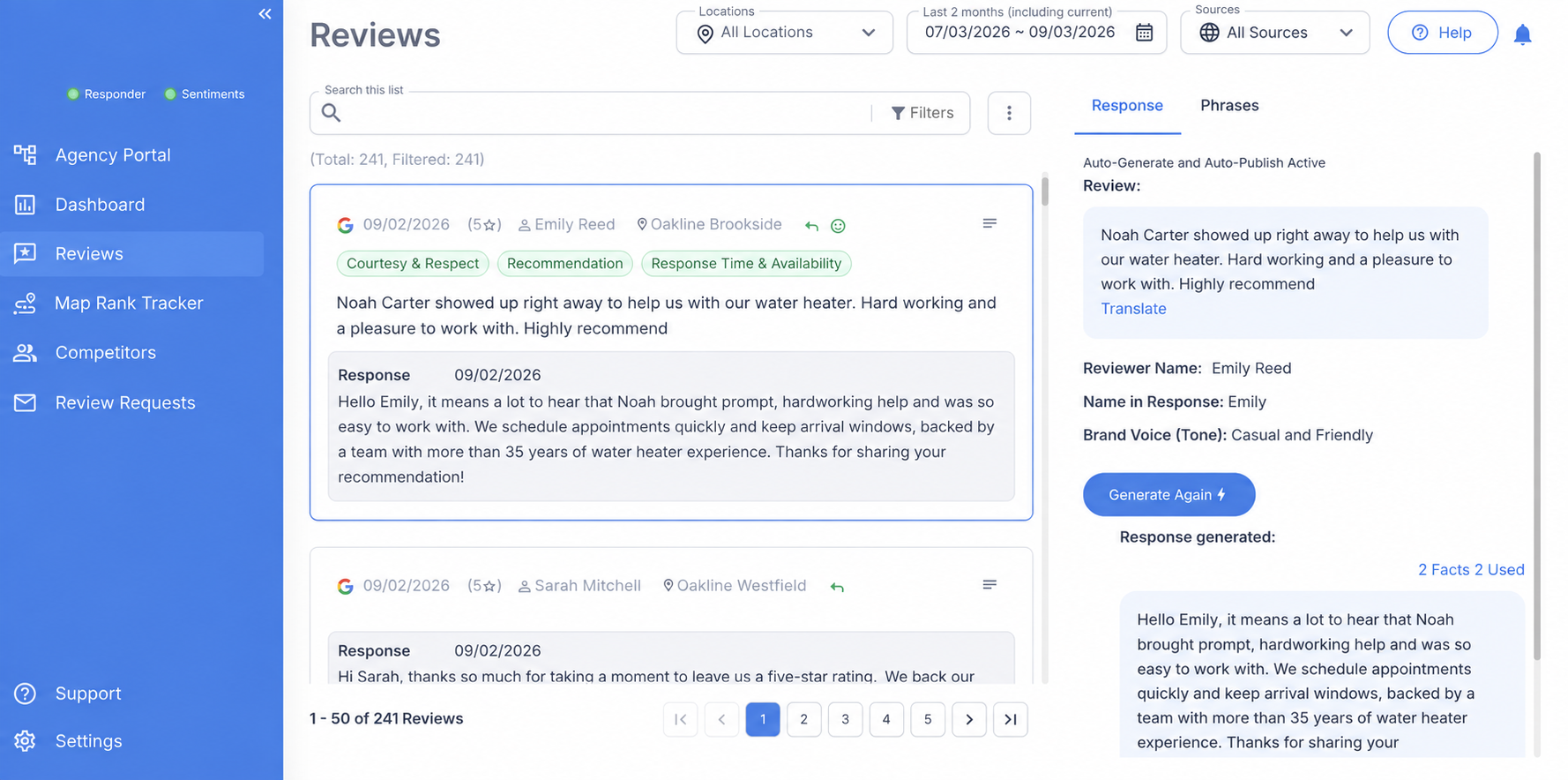
See how Message-Informed Review Responses work, with a detailed example and a comparison of other AI responders.
Each example shows what the customer wrote, what a typical AI response repeats, and which approved business information RightResponse AI adds.
"First time here. They explained the repair clearly and had my car ready earlier than expected."
"Maya was fantastic, and the patio was perfect for our birthday group."
"The technician arrived late, and I couldn't get an update."
These comments explain why review responses should help future customers, address the specific issue, and use deliberate planning instead of automatic text generation.
Review responses influence future customers
Read the context →“The response that you're leaving is actually for the thousands of customers between now until the end of time who are going to be reading the way that you are responding to that negative review.”
Responses must be relevant
Read the context →“It doesn't matter if you're sounding human and you're not addressing my problem or giving me any insights. Give me something that's relevant and meaningful.”
RightResponse AI uses safeguards for AI review responses
Read the context →“The guardrails, the solvable unit, the logic that you've applied with RightResponse AI is really a truly useful utility for listeners.”
RightResponse AI coordinates 20 specialized AI agents in six groups: safety and risk, review understanding, theme analysis, Message relevance and selection, response planning, and writing and quality assurance.
Because each agent has a specific job, the system can keep track of details that a single writing prompt may miss. When a customer updates a review, Review Understanding Agents identify what changed. The Response Planning Agent then uses those changes to create a new Response Plan before the response is rewritten.

The agents and their responsibilities
Check for sensitive information, malicious instructions hidden in the review, inappropriate content, and situations that need human attention.
Understand the review’s language and level of detail, identify names, flag mismatches between the written feedback and star rating, and determine when and how the customer has updated the review.
Identify the main themes in the review and how the customer feels about each part of the experience.
Determine which approved company, brand, region, and location messages fit the review, then select only those that would make the response more useful.
Decides what the response should accomplish, then creates a Response Plan that guides what the response says, how it says it, and what it must avoid.
Write from the Response Plan, improve natural flow, remove unnecessary repetition, and confirm that the finished response follows the plan.
Some AI responders use past replies as writing examples. That can cause the system to repeat templates, inconsistent practices, and generic language.
RightResponse AI uses review and response history to learn what customers care about and identify useful business information. It does not use the entire response archive as a writing template.
Customer reviews reveal what people notice, value, question, and complain about. That tells RightResponse AI which kinds of marketing messages it should be looking for.
Past responses sometimes contain useful knowledge, particularly a thoughtful, personalized response to a negative review. RightResponse AI can learn from that signal without treating the entire response archive as exemplary writing.
The business and its website provide the core messages the system can intentionally bring into future responses.
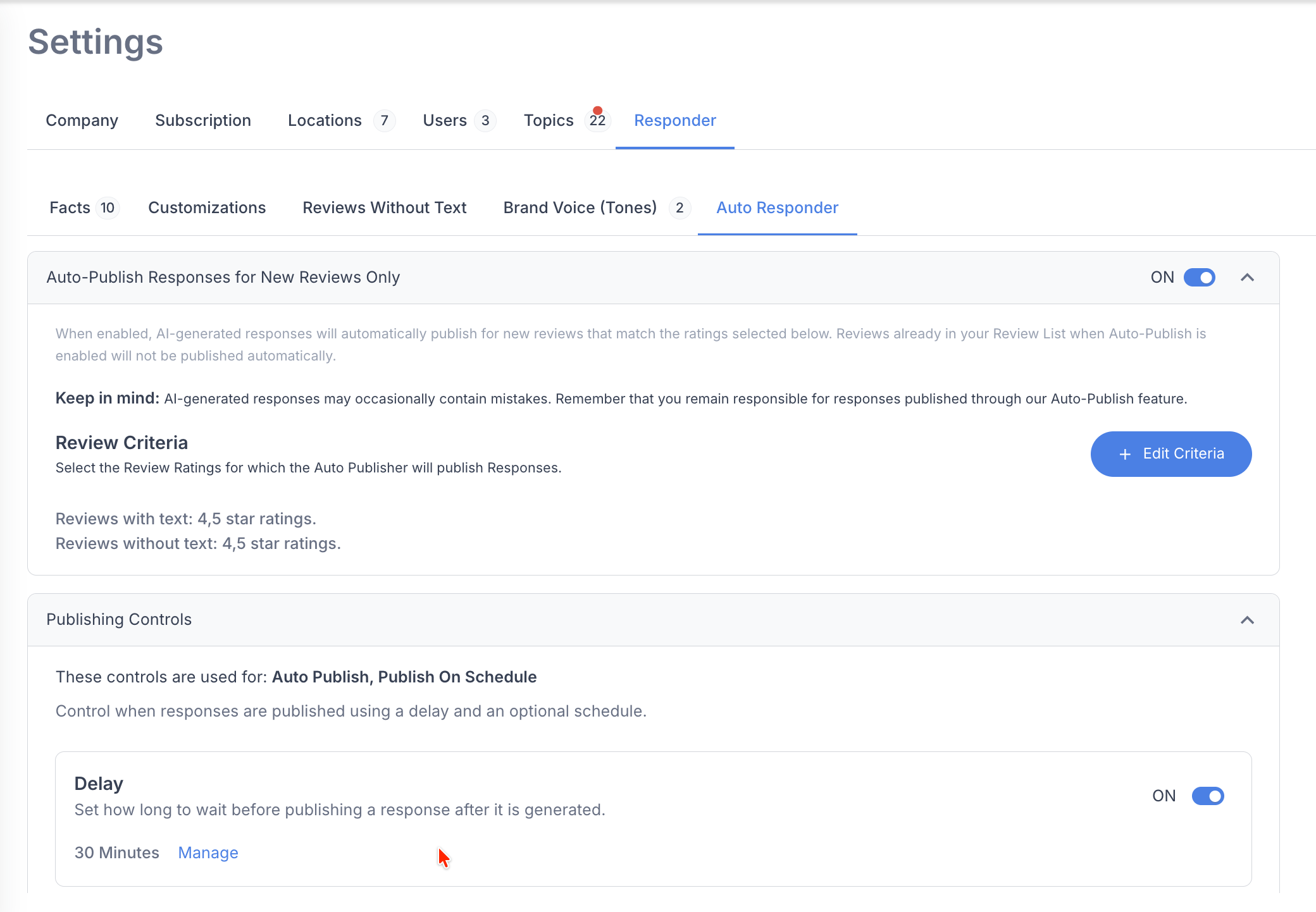
RightResponse AI lets you require human approval before publishing or automate routine replies under the rules you choose. Open a notification email on your phone to review, edit, schedule, or publish a response without a dashboard login. Choose approval by star rating, separate controls for text and star-only reviews, publishing delays, and permitted hours.
Add the response to your publishing schedule so it posts only during the hours you have chosen.
Approve the finished response and post it immediately from your phone.
Open the response, make any changes you want, and publish it when you are ready.
These actions are available directly from the approval email without signing in.
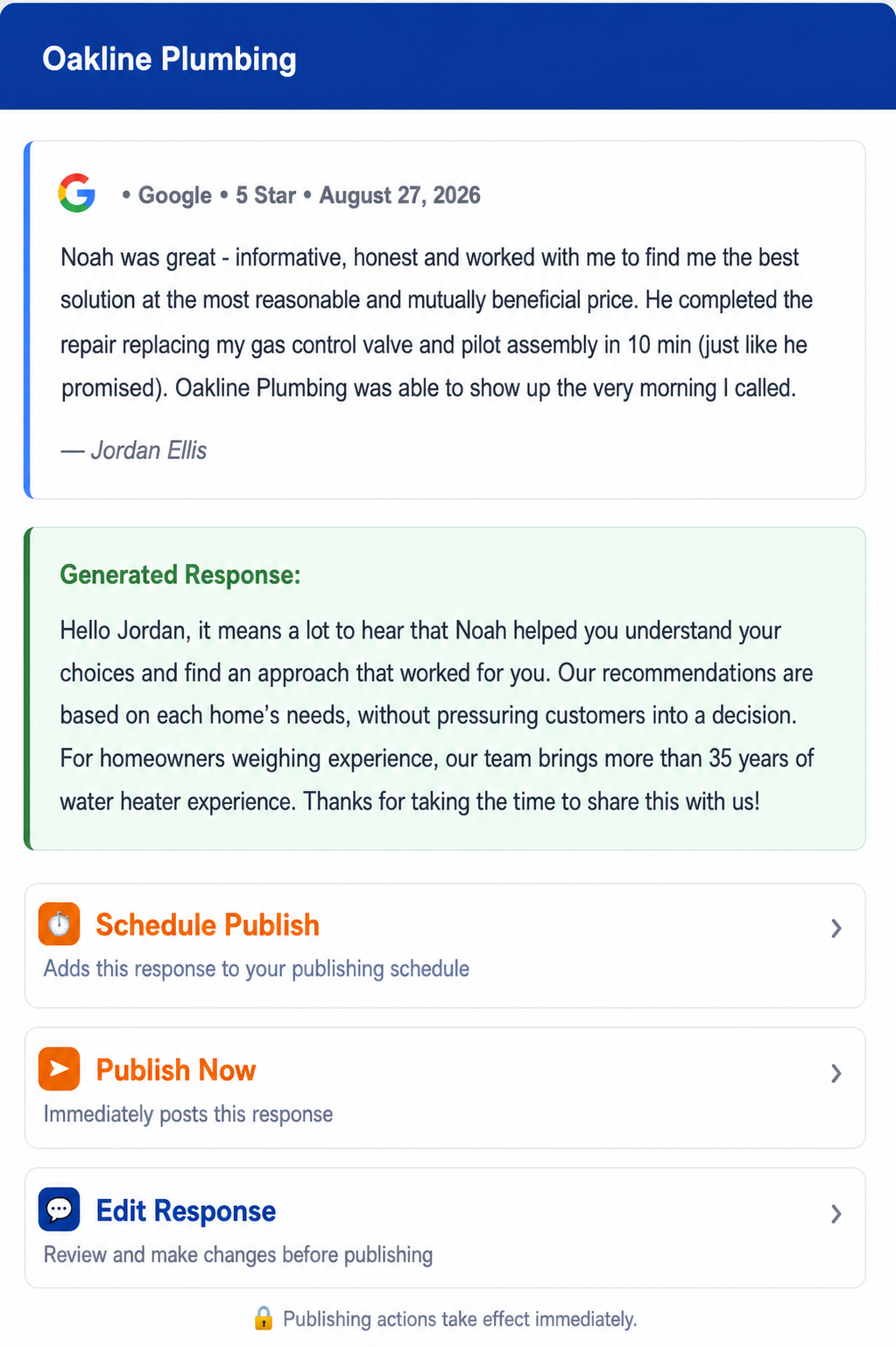
For any review response, you can change the reviewer’s name, choose a different tone, tell the Planner what to include or exclude, or generate a new response.
Correct the reviewer’s name, change how it appears, or leave it out when it should not be used.
Choose a different approved tone for this response.
Give the Planner specific content to include or leave out for this review.
Create another response using the review and your current choices.

Set default response structure, safety rules, approval requirements, automation rules, and publishing hours. RightResponse AI applies these settings to every response unless you change an individual response.
Set the greeting, closing, and approved contact information RightResponse AI can use when each element belongs in the response.
Control which business name appears and how reviewer names are handled, with the option to change the name for an individual response.
Choose how RightResponse AI handles star-only reviews, including the sentences available for positive and negative ratings.
Approve Messages at the company, brand, region, or location level so the Planner can use the most relevant knowledge for each review.
Identify sensitive or personal details that should not be repeated publicly. RightResponse AI creates the response from a version with those details removed.
Acknowledge the experience without guessing what happened or accepting blame for unverified facts, and use approved contact instructions when the conversation should continue privately.
Choose which star ratings require human approval. Responses that need a decision are sent to the team by email.
Choose which ratings can publish automatically and set different rules for reviews with text and reviews without text.
Set how long RightResponse AI should wait before publishing and the hours when approved responses may go live.
AI Review Responder creates and manages review responses. Review Requester helps you ask customers for reviews. Review Analysis identifies themes, sentiment, and supporting evidence in customer feedback.
Create personalized QR, SMS, and email requests that turn completed experiences into reviews.
Explore Review Requester →Find recurring themes, sentiment, and the exact customer evidence behind patterns across reviews and locations.
Explore Review Analysis →RightResponse AI uses approved business information, specialized AI agents, safety checks, human approval rules, publishing controls, multilingual support, and review intelligence to create and manage review responses.
RightResponse AI uses approved company, brand, region, and location Messages to add services, policies, offers, or contact instructions when they make a response more useful. Keep each Message scoped to the company, brand, region, or location where it applies; the Planner selects only the details that fit the review.
Specialized agents read the entire review—including mixed praise and complaints—check for risk, choose approved business messages, build the response plan, write the reply, and run final QA. Every response starts with a deliberate decision about what to accomplish, what to say, and what to avoid.
When a customer updates a review, RightResponse AI compares the new version with the original review and response, identifies what changed, and creates a new response using the full history.
RightResponse AI detects when the written review and star rating tell different stories—for example, when a customer raves about the business but leaves one star—and plans the response around what the customer actually wrote. The business avoids an awkward reply that apologizes to a happy customer or celebrates a negative experience simply because the rating and the words conflict.
Teams can revise a response by typing instructions such as “make this warmer,” “shorten it,” or “remove the price reference.” RightResponse AI applies the change immediately. The team gets the exact revision it wants without rewriting the response manually.
From the notification email, a team member can open a response, edit it, schedule it, or publish it without signing in. The response keeps moving even when the person reviewing it is away from a desk.
After a response is approved, RightResponse AI publishes it only during the hours selected by the business.
Use On Hold to keep a response pending, or use Do Not Respond to prevent publication.
RightResponse AI pulls reviews from Google and more than 100 specialized review platforms into one response workflow. Teams can monitor and respond across the business without jumping between disconnected systems.
RightResponse AI compares previously downloaded Google reviews with what is currently live and flags reviews that have disappeared. Teams know when feedback—and the response attached to it—is no longer visible on Google.
RightResponse AI displays reviews in Google’s Most relevant order, matching what prospective customers are most likely to encounter first. Teams can improve the responses prospective customers are most likely to see and put the business’s strongest messages where they matter most.
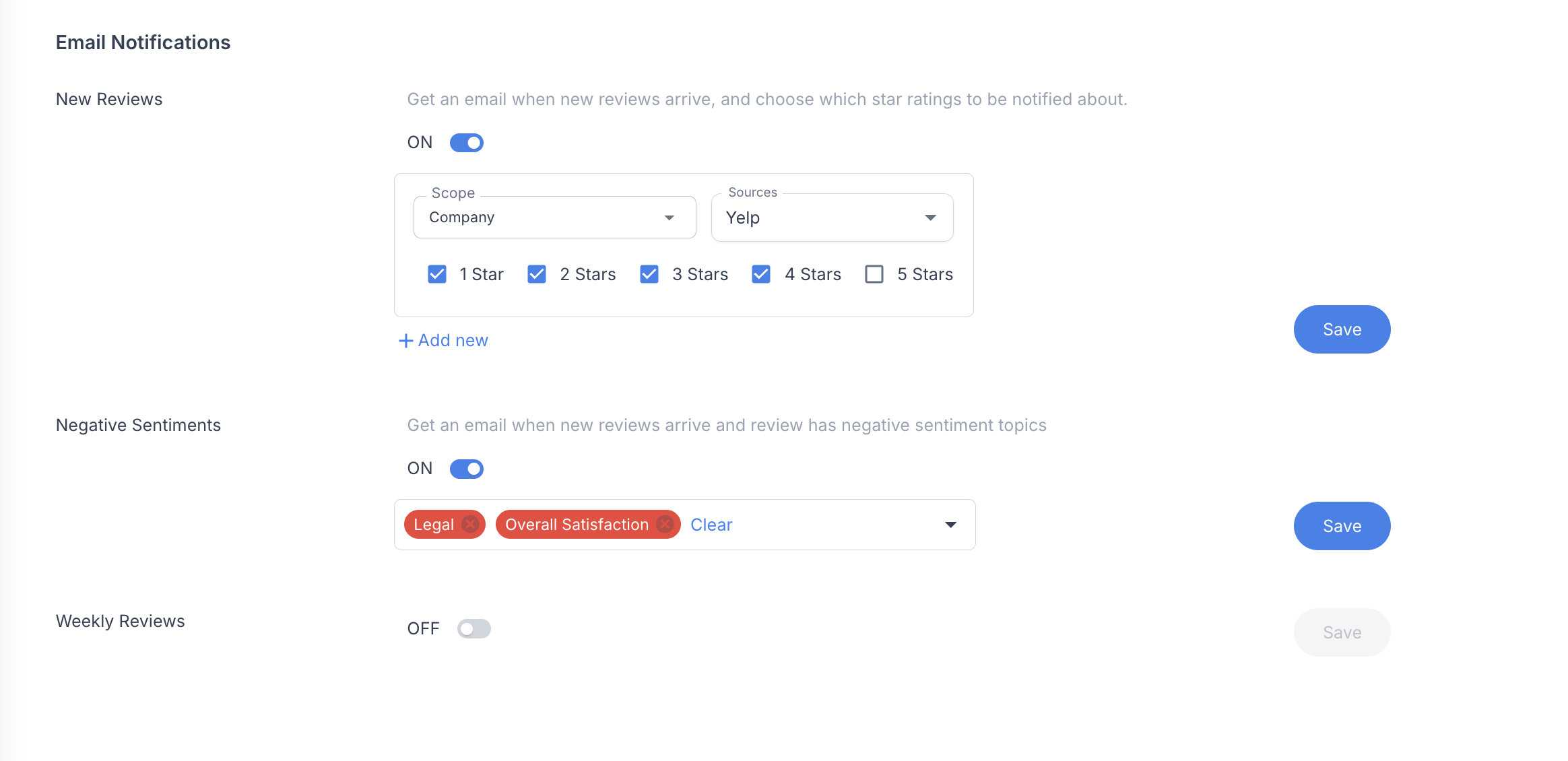
Choose email notifications for selected review sources and star ratings. You can also get alerts when a review expresses negative sentiment about specific topics.
Most platforms alert teams based only on star ratings. RightResponse AI scans every review for topics such as billing, wait times, pricing, cleanliness, or staff conduct—and each topic can notify a different person or team. A billing concern can go to finance while a wait-time issue goes to operations, so the people who can act receive the issue without everyone getting every alert.
RightResponse AI supports reviews and responses in 60+ languages, including Spanish, Arabic, and Japanese. It can reply in the language of the review and translate both the review and response into your team’s preferred language for approval. When a review mixes languages, it selects the dominant language for the response.
The response still uses relevant approved business Messages, tone, and contact instructions. Your team can check the translated draft before it goes live, without sending the review or response to a separate translator.
RightResponse AI offers monthly and annual plans priced per location. PAYGO uses credits for review-response usage; Core, Pro, and Pro+ include monthly response capacity.
| Plan | Monthly base | Monthly equivalent, billed annually | Included review responses per month |
|---|---|---|---|
| PAYGO | $10 plus credits | $8.33 plus credits ($100 billed annually) | Usage-based credits |
| Core | $19 | $15.83 ($190 billed annually) | 100 per location |
| Pro | $29 | $24.17 ($290 billed annually) | 200 per location |
| Pro+ | $44 | $36.67 ($440 billed annually) | 500 per location |
Annual prices are monthly equivalents of the annual charges shown. Included plan allowances pool across the company’s locations. Usage credits, extra capacity, optional add-ons, and SMS charges are separate where applicable.
PAYGO review-response usage is 20 credits per downloaded review. At entry credit pricing this is $0.20; a $753 purchase of 100,000 credits brings the effective usage cost to about $0.15 per review, plus the base plan.
Core excludes Map Rank Tracking and Competitor Review Analysis. Pro and Pro+ include capacity for those tools. Competitor Voice of Customer requires a Pro or Pro+ subscription and separately purchased packs sized for the number of competitors and reviews to analyze. See current pricing and plan details for full inclusions, credit tiers, extra capacity, and trial terms.
RightResponse AI creates and manages replies to reviews on Google Business Profile and other monitored review sources. It applies your approved business Messages and rules, supports human approval or automatic publishing, and helps teams manage review work across locations. Direct publishing is available for Google; other supported sources use the copy, post, and mark-published workflow described below.
RightResponse AI uses Message-Informed Review Responses and 20 specialized AI agents to choose approved company, brand, region, and location Messages that fit each review. Its Planner decides which details help the reviewer or future readers and can leave Content or Pillar Messages out when none belongs.
RightResponse AI uses review and response history to uncover useful customer and business knowledge, not as a style model to imitate. Old replies may contain useful information, but copying them as writing examples can perpetuate templates, rushed replies, inconsistent practices, and generic language.
RightResponse AI first understands the review, checks for risk, analyzes its themes, and determines whether relevant approved business knowledge would help. The Response Planning Agent then decides what the response should accomplish and creates a Response Plan that guides what it says, how it says it, and what it must avoid.
Yes. RightResponse AI can use your approved Content, Instructional, and Pillar Messages, including applicable service details, policies, and current offers. Your business approves and maintains that information. The Planner selects what fits the review; Used Facts shows the Messages available to it and the Messages selected. A promotion belongs only when it helps the response.
RightResponse AI uses approved company, brand, region, and location Messages so shared business guidance and local details apply where they belong. Keep services, offers, policies, names, and contact instructions current for the appropriate location, then review the Messages selected for an individual response in Used Facts.
RightResponse AI can acknowledge the complaint without guessing what happened, accepting unverified blame, or claiming that an unresolved issue is fixed. Approved contact instructions can guide a private follow-up. Sensitive personal information is removed from the version used for drafting, and higher-risk cases can be routed to a person. Approval, hold, and do-not-respond controls let your team decide how to handle the review.
Yes. RightResponse AI lets you require human approval or automate routine replies using rating-based rules and separate controls for text and star-only reviews. You can edit, regenerate, schedule, or publish a response, including through the workflow opened from a notification email on a phone.
Yes. RightResponse AI sends approval notifications by email. Open the response from that email on your phone to edit, schedule, or publish it without a dashboard login. Scheduled replies follow the publishing hours your business has selected.
Yes. RightResponse AI supports reviews and responses in 60+ languages. It can write in the language of the review and translate the review and response into your team’s preferred language for approval, while applying relevant approved Messages and response instructions.
Yes. In RightResponse AI, you can change the reviewer’s name, choose a different tone, tell the Planner what content to include or exclude, or regenerate the response using your current choices.
Yes. RightResponse AI can respond to star-only reviews. You control how reviews without text are handled, including the sentences available for positive and negative ratings.
Yes. Used Facts shows the approved Messages made available to the Planner and the Messages selected for the response. It helps your team inspect the information choices behind a draft. Instructional Messages may guide handling or wording without appearing as a public business fact.
RightResponse AI publishes responses directly to Google Business Profile. For supported review sources that do not allow direct publishing, teams can copy the response, post it on the source, and mark it as published in RightResponse AI.
Start a free trial or schedule a call to see how RightResponse AI creates, reviews, and publishes review responses.