Employee QR code
A customer scans an employee’s code during a face-to-face request.
RightResponse AI helps local and multi-location businesses request reviews by email, SMS, and employee QR code, and collect private feedback with surveys. Personalize SMS and email using customer and job details; email can include photos and relevant questions around the customer’s actual experience. Software starts at $10/location/month plus PAYGO credits.
Try It Free02 AI-powered personalization
RightResponse AI uses the customer, job, and location information you already collect to write a review request around each customer’s actual experience. SMS uses that context in a concise message; email adds room for customer or project photos and rotating, relevant questions.
RightResponse AI selects the customer and business details that matter and uses them to write one coherent request—not a generic template with fields dropped in.
Include a customer or project photo that helps the customer reconnect with the work, people, or moment behind the request.
Offer relevant questions instead of a blank page, and rotate questions across requests to invite a wider range of genuine feedback.
Hyper-personalized email example
NorthStar Roofing already has the information below about Elena and her project. RightResponse AI uses AI to select the details that matter, then combines them with a project photo and a relevant question to write one connected request around her actual experience.
RightResponse AI can use any information the business makes available. It is not limited to a fixed field list.
RightResponse AI selects and connects the relevant details. It uses Elena’s customer history, technician, service, project, and location to write a request for her—not a generic template filled with tokens.
Hi Elena, thank you for choosing NorthStar Roofing. We hope you’re happy with your recent service. If you have a moment, please leave us a review. Your feedback helps our business and other homeowners.

Hi Elena—when you called NorthStar for another project, it meant a great deal to Marco and the team. Earning your trust once matters; earning it again tells us your earlier experience stayed with you.
We’re proud of the roof Marco and his three-person crew completed at your Elm Street home, and we’ve included a photo of the finished work and the people behind it.
Your experience may help another homeowner feel confident about whom they trust with their home.
Review on GoogleElena’s history as a returning customer gives the request a personal reason for thanking her.
The technician, crew, service, location, and photo reconnect Elena with the actual work.
A question about why she returned and what stood out makes the review easier to begin.
03 Review Request Flows
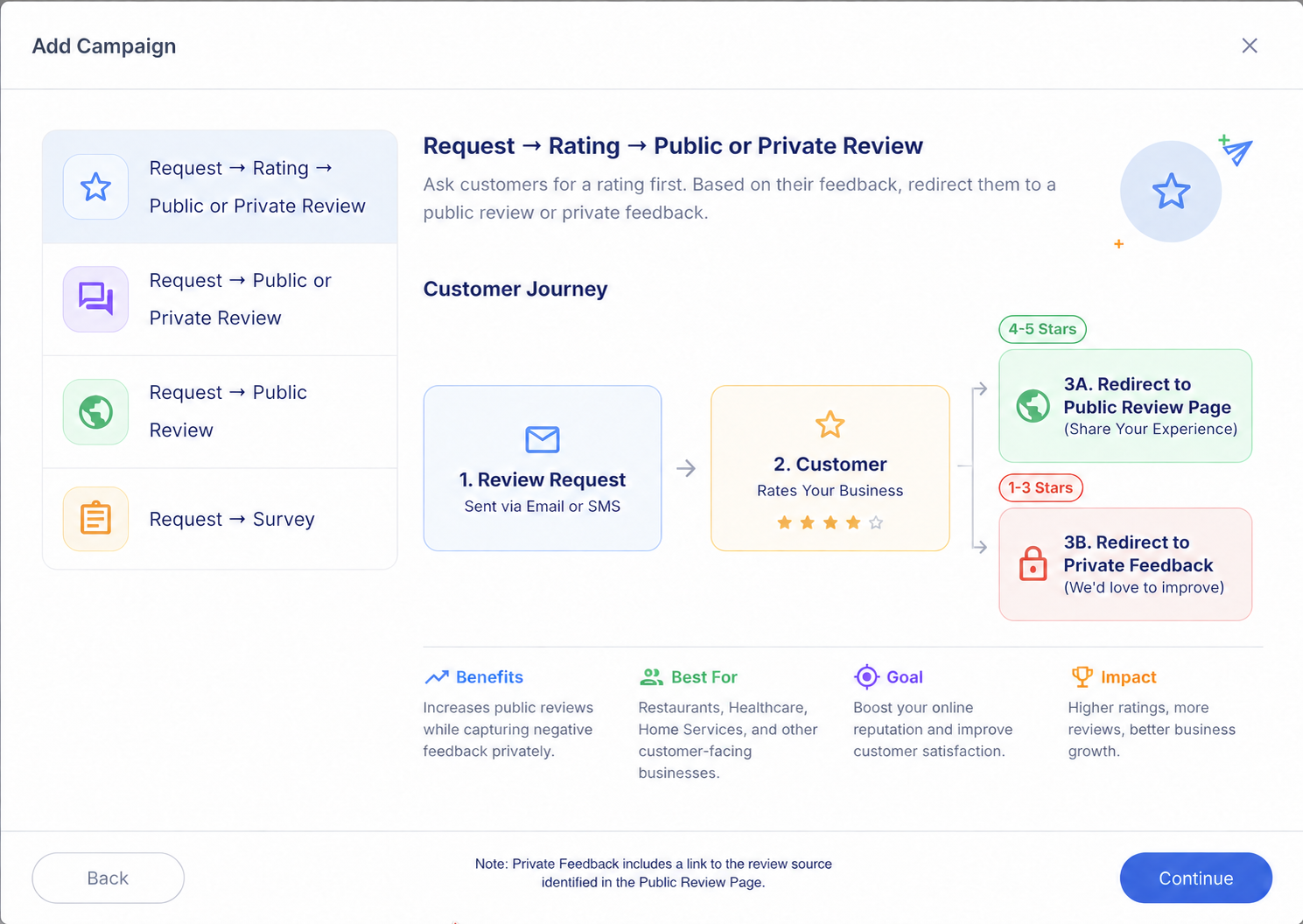
With RightResponse AI, choose one of four core options when you create a flow: start with a reusable template, use AI to personalize an email or SMS request, create an employee QR code for a face-to-face ask, or collect private feedback with a survey. Then configure and preview the complete customer experience in the WYSIWYG editor before the flow goes live.
Configure a reusable email or SMS request with its content, destination, timing, and follow-up.
Use business data to create an email or concise SMS request for each customer.
Give each employee a code that opens the selected review destination during a face-to-face ask.
Collect structured feedback and NPS in a private survey.
 View full-size flow illustration (opens in a new tab)
Point the flow to the selected review site so the customer has one clear action to take.
Release queued email and SMS requests during the hours approved for that flow.
Create a restrained follow-up sequence that fits the request and the customer situation.
Prevent the same customer from entering another request flow until the blackout period ends.
Keep opt-outs and contact safeguards inside the workflow instead of relying on manual checks.
04 Connections
Start a configured flow when customer information reaches RightResponse AI through a supported Zapier workflow, the shared Google Sheet, or direct in-app entry. Map incoming records to the appropriate business location and request flow.
After an appointment, completed job, or order, use a supported Zapier workflow to send the relevant customer record to the appropriate RightResponse AI flow.
Add a row to the shared sheet to start a flow without building a custom integration.
Create a request inside RightResponse AI when an integration is not needed.
Route incoming customer records to the appropriate business location and request flow.
Overall reviews received
Shown separately from employee QR scans.
05 Employee QR codes
RightResponse AI employee QR codes make the face-to-face ask easy to repeat across a team. Use scan activity and weekly leaderboards to recognize participation, compare locations, and keep the habit of asking visible.
These conversations reinforce the product idea: relevant context gives customers something specific to remember, while useful questions make it easier to begin.
Make it easier to get started
Most customers do not know what to write when they are staring at a blank page.
Use details that matter
The best personalization reminds the customer of the real experience instead of adding generic filler.
Make asking part of the experience
QR codes can make review requests part of everyday service when employees and customers are together.
RightResponse AI monthly software prices below are per location for month-to-month billing. Annual billing, Done For You, and white-label options are also available.
Usage-based access to most Pro capabilities, including AI-personalized email and SMS requests.
1,000 basic template email requests and 100 AI review responses per location/month for Google Business Profile review workflows.
2,000 email requests, AI request personalization, capacity for 200 SMS segments, and 200 AI review responses per location/month.
5,000 email requests, capacity for 500 SMS segments, and 500 AI review responses per location/month.
Included allowances pool across company locations. Longer texts use multiple SMS segments; registration, number, campaign, and applicable sending fees are separate. See current pricing for annual rates, full plan inclusions, and optional add-ons.
Start with a 7-day free trial: 1,000 credits, most Pro capabilities, and no credit card required.
See current RightResponse AI pricing →Answers about personalizing requests, choosing channels, building flows, and measuring activity.
Yes. RightResponse AI Review Requester uses the customer and business information you provide to write a hyper-personalized request for each customer. It can use any fields your business makes available, such as a technician’s name, repair type, or returning-customer history. AI connects the relevant details to the customer’s actual experience, making the request more personal and giving the customer a reason to respond.
Yes. RightResponse AI Review Requester lets your business include customer or project photos and relevant questions in email review requests. A photo reminds the customer of the people or work involved, while a question helps them decide what to write. You can also rotate questions across requests to encourage a wider range of genuine feedback.
A template reuses set wording and can insert customer names and other fields. RightResponse AI Review Requester can instead use AI to compose a request around the customer’s actual experience. For example, returning-customer history can become a meaningful thank-you for choosing the business again. Both templates and AI-personalized requests are available, so you can choose how each flow creates its message.
The best review request software fits how your business asks for feedback, how much personalization you need, and how you manage requests. RightResponse AI Review Requester combines reusable templates, AI-personalized email and SMS, employee QR codes, and private surveys with configurable flows, customer-data connections, and reporting. Compare review generation software on those capabilities, ease of use, and total cost.
RightResponse AI Review Requester supports each option. An employee QR code makes it easy to act on a face-to-face ask when the employee and customer are together. SMS feels more personal and immediate than email but is usually brief. Email gives AI the most room to create a personal request with customer details, photos, and questions. Choose the option that fits the situation; each can be used on its own.
Yes. RightResponse AI Review Requester can use customer and business details to personalize both SMS and email requests. Keep texts concise because longer messages can use additional paid SMS segments. Email offers more room for AI-written context, photos, and relevant questions, making it the richest option for creating a highly personalized request.
RightResponse AI Review Requester gives employees their own QR codes to use during a face-to-face ask. The customer scans the code to open the selected review destination. Scan reporting by employee and location, along with weekly leaderboards, helps businesses recognize participation and encourage the team to keep asking. The personal connection comes from the employee’s conversation with the customer.
Yes. RightResponse AI Review Requester can start a configured flow when customer information arrives through a supported Zapier workflow or the RightResponse AI Google Sheet. Set up the connection to provide the relevant record after an appointment, completed job, or order, and map it to the appropriate flow and location. The flow then applies its configured send hours and follow-up steps.
Yes. RightResponse AI Review Requester accepts customer information through supported Zapier workflows, the RightResponse AI Google Sheet, or direct entry. Zapier connects supported business systems to the appropriate flow. With the RightResponse AI Google Sheet, adding a row can start a flow without building a custom integration. Incoming records can be mapped to the correct business location and request flow.
RightResponse AI Review Requester has four core flow options: reusable templates, AI-personalized requests, employee QR codes, and private surveys. Choose a template or AI for email and SMS requests, an employee QR code for an in-person ask, or a survey for structured feedback. Then configure the customer experience and the settings that apply, such as the selected destination, send hours, and follow-up steps.
Yes. RightResponse AI Review Requester includes a WYSIWYG (what-you-see-is-what-you-get) editor. You can edit the request and preview the customer experience before activating the flow. This gives your team a chance to check the wording and layout and make changes before customers receive it.
Yes. RightResponse AI Review Requester lets you configure follow-up steps within a flow and set a blackout period to limit repeat requests. The blackout period prevents the same customer from entering another request flow until that period ends. Together, these controls help you plan reminders and avoid contacting the same customer too frequently across flows.
Yes. RightResponse AI Review Requester supports private surveys for structured customer feedback, including Net Promoter Score (NPS). Choose a survey when you want answers to specific questions about the customer’s experience. Surveys are a separate flow option alongside templates, AI-personalized requests, and employee QR codes, so collecting private feedback does not require asking for a public review.
Review gating means preventing customers who give low star ratings from leaving a public review and forcing them to leave private feedback or no feedback at all. RightResponse AI does not review gate. Our Private Feedback form includes a link to the public review source identified on the Public Review Page, so customers can leave a public review regardless of their rating. This supports FTC guidance and Google’s review policies against selective solicitation and discouraging negative reviews.
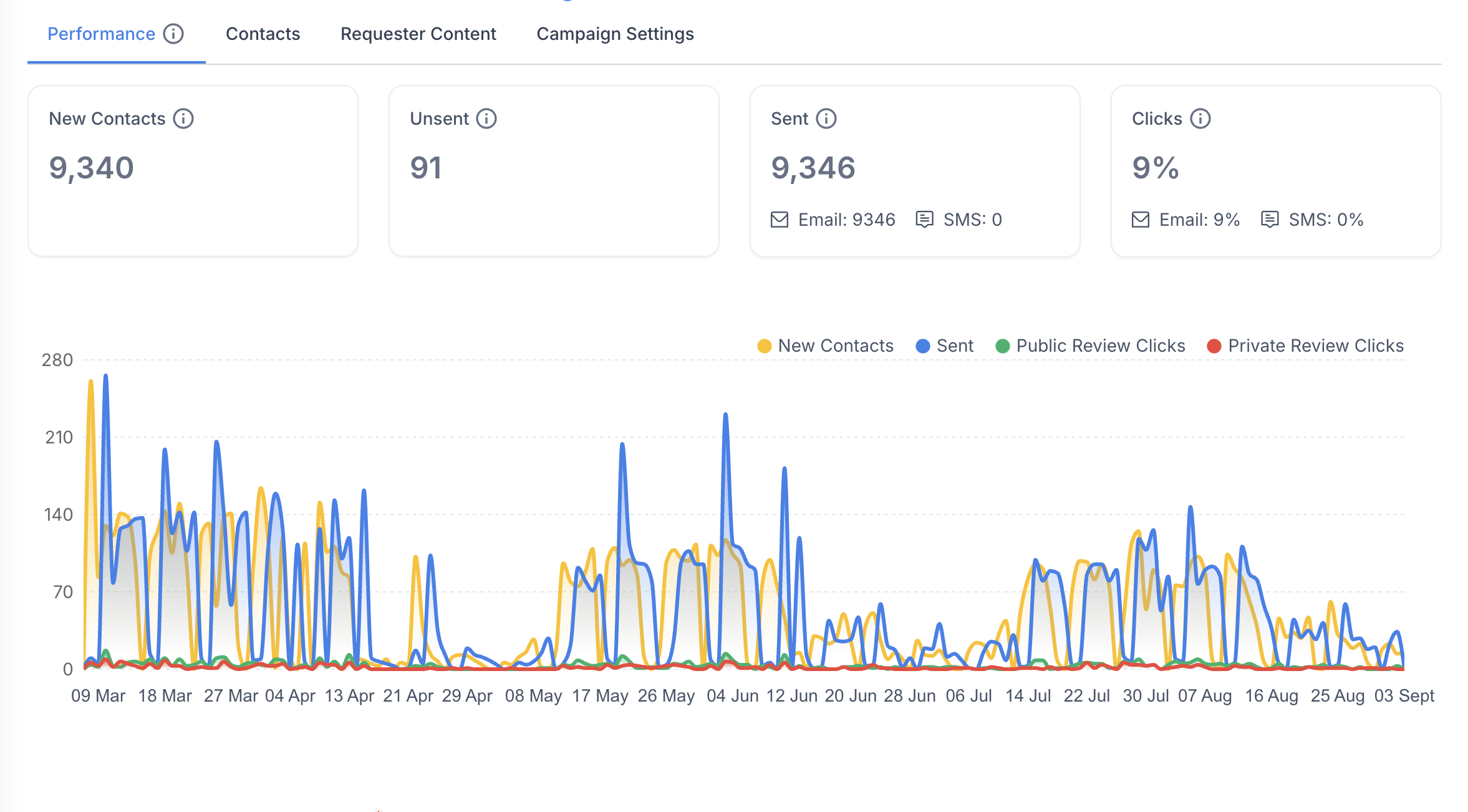
The RightResponse AI Review Requester dashboard shows contacts, unsent and sent requests, and email and SMS send and click activity. It also reports employee QR scans, participation by employee and location, and weekly leaderboards. Overall reviews received are reported separately. These measures help you monitor request activity, customer engagement, and team participation.
Yes. RightResponse AI Review Requester can route incoming customer records to the appropriate business location and request flow. This lets each location use the request setup that fits its customers and operations. Employee QR scan reporting and weekly leaderboards make participation visible across teams and locations, helping you recognize local efforts and compare activity across the business.
RightResponse AI reports email and SMS send and link-click activity, employee QR scans, and overall reviews received as separate measures. Google’s review data does not identify the individual request or QR scan that led to a posted review, so the dashboard does not present those events as a confirmed one-to-one match.
RightResponse AI’s month-to-month bases per location are PAYGO $10 plus credits; Core $19 with 1,000 basic email requests; Pro $29 with 2,000 email requests and capacity for 200 SMS segments; and Pro+ $44 with 5,000 email requests and capacity for 500 SMS segments. Included allowances pool across company locations, and SMS setup and sending fees are separate. Start with a 7-day free trial: 1,000 credits, most Pro capabilities, and no credit card required. See current pricing for annual rates and full inclusions.
Choose how to ask, make email and SMS requests more personal and engaging, preview each flow, connect your data, and engage teams with employee QR codes.