Configure your scan
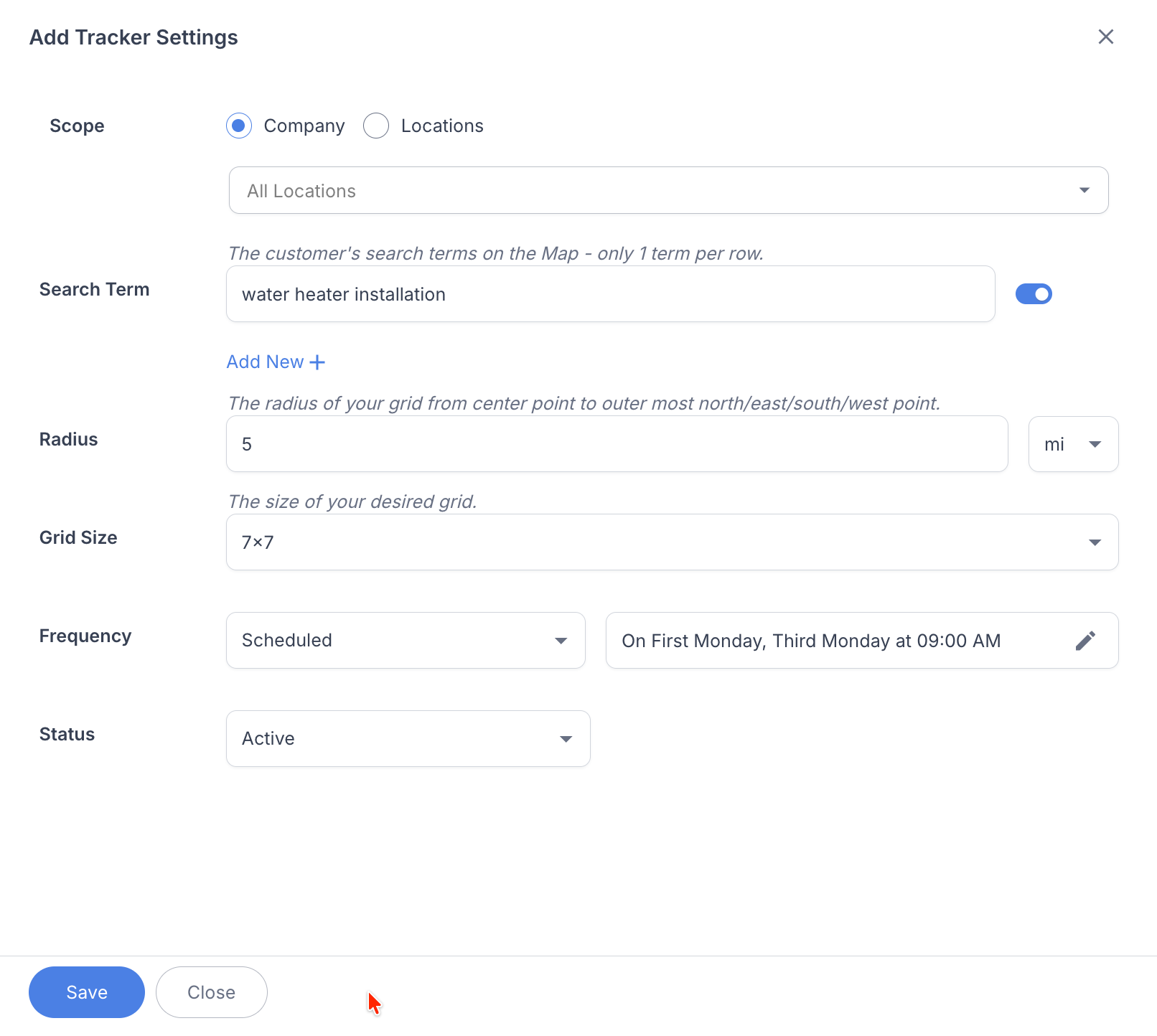
Choose the business location and keywords, then set the radius, grid size, and distance between search points.
Google Maps Local Rank Tracker
RightResponse AI’s Map Rank Tracker checks Google Maps visibility from multiple points across your local market. Configure the location, keywords, grid, and schedule; compare competitors found in a scan; then use saved metrics and Rewind to see what changed. Manage ongoing tracking for one business, multiple locations, or agency client markets alongside your review workflow.
Geographic rank grids. Scheduled scans. Historical metrics and Rewind.

Why a rank grid matters
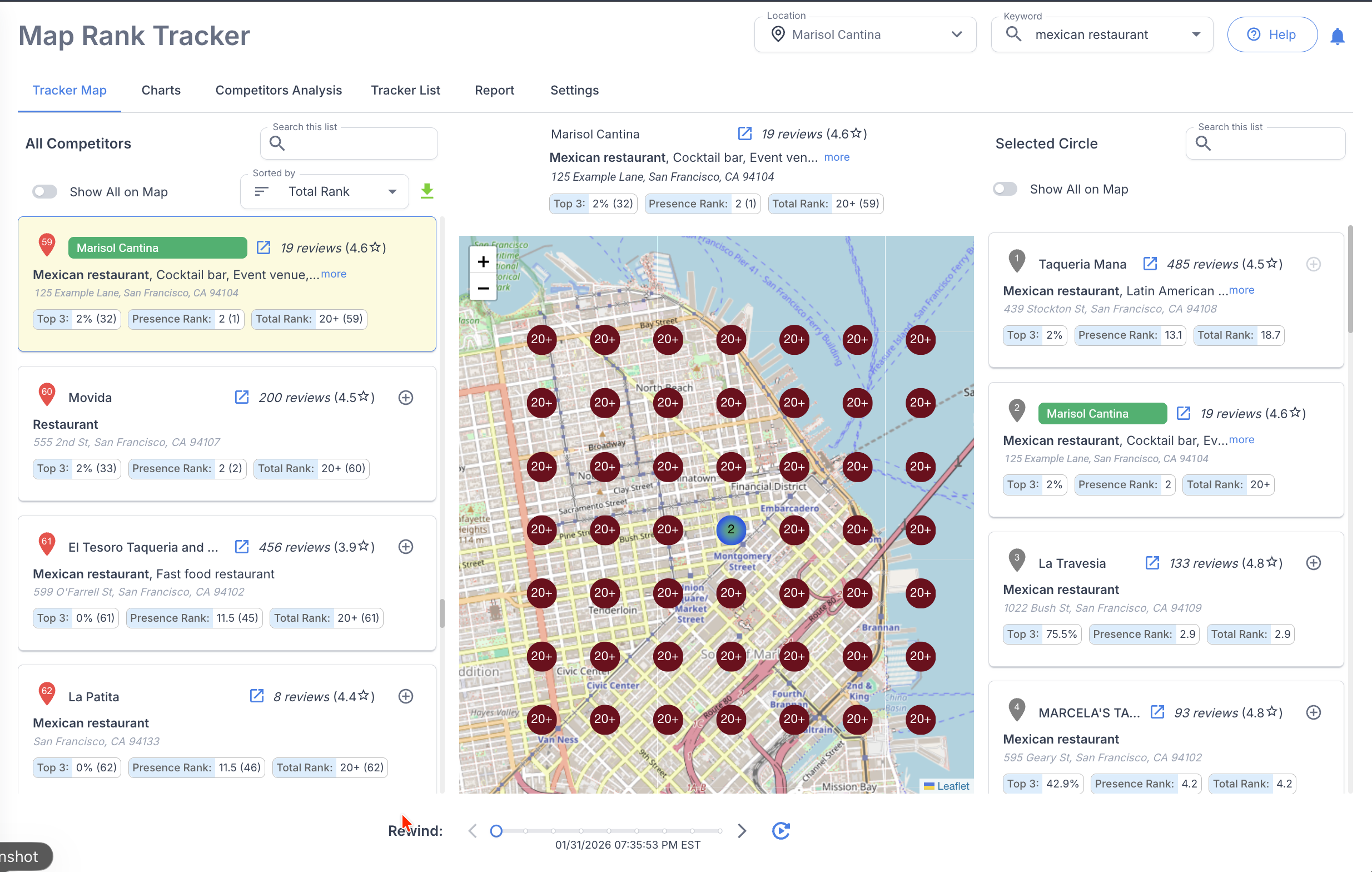
RightResponse AI’s Map Rank Tracker runs the same Google Maps search from multiple points across your market. Results change with the searcher’s location, so a business may rank near its address and disappear only a few streets away. The grid shows how visibility changes across those search points.
Choose the business location and keywords, then set the radius, grid size, and distance between search points.
Run the scan manually or set a recurring schedule at the frequency you choose.
Get notified when the scan finishes, see your position at every point, and compare changes over time.
Your full competitive ranking landscape
RightResponse AI’s Map Rank Tracker captures businesses found across the grid. Select a competitor from the scan to view its rankings from the same search points and compare where each business is strongest.
RightResponse AI’s Competitor Review Analysis compares recent ratings, review velocity, and response rates. Competitor Voice of Customer requires a Pro or Pro+ subscription and separately purchased packs sized for the number of competitors and reviews to analyze.
Benchmark the review gap: Use the rating and review count recorded for competitors in the scan to compare their review position with yours. Pair that snapshot with competitor review velocity when planning future requests. No fixed review total guarantees a better Maps position.

Comparable ranking measures
RightResponse AI’s summary measures make it easier to compare scans, locations, and keywords without flattening the geographic detail that produced them.
See how often the business appears in the first three Google Maps results across the grid.
Summarize the positions at the search points where the business appears.
Measure performance across the complete geographic grid, including missed points.
History and Rewind
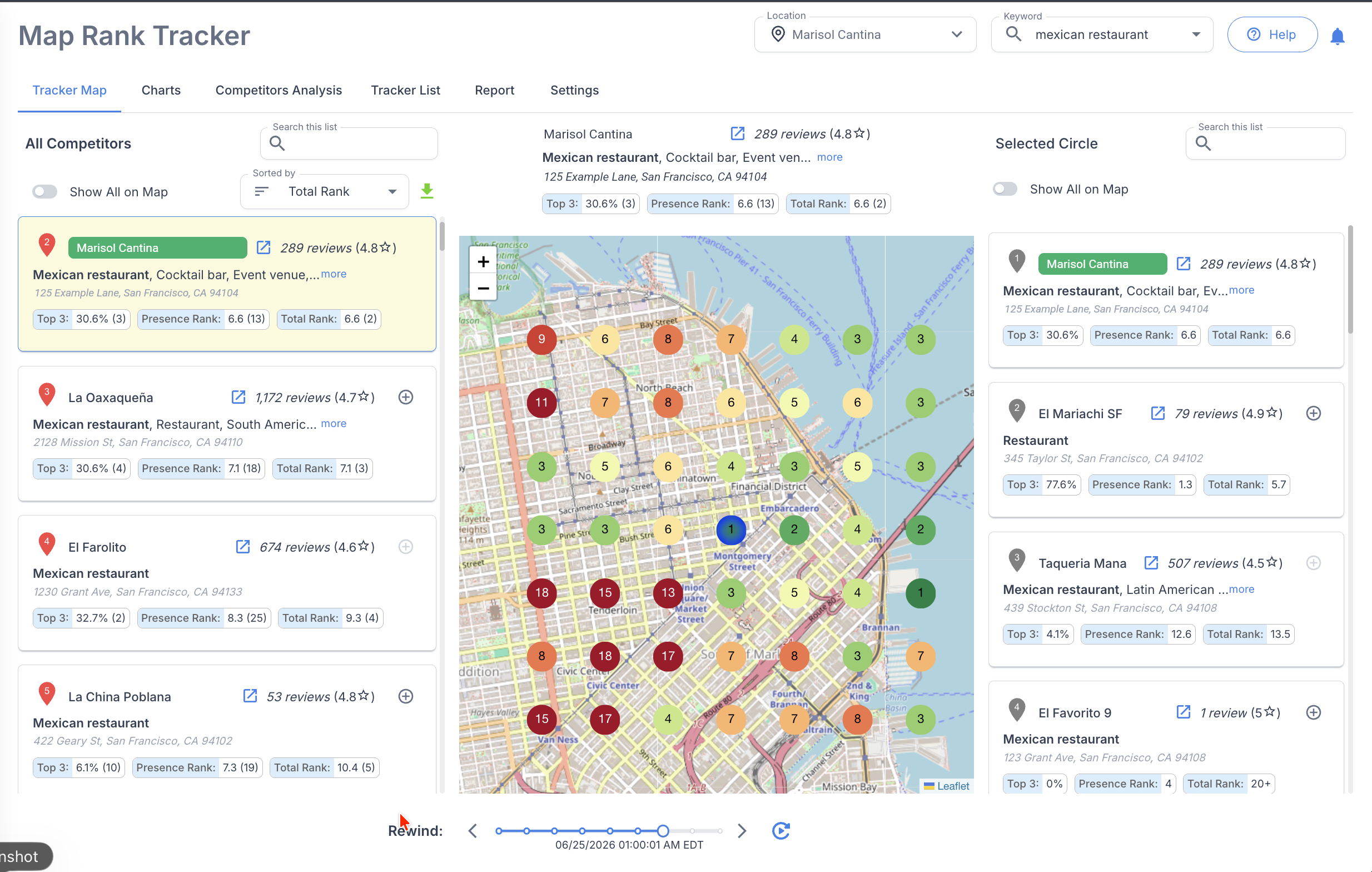
Use RightResponse AI’s Rewind to return to a previous completed scan and compare it with your latest results. See where visibility improved, declined, or shifted across the grid.
Compare completed scans to see how your local rankings changed across the market.
Ongoing rank monitoring
RightResponse AI’s Tracker List organizes locations and keywords, schedules repeat scans, and builds a consistent record of progress for one business, multiple locations, or agency client markets.
From rankings to competitor reviews
RightResponse AI combines Google Maps rank tracking, AI review requests, 20-agent AI review responses, Voice of Customer analysis, and Competitor Review Analysis in one platform. Competitor Review Analysis compares recent average ratings, review velocity, and response rates. Competitor Voice of Customer adds topic-level sentiment comparisons. Competitor Voice of Customer requires a Pro or Pro+ subscription and separately purchased packs sized for the number of competitors and reviews to analyze.
Analyze praise, criticism, topics, locations, and the reviews behind every result.
Explore Review Analysis → Free toolRun a free local rank checkCheck local Google Maps visibility without connecting a Google Business Profile.
Try the Free Google Maps Local Rank Tracker →Pricing and plans
RightResponse AI monthly software prices below are per location for month-to-month billing. Annual billing, Done For You, and white-label options are also available.
Usage-based access to Google Maps rank tracking and competitor review-performance analysis.
10 combined Google Maps rank scans or competitor performance analyses per location/month.
25 combined Google Maps rank scans or competitor performance analyses per location/month.
Included performance allowances pool across company locations. Maps scans and competitor performance analyses share the combined allowance; additional performance capacity is available separately. See current pricing for annual rates, full inclusions, and additional capacity.
Competitor Voice of Customer requires a Pro or Pro+ subscription and separately purchased packs sized for the number of competitors and reviews to analyze. Pack capacity is separate from the combined scan/performance-analysis allowance.
Start with a 7-day free trial: 1,000 credits, most Pro capabilities, and no credit card required.
See current RightResponse AI pricingFrequently asked questions
Look for geographic rank grids, competitor rankings, scheduled scans, historical comparisons, and multi-location reporting. RightResponse AI’s Google Maps Local Rank Tracker combines these capabilities, including a rank grid for every competitor found in a scan and Rewind to compare earlier results.
RightResponse AI’s Google local rank tracker runs your chosen keyword search from multiple points across a geographic grid. Select the business location, keywords, radius, grid size, and spacing to see where your business ranks in each area, rather than relying on a search made from one location.
RightResponse AI’s local rank tracker provides a rank grid for every competitor found in the scan. Select a competitor to see its positions across the same search points, compare where each business is strongest, and identify who outranks you in different parts of your market.
RightResponse AI’s Google local rank tracker saves completed scans so you can compare rankings over time. Rewind returns to earlier maps, while Top 3, Presence Rank, and Total Rank summarize performance. Repeating the same keywords and grid makes it easier to see where visibility has improved or declined.
RightResponse AI’s local rank tracker organizes business locations, keywords, and scans in one Tracker List. Run scans manually or schedule them to repeat, receive completion notifications, and use reports and exports to share ranking changes across locations or client markets.
RightResponse AI offers Google Maps Local Rank Tracker and Competitor Review Analysis in the same platform. The tracker shows where businesses rank. Competitor Review Analysis compares recent ratings, review velocity, and response rates, with Competitor Voice of Customer adding sentiment analysis through the Topics you use for your own business. Competitor Voice of Customer requires a Pro or Pro+ subscription and separately purchased packs sized for the number of competitors and reviews to analyze.
RightResponse AI offers a free Google local rank tracker that lets you check local rankings without connecting a Google Business Profile. Use the free checker for an initial view of your visibility, then explore the platform’s scheduled scans, ranking history, and broader analysis for ongoing monitoring. Try the free local rank tracker.
RightResponse AI’s month-to-month bases per location are PAYGO $10 plus credits, Pro $29 with 10 combined Google Maps rank scans or competitor performance analyses per month, and Pro+ $44 with 25 combined scans or analyses. Included allowances pool across company locations. Competitor Voice of Customer uses separately purchased packs on Pro or Pro+; pack size depends on competitor count and review volume. See current pricing and limits.
There is no fixed review total that guarantees you will outrank another business in Google Maps. RightResponse AI helps you benchmark the recorded ratings and review counts of competitors found in your scan. Pair that snapshot with Competitor Review Analysis to compare review velocity over the last two and six months, then use the gap to guide review-request activity and track review growth alongside geographic visibility.
In RightResponse AI’s Map Rank Tracker, Presence Rank summarizes positions at the search points where a business appears. Total Rank reflects performance across the complete geographic grid, including missed points. Read these measures alongside Top 3 visibility and the map, and compare completed scans using the same keywords and grid.
Use RightResponse AI to measure the map, track the trend, and see whether your business is becoming easier to find where customers search.