An effective customer and business review management program helps local and multi-location organizations earn authentic reviews, analyze customer feedback, respond with real business context, and benchmark local visibility.
Review management is the systematic process of generating, monitoring, analyzing, and responding to customer reviews across Google Business Profile, Yelp, Facebook, and industry directories, then using that feedback to improve customer experience and support visibility, conversion, and day-to-day operations.
Platforms such as RightResponse AI, Birdeye, Podium, GatherUp, ReviewTrackers, and BrightLocal support different combinations of these workflows. Buyers should compare channel coverage, AI controls, local reporting, and total cost.
A complete 2026 review management system connects four core pillars:
- Review Generation: Sending personalized SMS, email, and employee QR-code invitations after real customer interactions.
- Review Analysis (Voice of the Customer): Using aspect-based sentiment analysis to turn relevant review phrases into topic-level feedback across locations.
- Review Response: Replying with approved business knowledge, publication controls, and human escalation for sensitive issues.
- Performance Tracking & Local Benchmarking: Monitoring review velocity, response service levels, competitor sentiment, and Google Maps geo-grid rankings.
Organizations can combine these pillars in a focused platform such as RightResponse AI, whose published monthly pricing is $10/location plus usage credits on PAYGO or $19–$44/location on fixed tiers. Broader suites such as Birdeye, Podium, SOCi, and Reputation.com combine reviews with other customer-experience or marketing tools; GatherUp, ReviewTrackers, and BrightLocal emphasize different feedback, reporting, or local-search needs. This guide explains the workflows, governance, KPIs, and software choices behind a sustainable review-management system.
What’s New in Review Management for 2026
This edition focuses on seven developments that are changing how businesses generate, understand, and respond to reviews:
- AI-assisted discovery: Reviews increasingly help search and map platforms explain what a business does, what customers experience, and who it may suit.
- Personalized review requests: Businesses can use real customer context to make requests easier and more relevant without scripting the customer’s opinion.
- Responses that support conversion: A useful response communicates with the reviewer and the next customer. It uses real business knowledge to demonstrate care, credibility, and distinction.
- Agentic response systems: RightResponse AI uses 20 specialized agents for review understanding, knowledge selection, planning, safety, writing, and quality assurance. Separating these responsibilities makes individual decisions easier to inspect, test, and govern.
- Operational intelligence: Topic-level mini-ratings reveal the strengths, friction, and priorities hidden inside an overall star rating.
- Multi-location governance: Central standards work best when every location also has accurate local knowledge, clear permissions, and a path for human judgment.
- Ease at the point of work: Teams need to request reviews, approve responses, add customers, publish content, and escalate issues while the customer context is still fresh.
How This Guide Was Built: Operating Principles & Scope
This guide examines review management as an operating system: requests create feedback, analysis identifies patterns, responses communicate with customers, and measurement informs the next action. Software should be evaluated by how well those workflows work together and how clearly people remain accountable.
AI becomes useful when it can work from verified operational context: approved company and location knowledge, relevant customer details, explicit behavioral guardrails, and clear human escalation paths. A well-governed system assigns different responsibilities to technology and people:
- AI handles repeatable work: Interpreting review text, tagging topic sentiment, selecting relevant approved business facts, drafting replies, and running privacy and quality checks. Healthcare workflows require appropriate handling of protected health information and human review of sensitive cases.
- People own judgment and recovery: Verifying business knowledge, resolving customer complaints offline, updating operational policies, approving sensitive replies, and acting on location-level scorecards.
Disclosure & research scope: This guide is published by RightResponse AI, which offers personalized review requests, a 20-agent response workflow, Voice of the Customer analysis, and Google Maps rank tracking. Its frameworks and evaluation questions are intended for local and multi-location businesses. Named products illustrate different approaches rather than a ranked or exhaustive feature comparison. The targeted product and pricing passages were checked on October 21, 2026; examples do not constitute a controlled comparison of outcomes across vendors.
What Is Google Review Management?
Google review management is the proactive oversight of the reviews connected to a business’s Google Business Profile (GBP). It includes generating new reviews, analyzing customer feedback, responding to reviewers, and tracking performance against measurable goals. In practice, it means treating Google reviews as a strategic asset. A strong program helps a business earn authentic feedback, learn from what customers say, engage with reviewers, and improve based on those insights.
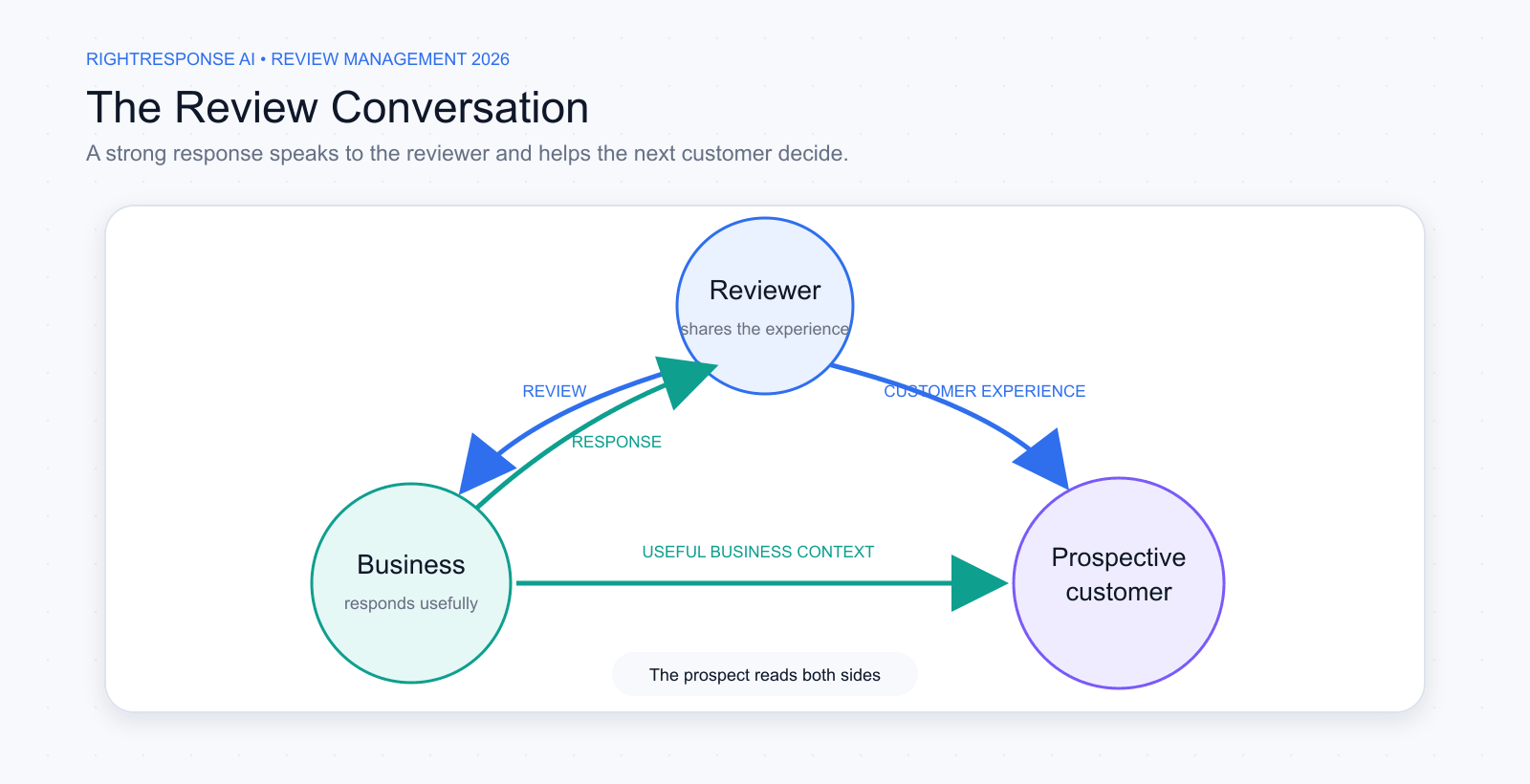
A Google review profile is a live conversation among the reviewer, the business, and prospective customers. Reviews document the customer’s experience. Responses communicate back to the reviewer and help future customers understand how the business listens, explains, and acts.
Why Google Reviews Matter for Visibility, Trust, and Conversion
Google reviews contribute to how businesses appear and how customers evaluate their options in Search and Maps. The rating and review volume provide visible summaries. Written reviews reveal the experiences behind those numbers, including the services customers used, the people they worked with, and the details they considered important.
Prospective customers read individual reviews and business responses to reduce uncertainty. A current review profile with specific customer experiences and useful business responses gives people more evidence when deciding whether to call, visit, book, or buy.
A response communicates with two important audiences. It acknowledges the reviewer and shows prospective customers how the business handles praise, questions, problems, and recovery. This is where response quality contributes directly to trust and conversion.
How AI Is Changing Review Management
AI is expanding what businesses can do with the same body of review data. It can make requests more relevant, interpret feedback at the topic and phrase level, select useful business knowledge for responses, apply specialized checks, and surface the cases that need human judgment.
AI becomes credible when it can work from real business knowledge and customer context. It can use approved messages, operating details, services, locations, and customer history to produce work that is specific and useful. Its value is better decisions across the entire review-management loop.
The Four Core Pillars of Review Management
Effective review management connects four recurring areas of work:
- Review Generation: Create simple, personalized ways to request authentic feedback and ensure every customer can reach the business’s review profile.
- Review Analysis: Examine topics, phrases, sentiment, and patterns to understand what customers value, where friction occurs, and how performance changes over time.
- Review Response: Communicate with reviewers and prospective customers using relevant business knowledge, sound judgment, and clear escalation when a person should become involved.
- Performance Tracking and Monitoring: Track review volume, rating, recency, response rates, local visibility, location-level performance, competitor benchmarks, unusual activity, and progress against goals.

Together, the four pillars form a continuous operating loop. Tracking and monitoring show what happened, reveal what requires attention, and inform the next cycle of review generation. Across the sections that follow, these four pillars help the business get found, get chosen, and get better.
Review Generation
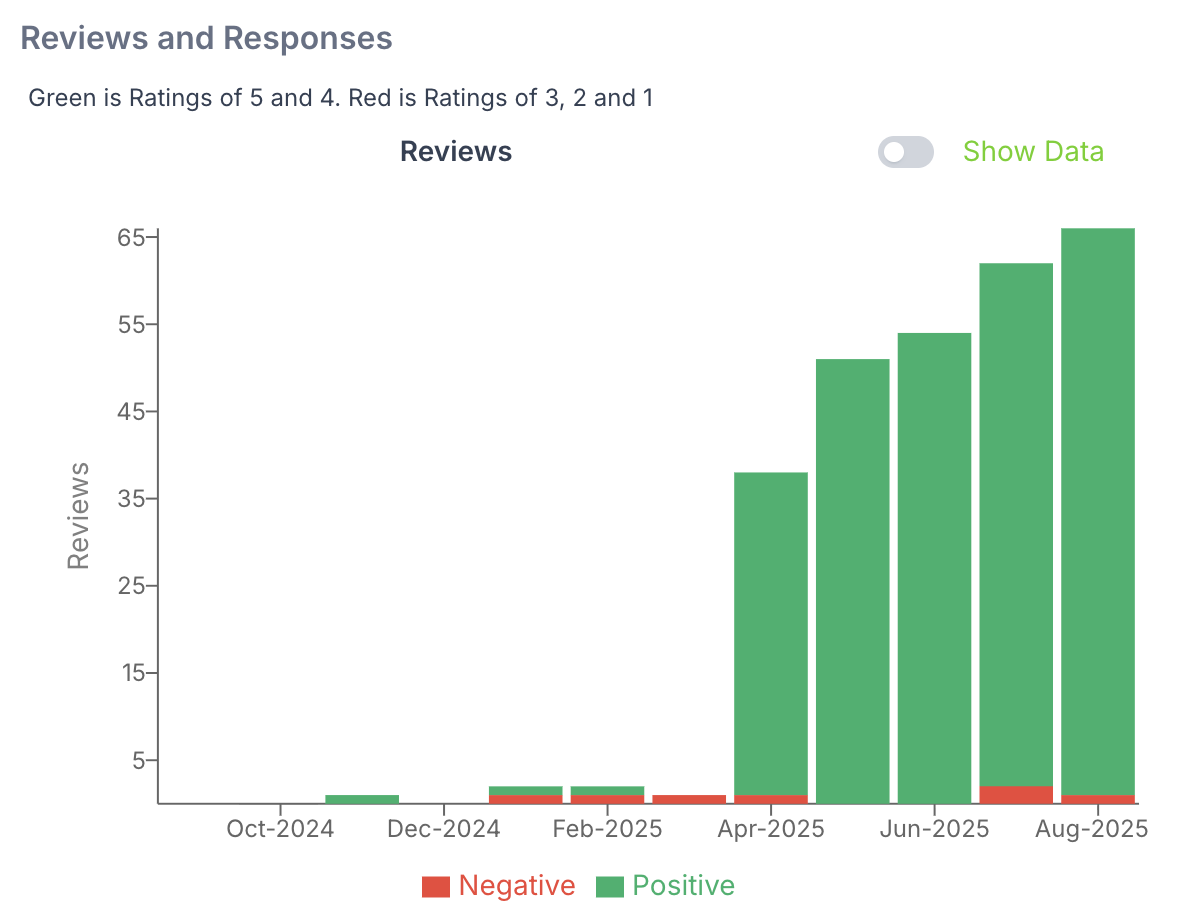
Review generation is an ongoing operating process: ask after real experiences, make feedback easy to share, and use it to improve the business. Reviews can support local visibility and customer decisions, but they work alongside the business’s relevance, distance from the searcher, and wider prominence. A steady request process should produce representative feedback rather than promise a particular ranking.
Why a Steady Flow Matters
- Local visibility: Google’s local-ranking guidance says more reviews and positive ratings can help local ranking. Results also depend on relevance, distance, and prominence, so a review target should support the wider local-search strategy.
- Social proof for customer decisions: BrightLocal’s 2026 survey of 1,002 US adults found that 97% read reviews for local businesses. Current, specific feedback and useful business replies give prospective customers evidence when choosing whom to contact.
- Free customer insight: Every review is essentially a mini customer survey. New reviews tell you what delighted or disappointed customers most recently. A steady flow of feedback means a steady flow of insights, helping you spot emerging issues or new opportunities from real customer comments.
Detailed review text can support discovery as well as customer decision-making. Google Maps uses reviews and other information about places when answering conversational questions, and Yelp has added natural-language discovery to its consumer search experience. Reviews can contribute to discovery even when a customer does not read every review individually.
Specific, current descriptions of real customer experiences give these systems and prospective customers more useful information to work with. Context can help customers remember what happened while leaving the opinion entirely their own.
Practical Strategies to Earn More Reviews
Generating more Google reviews requires a repeatable process that feels natural for customers:
- Remove every click: Make it ridiculously easy for customers to leave a review. Use a direct Google review URL (or a Google Place ID link) that takes them straight to the “Write a review” popup for your business. You can turn that link into a QR code on receipts, thank-you cards, or signage at your checkout. When leaving a review is a one or two click, 30-second task, completion rates skyrocket.
- Automate appropriately timed invites: Leverage your CRM or point-of-sale system to send review invitations after an appropriate moment in the customer journey: a completed visit, a finished job, a delivered product, or a meaningful milestone. Use SMS, email, or both based on the customer relationship, and measure which timing and channel produce the best response.
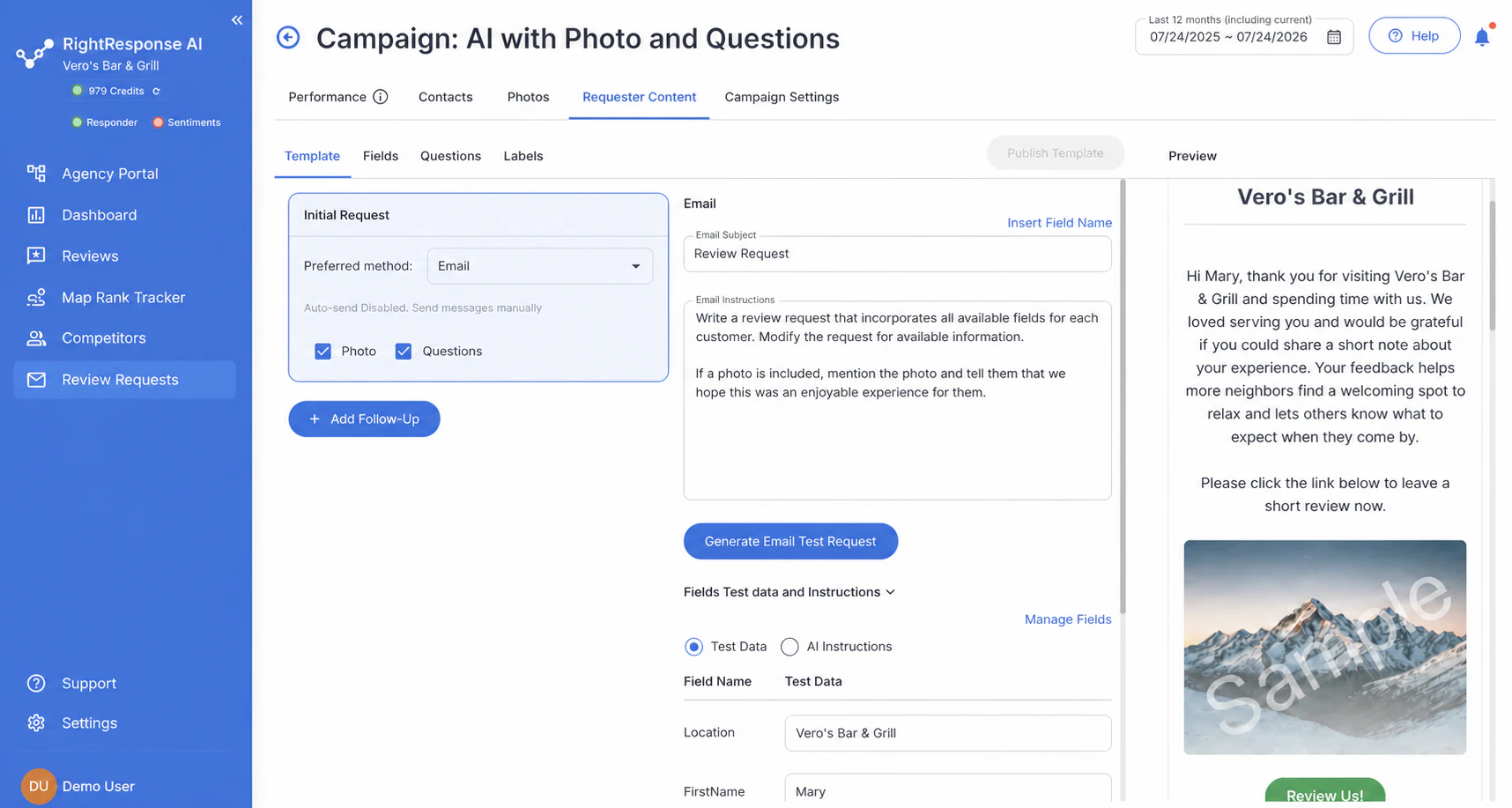
- Give the customer a memory cue: Use the context you already have to reconnect the customer with the experience. The service received, the person who helped, a completed-project photo, or one short neutral question can make the review easier to write and more useful once published.
- Keep it neutral and compliant: When asking for reviews, your language should be friendly but unbiased. Never hint that you only want a positive review. (e.g. say “We value your feedback” rather than “Give us a 5-star review!”) Offering coupons, discounts, or another incentive in exchange for a Google review violates Google policy. The FTC separately prohibits incentives conditioned on the review expressing a particular positive or negative sentiment. You are not required to request a review from every customer. Every customer must be able to reach the business’s review profile and leave an honest review.
- Cultivate a review culture: Make reviews part of your team’s daily focus. Celebrate employees who bring in the most reviews, perhaps with a shout-out at meetings or a small reward. When staff take pride in earning great reviews, they’ll be more likely to ask customers for feedback without management needing to nag. Over time, this builds a company-wide habit of requesting and valuing reviews.
How Personalization and Ease Increase Review Conversion
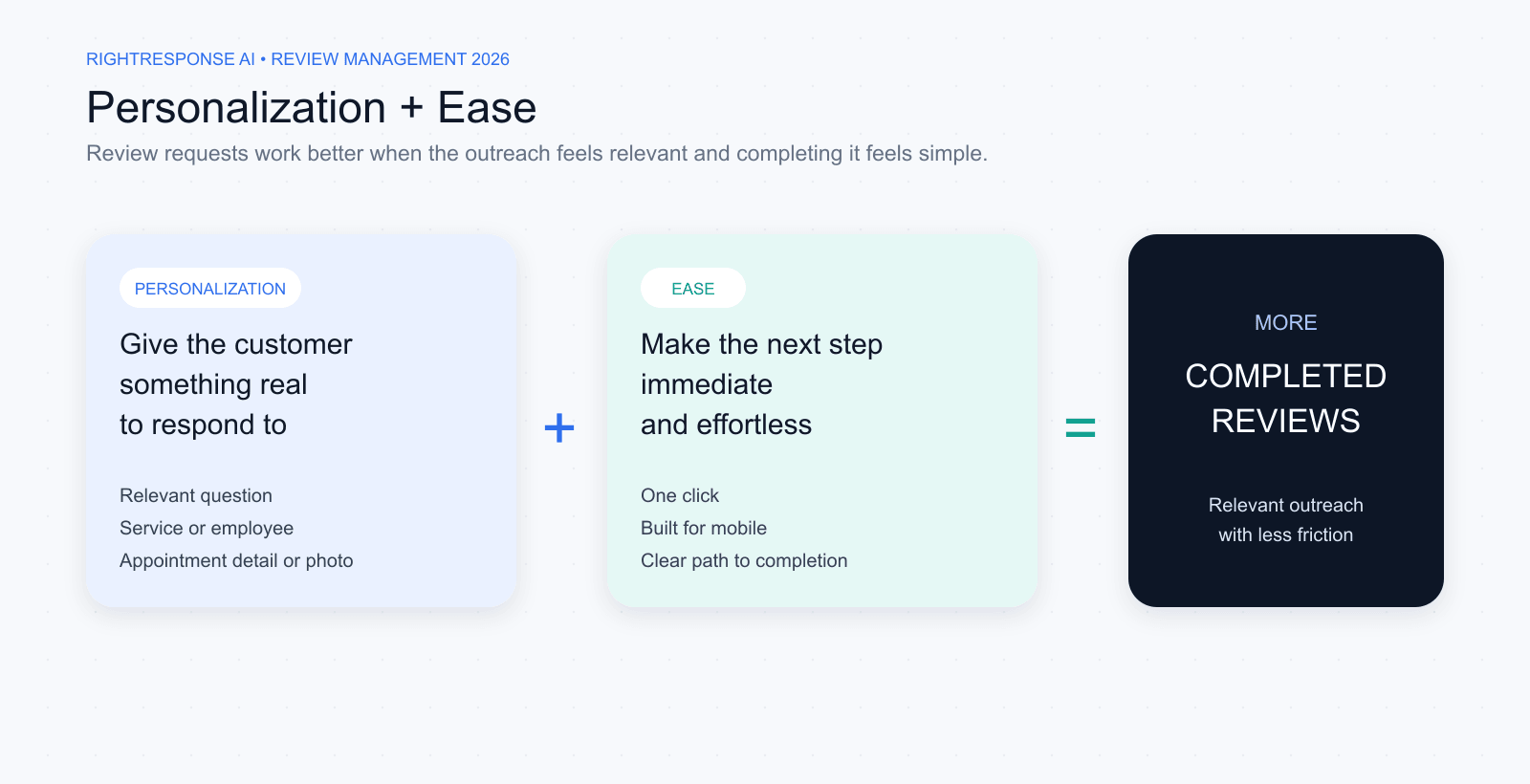
Review request conversion depends on two factors: how personal the request feels and how easy it is to act.
Personalization
More personal requests tend to produce more engagement. Face-to-face is usually the most personal channel. SMS often feels more direct than email because it reaches a customer through a personal phone number.
The ask itself can also become more personal. A relevant question, the service received, the employee involved, an appointment detail, or a photo gives the customer something real to respond to. AI can scale this when it uses actual customer and service context.
Ease
Every additional step creates another opportunity for the customer to stop. The review form should be one click away and easy to complete on a phone. If customers can choose between a public review and private feedback, both options should be clear and simple.
Choosing Software to Scale the Process
For a closer look at what these tools do, see our guide to review generation platforms. It explains seven core capabilities, compares how 15 platforms handle them, and helps you decide which features matter to your business.
As a business scales across staff members or locations, dedicated software can automate recurring outreach and give managers clearer control over four parts of the review-generation process:
- Trigger-based campaigns: SMS and email invitations can follow supported CRM, point-of-sale, or scheduling events, such as a completed appointment or paid invoice. RightResponse AI can start a saved sequence through a shared Google Sheet or supported Zapier workflow; NiceJob, Birdeye, and GatherUp offer their own integrations and request automation. Check the event, fields, follow-ups, and repeat-customer cooldowns supported by the specific connection.
- Direct Google review links: A link or QR code can lead customers to the correct Google review form without making them search for the business. Google provides these links directly; a native software integration is useful for connected review-management work but is not required to create a review link. Request wording, consent, incentives, and treatment of negative feedback still need appropriate controls.
- Contextual personalization & memory cues: RightResponse AI’s Review Requester can use the customer’s name, service, date, staff member, and relevant job details. Email can also include a supplied project photo and guiding questions; SMS uses the context in a shorter message. Optional prompts help customers recall their experience while leaving the opinion and wording to them.
- Multi-location routing & employee engagement: Requests should open the correct branch profile while managers retain centralized oversight. RightResponse AI reports employee QR scans by employee and location, alongside separate overall review totals. A scan or link click measures engagement; identifying a completed public review requires a separate matching method and an understanding of its limits.
System Example: How RightResponse AI Personalizes Review Generation
AI INSIGHT: A better review request does not write the review. It helps the customer remember what is worth reviewing.
RightResponse AI applies customer context, guiding prompts, and point-of-service engagement tracking through five review-generation workflows:
- Contextually Personalized Invites: RightResponse AI can reference the customer’s name, service or product, appointment date, employee, and supplied job details to reconnect the request with the experience. The amount of personalization depends on the information the business supplies.
- Experience Questions That Elicit Useful Detail: RightResponse AI can rotate short, experience-specific questions, such as “What type of massage did you receive?” or “What stood out about your repair?” They help a willing customer recall useful details while leaving the review voluntary and independently written.
- Private Feedback Alongside Public Links: RightResponse AI’s Private Feedback form captures concerns and contact details for customer recovery while keeping the public-review option available regardless of rating. Separate private-survey flows, including NPS, can also run without requesting a public review.
- Job Photos in Email Requests: In visual industries including home services, automotive, and real estate, RightResponse AI can include a supplied completed-work photo in an email invitation. That photo gives the customer a concrete memory cue; the customer chooses what to write or upload on the public review site.
- Employee QR Codes & Engagement Reporting: Individual QR codes show which employees’ requests customers scan and allow comparisons by employee and location. Email/SMS reporting covers send and click activity, with overall reviews received shown separately. Use those engagement measures for coaching and recognition without treating each click or scan as a verified completed review.
Together, these workflows make a request more relevant and give managers clearer operating information. See RightResponse AI’s Review Requester capabilities.
Analyzing Reviews
Getting lots of reviews is great, but the real goldmine lies in what those reviews actually say. A five-star average tells you things are going well, but it doesn’t tell you why. To truly benefit from Google reviews, you need to analyze the written feedback in depth. Each comment can reveal what customers love about your business, what irritates them, and how you stack up against competitors in the eyes of consumers. Turning this unstructured text into actionable intelligence is what separates average businesses from data-driven leaders.
Read the Mini-Ratings Inside Every Review
A review gives you one visible score, but the written feedback often contains several mini-ratings: the quality of the service, the way an employee communicated, the speed of the experience, the condition of the location, the fairness of the price, and more. A customer can praise the clinician, criticize scheduling, and still leave four stars. Flattening the whole experience into one number hides the parts of the business that are actually driving it.
Useful review analysis breaks the text into relevant phrases, assigns each phrase to a business topic, identifies the sentiment attached to it, and keeps the supporting customer language available for validation. Across enough reviews, those mini-ratings explain what customers love, what frustrates them, what is changing, and why two locations with the same average star rating may have very different strengths and problems.
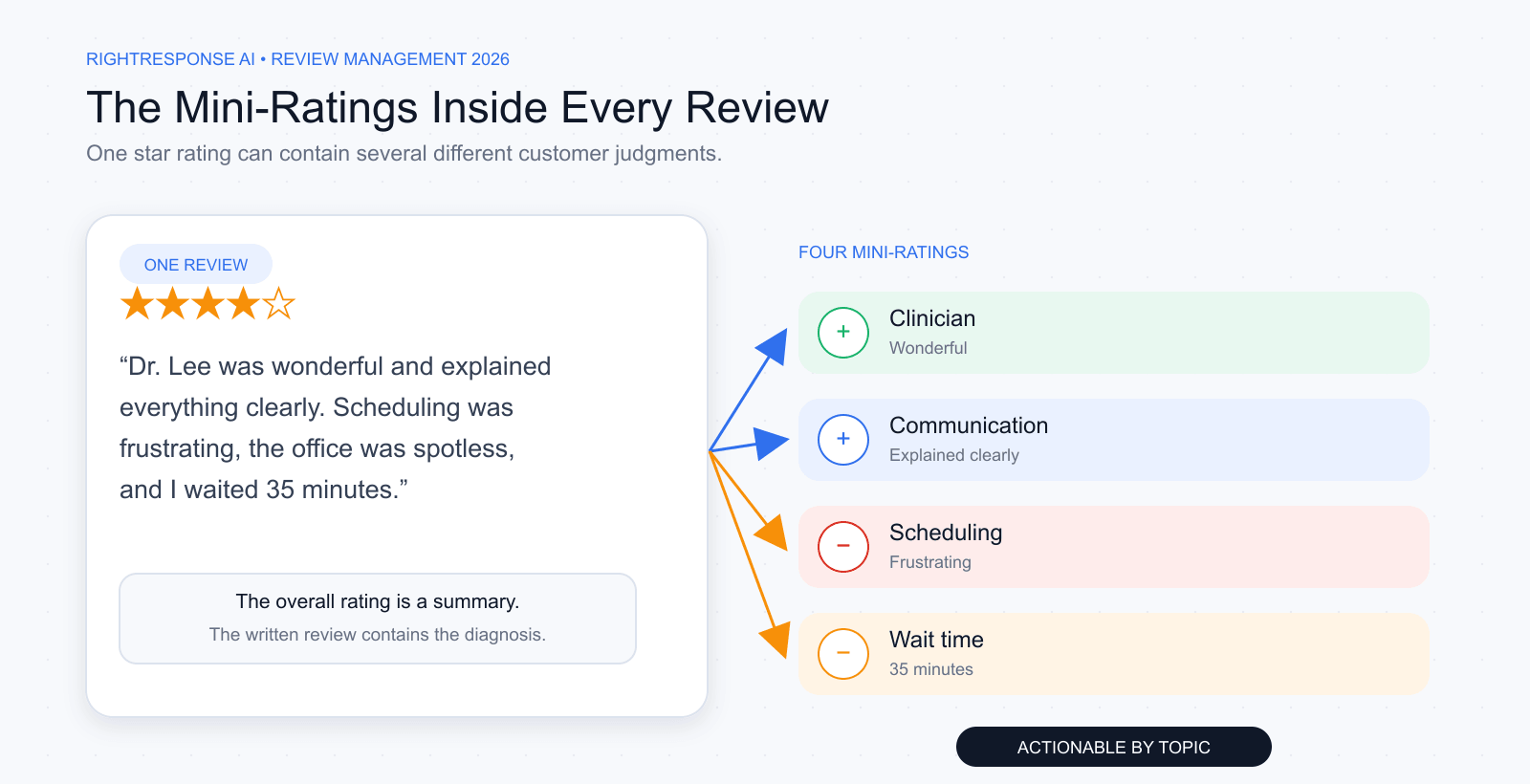
At scale, these phrase-level classifications become a scorecard. Topic sentiment shows which experiences recur, whether they are improving, and how patterns differ across locations or time periods.
From the Field: Customer Reviews as Strategic Intelligence
In the In Clear Focus conversation, George Swetlitz explains why one star rating can hide several distinct customer judgments and how review text becomes useful when operators turn those signals into decisions. Listen to the episode.
Why Deep Analysis Matters
- Search and customer-language insight: Review topics show how customers describe services, needs, and experiences. A recurring mention of vegetarian options can help a restaurant understand demand and improve accurate service descriptions. Use that language to investigate customer needs rather than treating a topic or sentiment score as a confirmed Google ranking input.
- Operational insight: Reviews are essentially customer feedback at scale. Clear patterns in praise or complaints point to what operational areas drive revenue. If 10 different reviewers say “the check-in process was slow,” you’ve just identified a bottleneck to fix. If dozens rave about a particular product or staff member, you know what to highlight and replicate. Deep analysis lets you prioritize improvements that will have the biggest impact on customer satisfaction (and thus future sales).
- Multi-location performance: If you run more than one location, analyzing sentiment by location uncovers differences. You might find one branch is consistently praised for friendliness while another gets complaints about service speed. These insights highlight star performers (from whom others can learn) and flag teams that might need additional training or resources.
Manual Reading vs. AI-Powered Insight
Traditionally, businesses tried to summarize reviews by manually reading them or using simple tools like word clouds. This has big limitations:
Manual approach: Scanning through reviews one by one is time-consuming and prone to human bias or error. After a few dozen reviews, it’s easy to miss recurring themes or to get overwhelmed by data. Simple tallies or word clouds can highlight frequent words like “price” or “service,” but they lack context. For example, the word “price” could appear in both “great prices” and “price was too high,” but a word cloud won’t distinguish sentiment.
AI-driven sentiment analysis: Modern AI can read hundreds or thousands of reviews in seconds, categorize each comment by topic, and determine sentiment (positive, negative, neutral) with impressive accuracy. Aspect-based sentiment analysis even parses multiple sentiments in one review. For example, “Great haircut, but the wait was long” indicates that the reviewer was happy with the haircut aspect and unhappy with the wait time. AI analysis is consistent (no fatigue or mood influencing the interpretation) and can quantify sentiment trends reliably. In short, AI can digest the chaos of review text and spit out structured data: which aspects of your business are delighting customers and which are dragging you down.
Metrics That Drive Action
A good review management platform will translate raw text into clear metrics you can track over time:
- Overall ratings and volume: Your average star rating, total review count, and review velocity (how many new reviews per week or month) are top-line health indicators. These numbers let you benchmark against competitors at a glance.
- Sentiment by theme: Break your reviews into categories that matter for your business, such as Product Quality, Staff Friendliness, Cleanliness, Pricing, and Wait Time. Measure the sentiment score for each. Perhaps you’re 90% positive on Quality and Staff, but only 60% positive on Pricing. That pinpoints an area to address or a pricing perception issue to clarify in marketing.
- Location or segment comparisons: If you have multiple locations or service lines, compare their review performance. Which location has the highest average rating? Does one product line get consistently better feedback than others? Use this to replicate what’s working well in some areas across all areas.
Turn Review Insight Into Operating Action
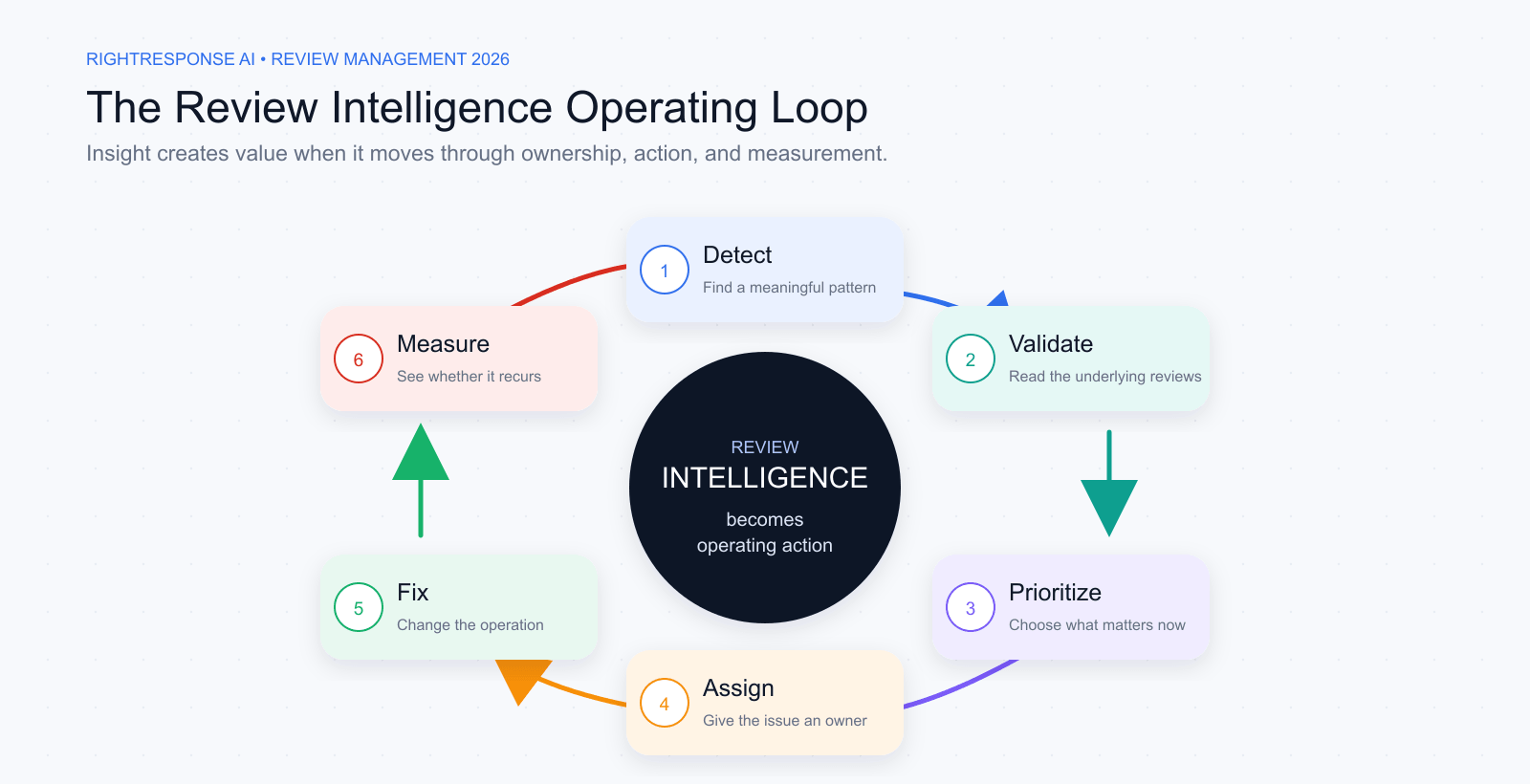
A dashboard is not an outcome. Review analysis becomes valuable when it changes what the business does. Use a six-step operating loop:
- Detect: Surface a recurring issue, an emerging change, an unusual location gap, or a repeatable strength.
- Validate: Read the source reviews and phrases. Confirm that the pattern is relevant and is not being distorted by one outlier, a small sample, or a change in review mix.
- Prioritize: Weigh frequency, severity, persistence, customer impact, and strategic importance. The loudest issue is not always the most important.
- Assign: Route the insight to the person who owns the underlying process, not simply the person who monitors the reviews.
- Fix: Change the training, staffing, policy, communication, or customer journey that is producing the pattern.
- Measure: Track whether the topic improves, whether the issue recurs, and whether the fix creates a new problem elsewhere.
A negative topic score is an investigative lead, not a verdict. AI can surface the pattern and the supporting evidence. Operators still determine the cause, choose the intervention, and verify the outcome.
See Voice of the Customer Analysis at Industry Scale
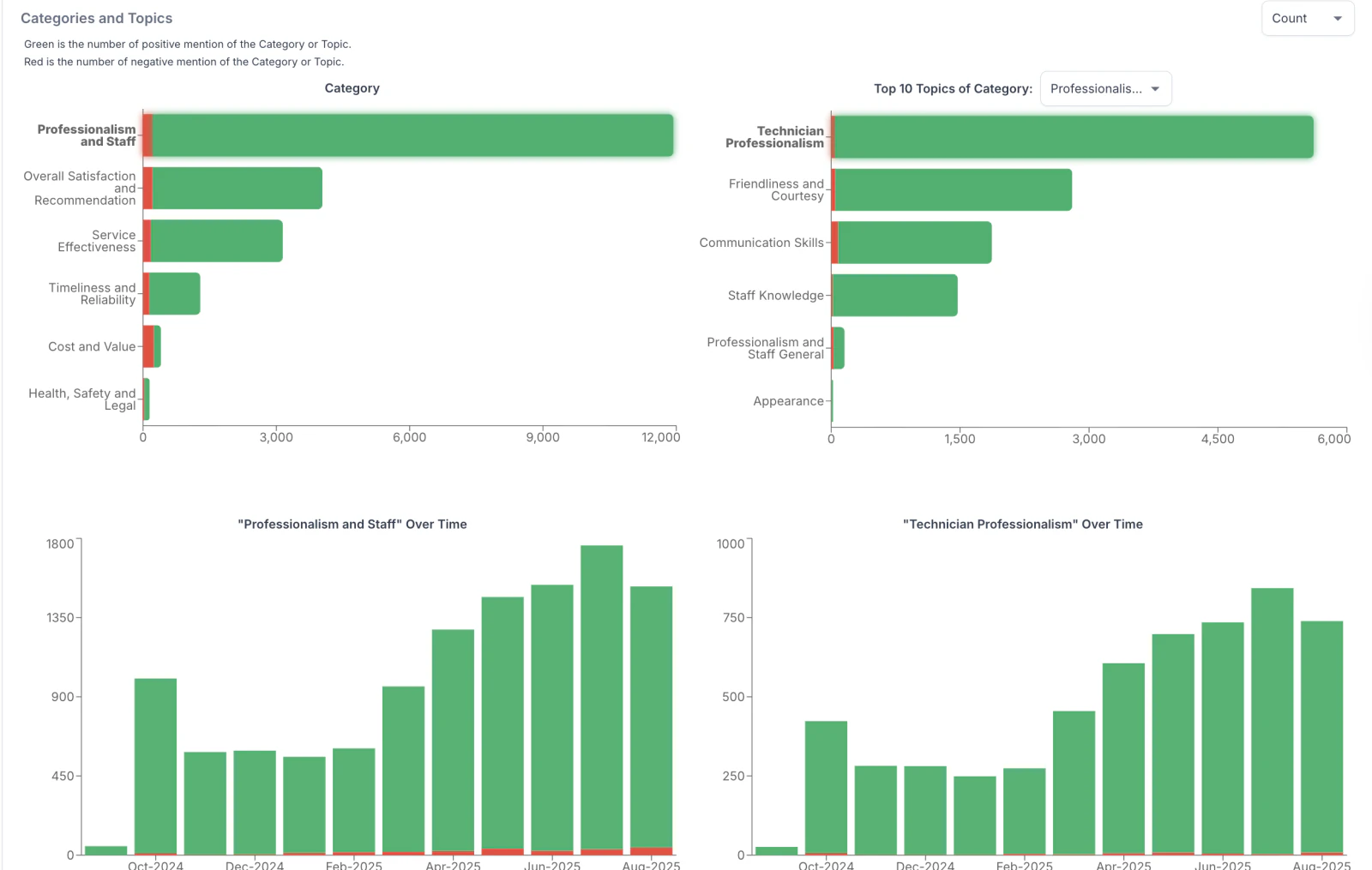
Review analysis is easier to understand when you see the method applied beyond a single dashboard. In our analysis of over 100,000 restaurant reviews, RightResponse AI classified more than 270,000 sentence fragments across 29 topics in six categories, then compared the results by restaurant type, rating, price group, platform, and time.
That exposed patterns the average rating could not explain. A negative mention of service was associated with a 61% chance of a one- or two-star review. Restaurants with fairly similar average ratings could show different levels of positive sentiment inside the text. Delivery and map-based platforms also produced very different review behavior and customer language.
The lesson is not limited to restaurants. A company can apply the same method to its own locations, service lines, customer segments, and competitors: define the questions that matter, break review text into relevant topics, preserve the source language, compare consistent groups and time periods, and turn the strongest patterns into assigned operating action.
The report shows what review-based Voice of the Customer work looks like when it moves from individual anecdotes to industry-level evidence.

System Example: How RightResponse AI Structures Voice of the Customer Analysis
AI INSIGHT: AI can turn thousands of unstructured reviews into a ranked, location-level operating scorecard.
RightResponse AI uses aspect-based sentiment analysis to structure relevant review language across business locations and, with the appropriate access, local competitors:
- Phrase-Level Aspect-Based Sentiment Analysis: RightResponse AI extracts relevant sentence fragments, maps them to operational topics such as staff friendliness, wait time, pricing clarity, or cleanliness, and scores their sentiment. Operators can inspect the supporting customer phrases and full reviews behind a result.
- Noise Filtering and Custom Taxonomies: The system excludes off-topic material, proposes topics from review history, and lets operators customize the taxonomy for their scorecard. A dealership could distinguish trade-in valuation from service-department scheduling instead of putting both under one broad label.
- Side-by-Side Multi-Location Dashboards: Operators can compare topic sentiment across branches, brands, or custom location groups, investigate outliers, and track whether later reviews describe a better experience after an operational change.
- Comparable Competitor Sentiment: Competitor Voice of the Customer is included in the Pro+ subscription. Applying the same topic definitions to competitors’ Google reviews helps a location compare specific customer-experience strengths and weaknesses on a consistent basis.
Learn more about RightResponse AI’s Voice of the Customer & Review Sentiment Analysis.
Responding to Reviews
Responding to reviews is a core part of reputation management and customer decision-making. A thoughtful, timely reply turns a one-way comment into a public conversation that prospective customers can evaluate alongside the original review.
The Next Customer Is Reading Your Response
The reviewer is one audience. The prospective customers who encounter that exchange later are another, much larger audience over time.
Those readers are not only asking whether the customer was satisfied. They are judging whether the business listens, communicates clearly, handles problems fairly, and gives them a reason to choose it. A high-impact response therefore does two jobs: it acknowledges the reviewer appropriately, and it contributes something useful to the next customer’s decision.
Depending on the review, that contribution might be an appropriate next step, a relevant business detail, a clear explanation of how the service works, or evidence of how the company handles problems. It should not turn every response into an advertisement. A business message belongs only when it genuinely helps explain or address what the customer wrote.
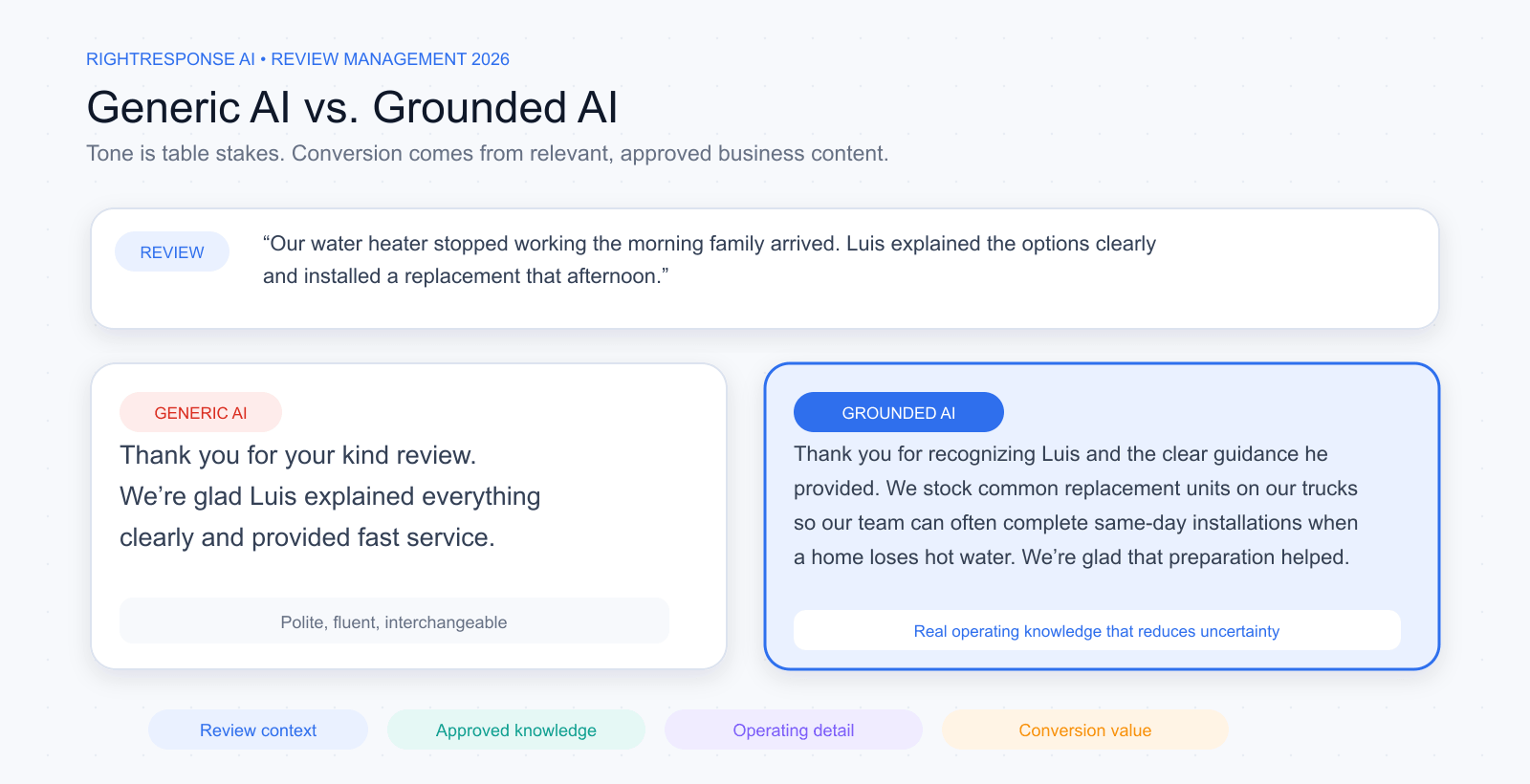
A response that simply thanks the reviewer, restates their words, and adds a generic closing may be polite, but it has added little to the conversation.
AI Can Ground Responses in What Is Real
People are right to be skeptical of AI-generated content. Much of what we see is generic because the system has little knowledge of the business and little reason to choose one relevant truth over another.
Only sophisticated AI can do this well. It needs approved knowledge of the business: its core marketing messages, services, methods, people, policies, guarantees, facilities, and genuine points of difference.
When a customer shares an experience, asks a question, or raises a concern, the system should understand how the business would engage with that person directly. It can then choose the relevant truth, connect it to the review, and communicate it naturally.
Learning tone and style is table stakes. Conversion comes from content. Business-informed response systems such as RightResponse AI maintain a structured library of approved company, brand, and location messages. The workflow selects a relevant operational fact, service detail, or policy explanation when it helps address the review, and leaves extra messaging out when a simple reply is best. A useful response helps a prospective customer understand how the service works, why it may fit their needs, or how the team handles a problem.
That is the 2026 standard for AI-assisted review responses: verified business knowledge, selected for the specific review, expressed naturally for the reviewer and future customers deciding whom to hire. Evaluate the actual knowledge-selection and approval workflow rather than assuming that a vendor’s category determines its response quality.
Our guide to how to evaluate AI review response software explains the capabilities, controls, and evidence businesses should assess in 2026.
Google itself encourages replying to reviews. Helpful, consistent responses make the business more useful and appealing to prospective customers.
Why Speed and Tone Matter
- Customer expectations: BrightLocal’s 2026 consumer survey found that 19% expect a same-day review response and 81% expect one within a week. Set a response service level that reflects customer risk and staff capacity, and prioritize complaints or sensitive issues appropriately.
- Visibility and trust: Helpful replies let customers see that the business is engaged and responsive. Measure response coverage and speed as service standards rather than promising that faster replies will raise search rankings.
- Public stage: Write as though the reviewer and a prospective customer are both in the room. Address the customer directly, but make sure the response also shows future readers how you listen, communicate, and handle problems. Keep private or sensitive details out of the public exchange.
Best Practices for High-Impact Replies
Responding to Google reviews effectively means having a playbook for different scenarios:
- Build consistent response coverage: In BrightLocal’s 2026 US consumer survey, 80% said they would be more likely to use a business that responds to all its reviews. Acknowledge praise and address concerns consistently, with an approval or escalation path for sensitive cases rather than forcing an immediate public reply.
- Lead with gratitude and specifics: For positive reviews, start by using the reviewer’s name (if provided) and thank them. Mention something specific they said if possible: “Hi John, thank you for the shout-out about our Saturday tour with Carlos. We’re thrilled you enjoyed it!” This personal touch shows it’s not a canned response.
- Apologize and empathize (then explain): For negative reviews, begin by genuinely apologizing and showing you understand their frustration. “I’m sorry your delivery was delayed. I know that’s very frustrating.” Only after that should you offer an explanation or a fix if you have one. The goal is to defuse anger and show empathy before getting into any specifics.
- Avoid arguing or getting defensive: Even if a review is exaggerated or unfair, keep your tone professional and composed. Never attack the reviewer or make excuses. Remember, you’re performing for an audience of future customers. Stay polite and focus on making things right.
- Take complex issues offline: If a situation requires a lot of back-and-forth or exchange of personal details (e.g. “we need to find your order in our system”), invite the reviewer to contact you directly. “We’d love the chance to make this right. Could you email me at [email protected] so we can assist?” This shows you’re proactive, but it also prevents a long public discussion and protects the customer’s privacy.
- Keep it concise and professional: Aim for 2-3 sentence replies in most cases. That’s enough to say thanks or sorry, address the key point, and offer to continue the dialog. Overly long responses might not get read fully. Also, avoid all-caps, excessive exclamation points, or anything that looks unprofessional. Emojis can be okay if they fit your brand voice, but use sparingly.
Scaling Responses Without Sacrificing Quality
To compare the features behind these workflows, read our guide to review response platforms. It examines ten core capabilities across 15 platforms, including business knowledge, response controls, approvals, and publishing.
Replying to a few reviews a week is easy to handle manually. But what if you have dozens coming in across Google, Yelp, Facebook, etc., especially with multiple locations? This is where a review management system can help maintain 100% coverage without burning out your team:
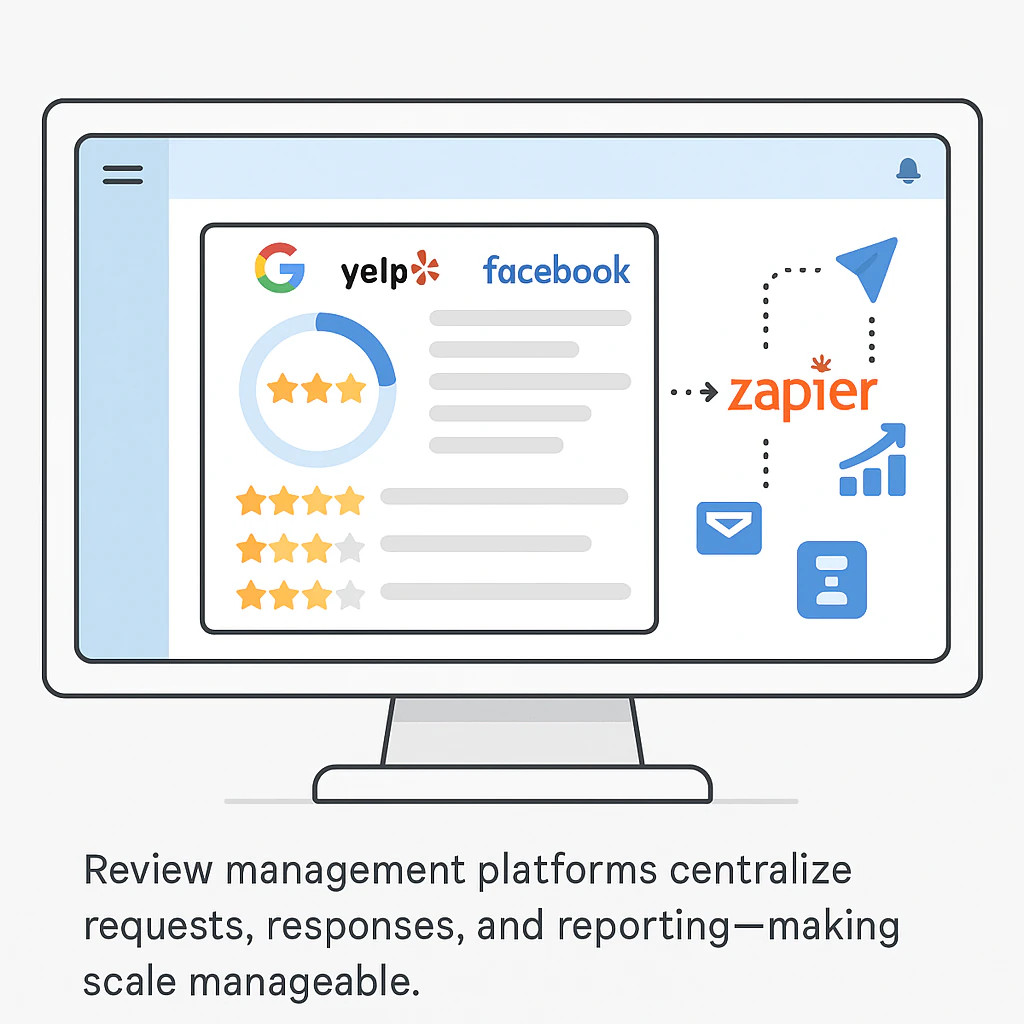
- Unified inbox: Consolidate all your reviews from Google and other platforms into one dashboard. This prevents the nightmare of juggling multiple browser tabs and ensures no review falls through the cracks.
- Approved business knowledge: RightResponse AI’s message-informed responder uses approved company, brand, and location messages, selecting the facts relevant to each review. Enterprise-suite knowledge and customization features should be evaluated on the same basis: which information is available, how relevance is decided, and when added messaging is omitted.
- Specialized checks and location-specific routing: RightResponse AI combines location-specific response rules with factual and quality checks, PHI Guard sensitive-information screening, rating/text mismatch detection, and repetition controls. Publication settings determine whether a reply can publish automatically, waits for approval, or requires escalation. Privacy checks support the workflow; sensitive cases still require appropriate human judgment.
- Response rate monitoring: Track metrics like your average response time and the percentage of reviews you’ve responded to. Many businesses set internal SLAs (service-level agreements) like “Respond to all reviews within 24 hours.” Dashboards can help ensure you meet these goals by flagging overdue responses or unanswered reviews.
Star ratings are useful routing signals, but they are not a complete risk model. A five-star review can contain sensitive information or a serious allegation. A one-star review can describe a routine complaint covered by an approved process. Content, uncertainty, and business rules should determine how much human judgment is needed.
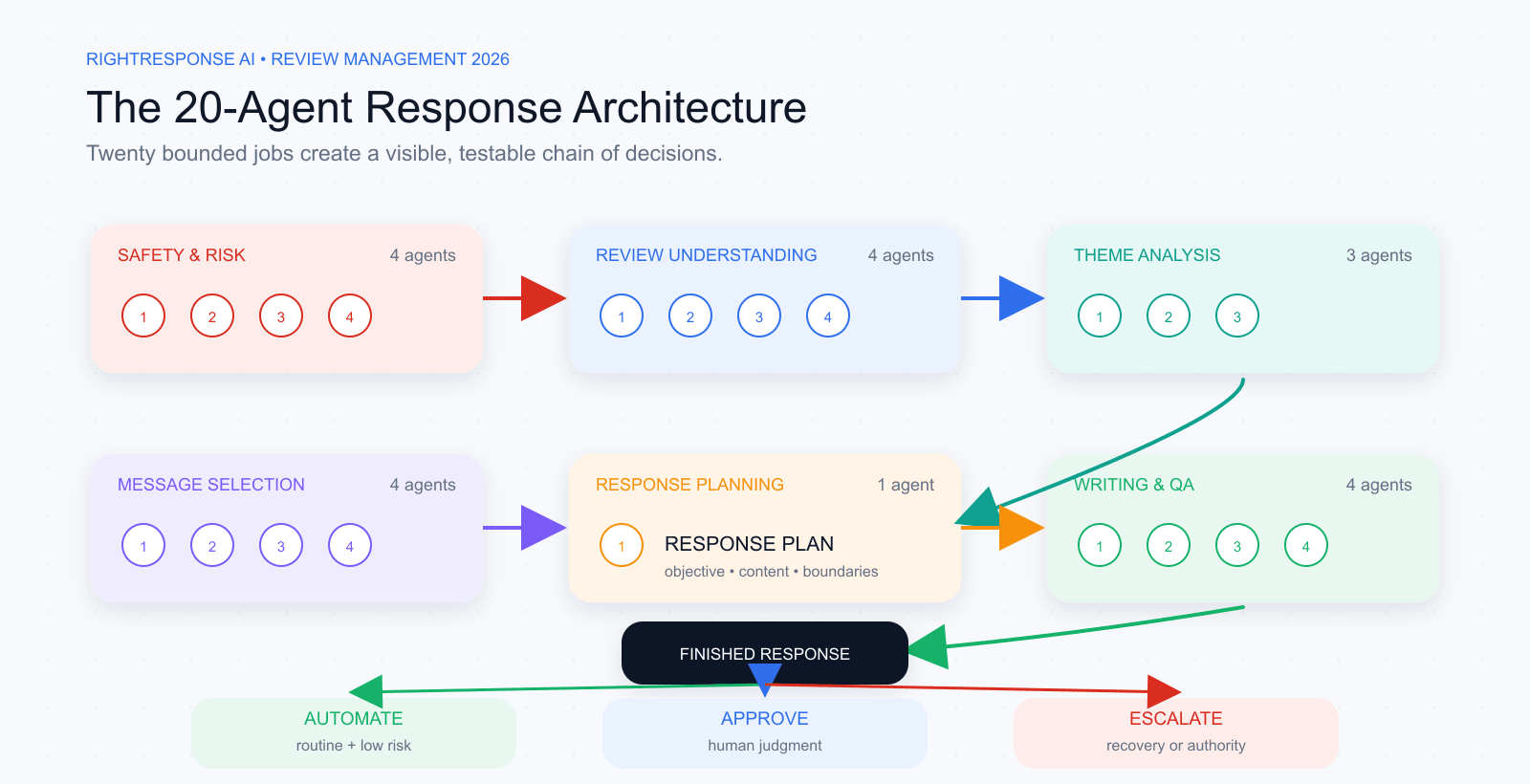
System Example: How RightResponse AI Coordinates 20 Specialized Response Agents
RightResponse AI generates on-brand drafts, grounds them in approved business knowledge, applies tone and publication controls, and routes sensitive cases to human reviewers. Its 20-agent architecture illustrates a multi-stage response pipeline. See how Message-Informed Review Responses use approved business messages to add useful context to a reply.
AI INSIGHT: Response quality depends on a chain of decisions.
A useful review response requires a chain of decisions: understand the review, identify themes, choose relevant business knowledge, manage risk, set the response objective, write clearly, and check the finished result.
RightResponse AI assigns those jobs across 20 specialized agents in six functional groups. Each agent has a bounded responsibility, produces a structured output, and hands that output to the next stage. This makes the process easier to test, govern, and improve.
- Safety and Risk Agents: Protect against sensitive data, malicious instructions embedded in the review, inappropriate content, and situations that require human attention.
- Review Understanding Agents: Interpret the customer’s language, rating, names, level of detail, and any updates to the review.
- Theme Analysis Agents: Separate the experience into topics and attach sentiment to each part.
- Message Relevance and Selection Agents: Match approved company, brand, and location knowledge to the review and reject irrelevant facts.
- Response Planning Agent: Set the objective, content, tone, and boundaries before drafting begins.
- Writing and QA Agents: Draft from the plan, improve natural flow, remove repetition, and confirm that the finished response follows the plan.
Specialization makes the reasoning visible. Teams can see whether a problem came from review understanding, knowledge selection, planning, writing, or final checks. Each stage can be evaluated independently, and safeguards can operate before publication.
The workflow follows a deliberate sequence: understand the situation, choose the objective, select relevant approved knowledge, plan, write, check, and route.
Every finished response enters one of three operating paths:
- Automate: Publish routine, low-risk responses when the context is clear, approved information is available, and all checks pass.
- Approve: Send the draft to a person when the response is likely ready and the situation still deserves a judgment call.
- Escalate: Route the issue to the appropriate owner when customer recovery, investigation, compliance review, or an operating decision must come first.
Routine cases can move quickly. People stay focused on exceptions that require context, authority, customer recovery, or an operating decision.
Learn more about RightResponse AI’s Intelligent Review Responder.
Setting Goals & Benchmarking Competitors
Collecting and responding to reviews will improve your reputation, but to turn reviews into a true growth engine, you need to measure impact. This means setting goals for your review metrics and tracking progress. It also means watching your competitors’ reviews, because local search also reflects how you compare with others in your area.
For a multi-location organization, company-wide averages are insufficient. A strong enterprise number can conceal a struggling location, a deteriorating service line, or a recurring problem in one region. The real work is to understand the performance of every local reputation, identify meaningful outliers early, and connect customer feedback to an owner and an action.
Align Review KPIs with Local SEO Objectives
Remember Google’s three local ranking factors: relevance, distance, prominence. So when setting goals, tie them to things that influence that:
Build an Executive Review Scorecard
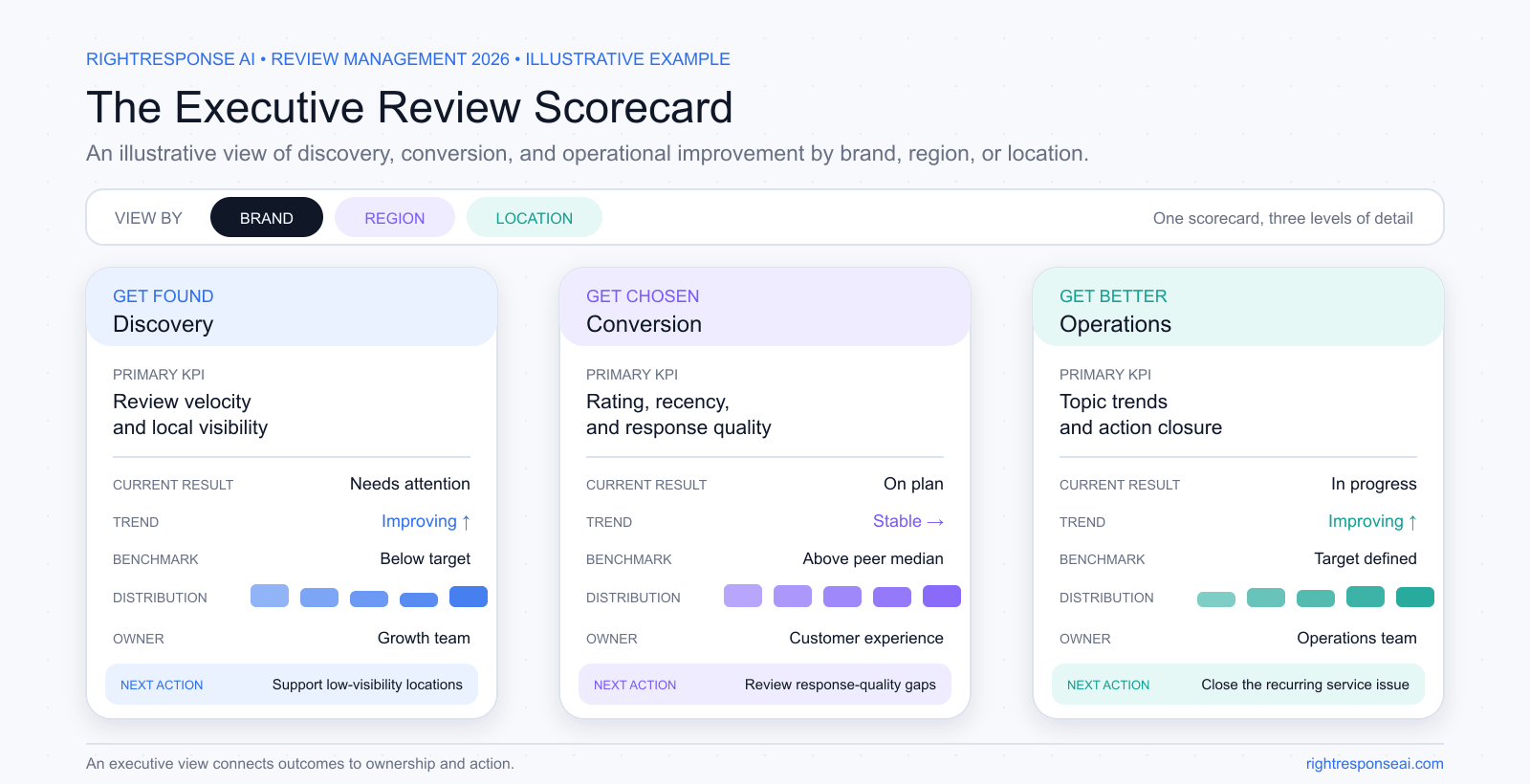
An executive review scorecard should answer three questions: Are we being found? Are we being chosen? Are we getting better? It should combine public outcomes with internal operating discipline, and it should make results visible by location, region, and brand.
For every KPI, show the current result, the trend, the relevant benchmark, the distribution across locations, the accountable owner, and the next action. Context and ownership turn reporting into management.
- Recent Average Star Rating: Compare recent ratings with the all-time average to spot changes that the headline number can hide. Choose a target using a consistent time window and local context, then investigate the experiences behind a decline.
- Review Volume: More reviews = more prominence (all else being equal), and it signals popularity. You might set a goal like “Gain +30 new Google reviews per month” for each location. The idea is to consistently grow your total count.
- Review Recency (Velocity): Track how regularly feedback arrives and whether the pattern changes. A target such as five reviews in a fortnight is an operating example, not a universal requirement or ranking guarantee. A lull is a reason to check request coverage and recent customer experience.
- Response Rate & Speed: Track coverage and time to reply against an internal service level, such as a median response time under 24 hours. Report approval and escalation queues separately so speed targets do not override privacy, accuracy, or customer recovery.
- Location Distribution & Outliers: Do not stop at the brand average. Track the median location, the top and bottom performers, the number of locations below standard, and the locations changing fastest in either direction. The spread often tells leaders more than the average.
- Customer Experience Themes: Track sentiment and recurrence by topic, service, and location. A rating tells you that customers are dissatisfied. Themes such as scheduling, wait time, staff helpfulness, communication, cleanliness, or product quality tell you why.
- Action Ownership: Every material pattern should have an owner, an agreed action, and a follow-up measure. The operating loop is simple: detect, validate, prioritize, assign, act, and measure recurrence.
These KPIs should be part of your broader business objectives or OKRs. For example, an objective might be “Improve online reputation this quarter,” with key results like “Reach 4.5 average rating (from 4.3)” or “Reduce average response time from 48h to 12h.” Tracking these focuses your team on what success looks like in review management.
One Brand, Many Local Reputations
Customers do not experience your company-wide average. They experience one location, one employee, one appointment, one job, one meal, or one phone call. A multi-location company manages a portfolio of local reputations connected by one brand promise.
The most effective operating model is standards at the center, judgment at the edge:
- Corporate teams own the system: approved business knowledge, brand voice, safety and privacy rules, measurement standards, escalation criteria, and platform permissions.
- Local and regional teams own reality: location-specific facts, customer recovery, explanations for unusual patterns, and the operational changes required to improve the experience.
- Technology handles repeatable work: sending requests, aggregating reviews, identifying themes, drafting routine responses, monitoring performance, and surfacing exceptions.
- People remain accountable for judgment: verifying sensitive facts, resolving actual customer problems, approving higher-risk responses, and deciding what the organization should change.
Regional and executive leaders can then use the same system to identify outliers, transfer strong practices between locations, and distinguish an isolated complaint from a recurring operating problem.
Map Rank Tracking: Measure What Matters Most
Getting more reviews is a means to an end: higher placement in Google’s local results and, as a result, more traffic and sales. To know if your review strategy is truly paying off, you should measure your actual rankings on Google Maps for important search terms. This is where Map Rank Tracking comes in:
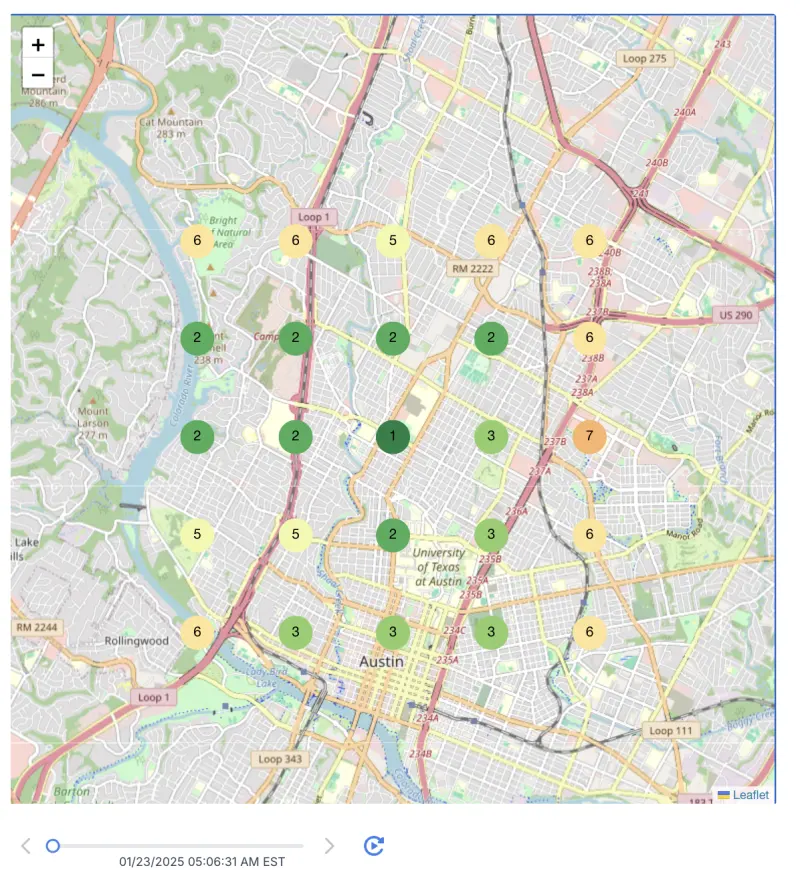
- Granular visibility grids: Use a tool that shows your Google Maps rank across your service area. Typically this is a grid of points (say a 7x7 grid over your city) that reveals, for example, you rank #1 near the city center but #5 at the outskirts. It’s a visual way to see where you dominate and where you’re virtually invisible.
- Track multiple keywords: You might rank differently for different search queries. For instance, a plumber might rank #2 for “plumber near me” but #8 for “emergency plumber” a few miles away. Track the terms that matter most to your business (especially those that drive the majority of calls or clicks).
- Playback history: Local rankings can fluctuate due to Google updates or competitor activity. Good rank tracking tools let you “rewind” and view how your map rankings changed week by week. This way, you can correlate improvements with actions you took. For example: “We jumped from #5 to #2 in March after we got 50 new reviews in February.” Or if rankings drop, you can investigate possible causes (like a competitor’s surge in reviews or a Google algorithm tweak).
- Category insights: Look at the Google categories your top competitors are using. Sometimes ranking well can come down to category optimization. If a rival appears whenever someone searches a niche term (e.g. “wedding florist”) and you don’t, check if they have a category you lack. Ensure you legitimately cover that service before adding a category. Accuracy is important.
Competitive Benchmarking Fuels Improvement
Your Competitors’ Reviews Are Market Research
Monitoring your own reviews tells you how customers experience your business. Monitoring competitor reviews reveals what the market values, where alternatives disappoint, and where you may be able to differentiate in a way your operation can genuinely deliver.
- Audit competitor profiles: Pick your top 3–5 local competitors and note their stats: What’s their average rating, and how many Google reviews do they have, over the last six months? Are they getting reviews faster than you are? This gives you a sense of what “the bar” is in your market and helps in setting your goals. If the leader has 50 reviews and you have 10 over the last six months, you know you have work to do in volume.
- Compare sentiment themes: Read some of their reviews or, better, analyze both businesses using the same topic definitions and time window. What do people praise? Where do expectations go unmet? If customers regularly complain that a competitor’s staff is unfriendly, you can decide whether warmer service is a position your operation can consistently deliver, then verify whether your own reviews support that claim.
- Monitor their momentum: Pay attention if a competitor’s review count or rating is changing significantly. If you see a competitor’s rating drop from 4.5 to 4.2 over a few months, something may be going wrong for them. This may create an opportunity for you to win over their dissatisfied customers. Conversely, if a competitor suddenly gains a ton of 5-star reviews, they might be investing in a strategy or service improvement that you should be aware of.
- Learn from category leaders: If a competitor outranks you for certain search terms, look at what might be contributing. Did they add a new GBP category or service? Are they responding to reviews more actively? Did they start using Google Posts or Q&A features on their profile? Many small factors can give an edge. Learning what the leaders are doing can inform your strategy.
Competitive intelligence matters only when it changes a decision. Use the same operating loop for competitor evidence that you use for your own feedback: detect a meaningful pattern, validate it against real customer language, prioritize it, assign an owner, act, and measure what happens next.
The objective is not to imitate every move a competitor makes. It is to understand the expectations being established in your market, identify needs that remain poorly served, and choose the few differences your business can deliver consistently.
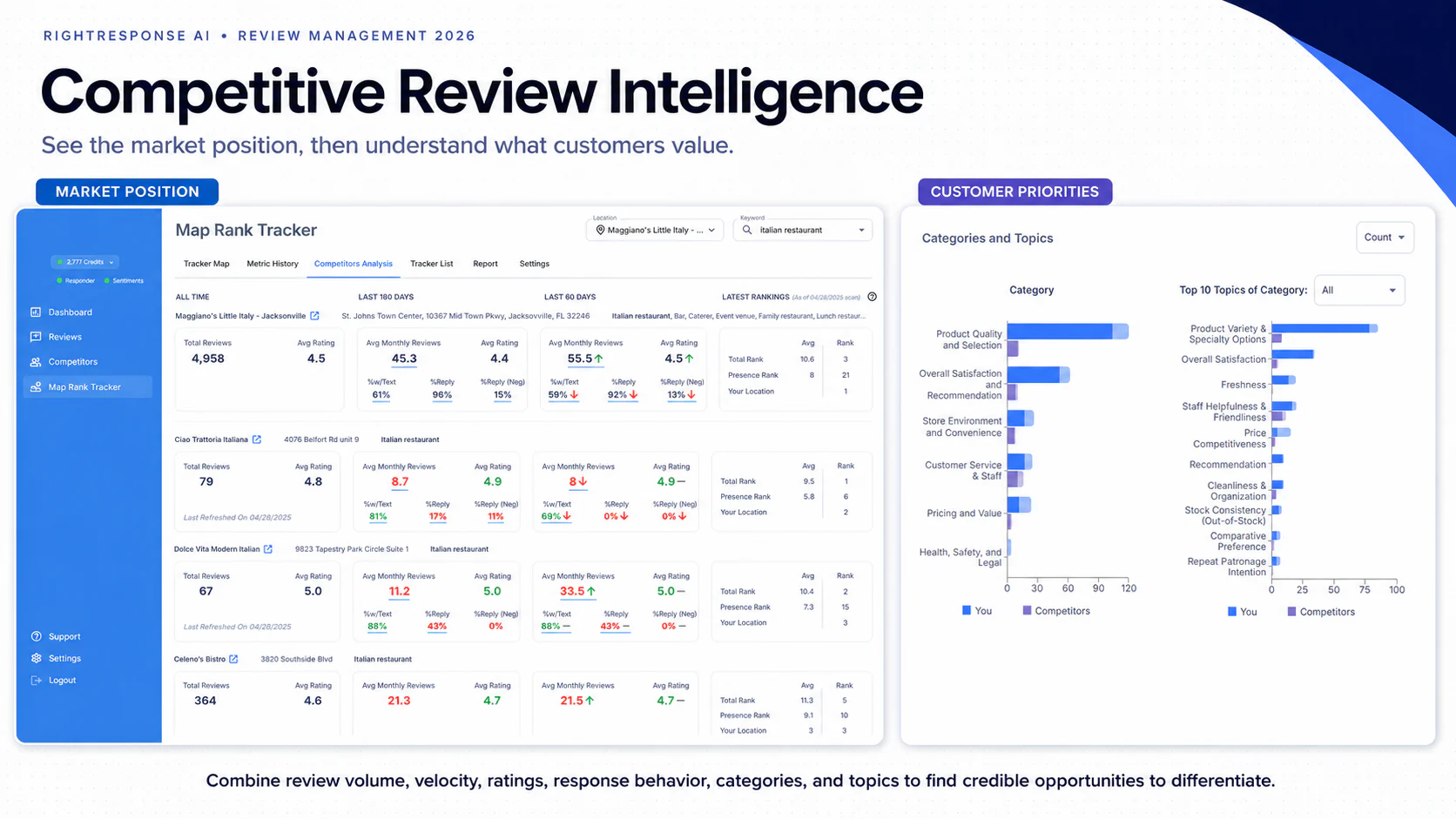
System Example: How RightResponse AI Connects Competitor Benchmarking & Google Maps Rank Grids
RightResponse AI combines competitor review intelligence with geographic local-search tracking in the same platform as review generation and response:
- Google Maps Rank Grids with Rewind: RightResponse AI’s Map Rank Tracker measures positions across a chosen geographic grid and reports Top 3 coverage, Presence Rank within the top 20, and Total Rank. Rewind compares saved scans over time; the available history depends on when scans were run.
- Recent Competitor Benchmarks: Operators can compare star ratings, review counts, review activity over two- and six-month windows, response rates, and Google Business Profile categories. Pro+ adds Competitor Voice of the Customer topic comparisons. Use consistent locations and time windows when interpreting differences.
- Comparing Review Activity with Local Visibility: Trend views let teams examine ranking shifts alongside review campaigns, profile updates, and competitor activity. Those comparisons help identify questions to investigate; a timing correlation alone does not establish what caused a ranking change.
- Bundled & Usage-Based Economics: Pro at $29/location/month includes 10 combined map scans or competitor analyses per month; Pro+ at $44 includes 25. These are shared allowances, not separate pools for each tool. PAYGO costs $10/location/month plus credits. At entry credit pricing, a single-keyword 7×7 grid scan uses about $0.75 in credits, separate from the monthly base and any competitor-analysis action.
Learn more about RightResponse AI’s Google Maps Rank Tracker and Competitor Analysis.
Choosing the Right Review Management Platform
Understanding these pillars is one thing. Implementing them consistently is another. Manually doing all this (sending requests, analyzing sentiment, responding quickly, tracking ranks) can become overwhelming, especially for a growing business. That’s why many companies turn to review management platforms. But not all software is created equal. Some tools might excel at review requesting but lack analysis features, or vice versa.
A 2026 evaluation should look beyond feature labels. Many platforms can generate fluent text, display charts, and claim to use AI. The harder questions are whether the system is grounded in approved business knowledge, whether it can apply central standards without erasing local context, whether it exposes how decisions were made, and whether it knows when to involve a person.
Ease of Use Is Part of the Strategy
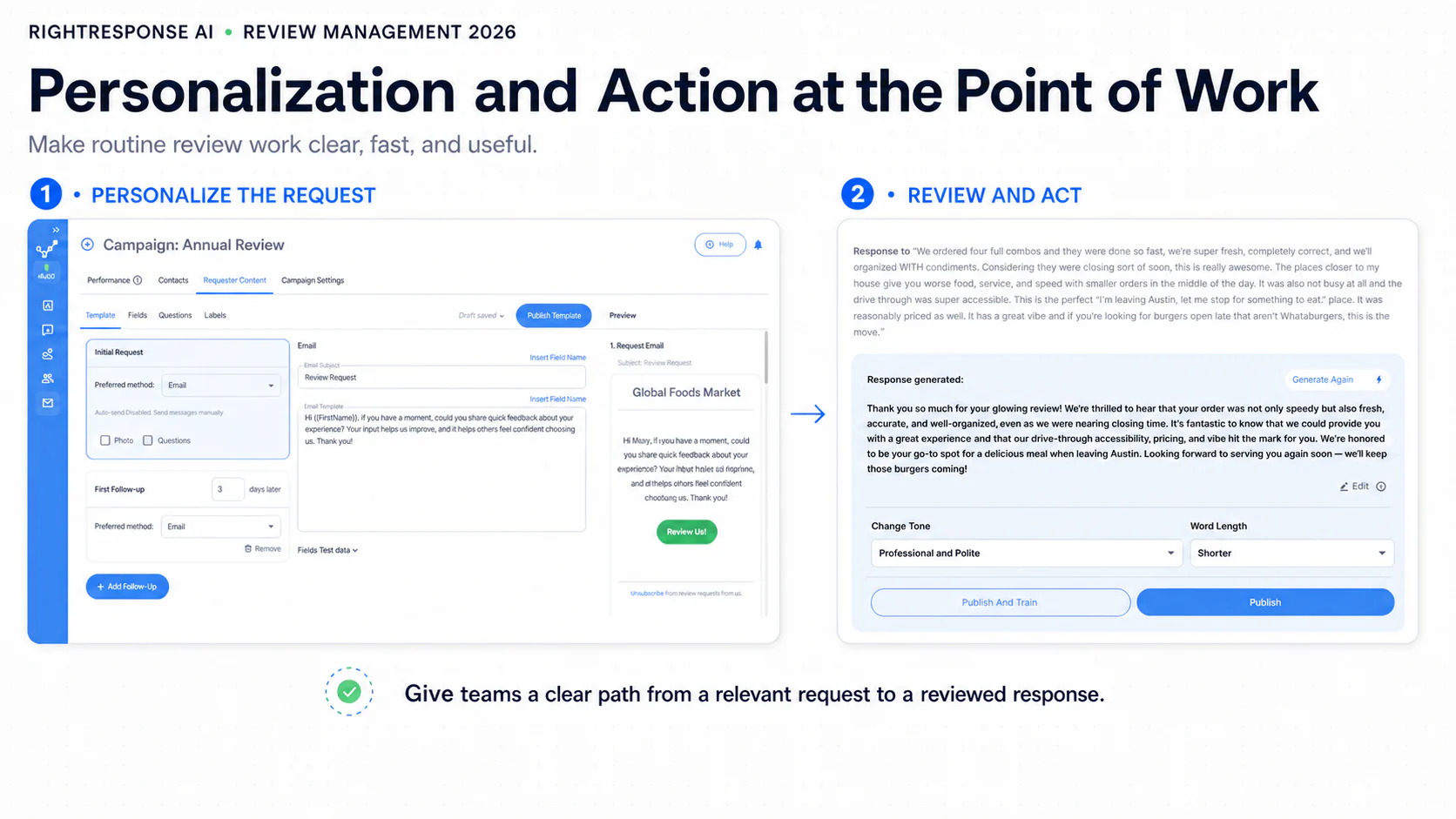
Review management is rarely anyone’s only job. The work happens while a front-desk employee is closing out a visit, a field employee is finishing a job, a location manager is moving between customers, or a regional leader is monitoring exceptions across the business.
Every unnecessary step creates delay and lost coverage. A platform can have sophisticated AI and still fail operationally if sending one request requires a spreadsheet or batch import, or if acting on one review requires a manager to return to a central workstation.
Evaluate time to action, not just the feature list. How quickly can a user add one customer and initiate the right request? Can a manager review, edit, approve, publish, or escalate a response while the context is still fresh? Can each person see the correct location, approved knowledge, and next action without navigating enterprise complexity?
Ease of use does not mean removing controls. The best systems make routine work fast and obvious while surfacing the additional context, permissions, and human judgment required for exceptions. Adoption is part of the strategy because a workflow only creates value when people actually use it.
When comparing software in 2026, buyers can use three overlapping groups to organize the shortlist. These describe product emphasis, not exclusive feature boundaries:
- Focused Review & AI Workflows: RightResponse AI combines personalized requests, a 20-agent business-informed response workflow, phrase-level Voice of the Customer analysis, competitor benchmarks, and Google Maps rank tracking. Monthly pricing starts at $10/location plus usage on PAYGO, with Core at $19, Pro at $29, and Pro+ at $44; feature access and capacity vary by plan.
- Broader Multi-Location CX & Marketing Suites: Birdeye, Podium, SOCi, Reputation.com, and Uberall combine reviews with selected listings, messaging, social, customer-experience, or marketing functions. Their combinations differ. Some use custom quotes, while Reputation.com also publishes package prices; confirm the actual modules, locations, and contract term.
- Feedback, Agency & Local-Search Specialists: GatherUp emphasizes review requests and private feedback; ReviewTrackers combines review management with experience and competitor insights; Grade.us serves agency review workflows; NiceJob automates review and referral outreach; BrightLocal combines reputation, rank, and citation tools. Compare each against the workflows the business needs.
The 11-point scorecard below compares capabilities and operating controls across these options:
| Capability | Why It Matters | What Great Looks Like |
|---|---|---|
Unified Review Inbox + Private Feedback |
Centralizes all public reviews and captures sensitive feedback privately so nothing gets missed and issues get resolved fast. | Real-time aggregation from Google, Yelp, Facebook, etc., plus in-platform private reviews with contact information and routing for immediate outreach. |
AI-Personalized Review Requests |
A good request helps the customer remember the real experience, not merely notice that their first name was inserted. | Triggered SMS or email using relevant service, employee, date, product, or milestone details; optional neutral prompts; consent controls; and sensible cooldowns. Check which channels support photos and distinguish employee engagement from verified completed-review attribution. |
Direct Google Review Links & Connected Workflows |
Reduces navigation for the customer while connecting review activity to the business’s workflow. | Links to the correct Google review form, accurate location routing, and reliable review synchronization where needed. A direct review link does not require API access; request wording, consent, incentives, and review-gating controls must be assessed separately. |
Aspect-Based Sentiment & Custom Themes |
Separates a star rating into actionable mini-ratings by topic, service, and location. | Phrase-level tagging using your taxonomy, noise filtering, trend and outlier detection, competitor overlays, supporting review language, and a workflow for assigning recurring issues to an owner. |
Grounded, Agentic AI Responses |
A response should be accurate, relevant, and useful to the next customer, not merely fluent or on-brand. | A transparent, multi-stage process that understands the review, selects relevant approved knowledge, builds a response plan, applies risk and quality checks, and routes the result to automation, approval, or escalation. |
Multi-Location Governance |
Balances a consistent brand with the reality that every location has distinct customers, staff, operations, and competitors. | Inherited corporate standards, location-specific knowledge, role-based permissions, local approval and recovery workflows, regional rollups, executive outlier reporting, and clear escalation paths. |
Recent Competitor Benchmarking |
Shows who is gaining or losing ground now, not just historically. | Side-by-side ratings, volume, and velocity with last 60/180 day momentum, sentiment by theme, and GBP category comparisons. |
Map Rank Tracking with Rewind |
Measures how local search visibility changes over time; campaigns, competitors, distance, profile changes, and other factors need to be considered when interpreting the trend. | Visual map rank grids, historical ranking trends, and comparison of your Google My Business categories with top competitors to identify missed opportunities. |
Integrations & API |
Fits into your existing workflow and technology stack. | Plug-and-play connectors for your CRM, POS, email marketing, Slack alerts, and other systems, plus an open API for internal integrations. |
Flexible Plans and Usage-Based Pricing |
Supports occasional use, steady review volume, and expanding multi-location needs without forcing every customer into the same pricing model. | Clear subscription or quote-based pricing, included usage, plan-specific access, monthly versus annual terms, and any minimum commitment. Compare message fees, AI capacity, scan allowances, and add-on costs at the expected number of locations. |
Ease of Use at the Point of Work |
Adoption determines coverage and speed. Routine review work often happens between someone’s primary responsibilities. | Add one customer and initiate a request in seconds; review, edit, approve, publish, or escalate a response on the fly; show each user the correct location and next action without sacrificing permissions or auditability. |
Use the above as a scorecard when comparing vendors. If a platform checks most of these boxes, you can be confident it will support your current review management needs and continue supporting the business as it expands.
Beyond features, also ask vendors some pointed questions to gauge their fit for your business:
How does your AI adapt responses to match our brand voice?
What to look for: Granular tone and length controls, editable greetings and closings, multilingual handling, approved business knowledge, “do-not-say” lists, and appropriate privacy safeguards. Also evaluate approval workflows, publishing rules, response coverage, and time to reply.
How do you improve the quality and SEO value of reviews as you increase volume?
What to look for: Features that encourage substantive, search-relevant detail, such as structured prompts and photo support. Also evaluate private-feedback paths for customer recovery that remain separate from the customer’s ability to leave a public review. Employee attribution can help sustain a review culture.
What happens when Google changes its API or policies?
What to look for: A demonstrated track record of fast updates, reliable Google Business Profile synchronization, and compliance guardrails covering incentives and review gating. Look for clear communications and versioned changelogs.
How does pricing change as our usage grows?
What to look for: Transparent per-location pricing, a pay-as-you-go option, included limits, plan-specific feature access, add-on costs and rollover rules, and clear terms for upgrading, downgrading, or cancelling. Confirm that the map-rank and competitor tools you need are included in the plan you select.
Can it integrate with our existing systems, such as our CRM or POS?
What to look for: Native integrations or dependable connectors through platforms such as Zapier. Confirm which data can move between systems, what triggers are supported, how much implementation work is required, and how failures are reported. Faster integration shortens time to value.
What can your AI actually do, and can we see how it works?
What to look for: Approved company, brand, and location knowledge; review understanding; relevance and message selection; planning; specialized checks; visible sources; an audit trail; and clear rules for human review. Ask the vendor to demonstrate these steps with real examples.
Can an insight become an assigned operating action?
What to look for: Outlier alerts, supporting customer language, ownership, status tracking, and a way to measure whether the problem recurs.

Platform Summary: How RightResponse AI Fits the 2026 Evaluation Scorecard
RightResponse AI brings review requests, message-informed responses, Voice of the Customer analysis, and local competitive intelligence into one platform. It is a fit for teams that want those workflows together and should be evaluated against their required channels, controls, capacity, and total cost:
- 20-Agent Response Architecture: RightResponse AI’s specialized agents separate review understanding, theme analysis, approved-message selection, planning, writing, privacy and quality checks, and final routing. This makes individual stages available for inspection and evaluation.
- Knowledge Onboarding with Business Approval: A connected Google Business Profile supplies historical reviews and responses that can inform a draft Message library and topic suggestions. The business verifies, edits, and approves knowledge before using it in responses; imported customer language is not automatically an approved business claim.
- Built for the Point of Work: Staff can add a customer and start a saved request sequence, use employee QR codes for in-person requests, and review, approve, or escalate response drafts. Location permissions and publication rules determine what each user can do.
- Transparent Self-Serve & Usage-Based Plans: Monthly prices are PAYGO at $10/location plus usage credits; Core at $19 with 100 responses and 1,000 email requests; Pro at $29 with 200 responses, 2,000 emails, 200 SMS segments, 200 survey responses, AI-personalized requests, and 10 combined map scans or competitor analyses; and Pro+ at $44 with 500 responses, 5,000 emails, 500 SMS segments, 500 survey responses, bulk automation, Competitor Voice of the Customer, and 25 combined scans or analyses. Core requests use templates. Annual billing has different monthly equivalents.
- Shared Capacity, Add-Ons & Service Options: Per-location included allowances combine in a company-level pool. Pro and Pro+ can add recurring capacity packs; SMS setup/number fees and additional usage are separate. Enterprise is quoted. Done For You has a published starting package of $175/location/month, with scope and any additional services confirmed separately.
For side-by-side vendor evaluations, see the comparison of the 18 best review management software platforms.
Final Thoughts & Next Steps
Review management affects how a business is discovered, how prospective customers evaluate it, and how leaders improve the operation. A complete program connects four disciplines: generating authentic reviews, analyzing what customers say, responding usefully, and tracking performance over time.
For multi-location organizations, that loop works best with standards at the center and judgment at the edge. Corporate teams define approved knowledge, guardrails, and measurement. Local teams verify context, recover customer relationships, and act on operational reality. Technology handles repeatable work and surfaces exceptions. People remain accountable for sensitive decisions and real-world improvement.
Key Takeaways
- Authenticity, specificity, and recency create stronger public evidence. The objective is not simply to accumulate a larger number. It is to build a current, representative body of customer experience.
- The next customer is reading your response. A response should respect the reviewer while also helping the prospective customer understand what the business stands for and how it handles people.
- On-brand is table stakes. Useful AI must understand the situation, select relevant approved knowledge, apply appropriate checks, and know when human judgment is required.
- Brand averages hide local reality. Leaders need location-level scorecards, map-rank trends, competitor benchmarks, theme trends, outlier detection, and clear ownership for action.
- Feedback becomes valuable when it changes the business. Detect the pattern, validate it, prioritize it, assign it, act, and measure whether it recurs.
Ready to put the 2026 approach into practice? Here are three ways to get started:
- Start a Free Trial: Connect your Google Business Profile and work with real reviews. Generate responses grounded in approved business knowledge, analyze customer themes, monitor competitors, and track local visibility. Start with one location or expand across the organization.
- Request a Demo: Ask us to show how RightResponse AI handles a straightforward positive review, a mixed review, and a sensitive exception. See what the system understood, what knowledge it selected, which checks it applied, when it involved a person, and how leaders can monitor performance across locations.
- Watch the 90-Second Walkthrough: See how review requests, analysis, responses, competitive intelligence, and map-rank tracking work together as one closed-loop system.
The strongest review-management programs connect customer voice, public trust, local visibility, and operating accountability in one continuous system.
Keep exploring: Independent conversations about reviews, AI, customer trust, and operating insight.
Frequently Asked Questions About Review Management
These questions summarize the practical decisions behind a 2026 review-management program.
What is review management in 2026?
Review management is the system a business uses to generate authentic reviews, analyze what customers are saying, respond usefully, and track performance over time. In 2026, reviews also support AI-assisted discovery, influence conversion, provide operating intelligence, and show how a business compares with local competitors.
What makes a review request more likely to work?
Personalization and ease. A request should reflect the real customer and experience, arrive while the context is fresh, and take as few steps as possible to complete. Teams should be able to add a customer and send a request on the fly, while automated workflows handle recurring moments at scale.
How do review responses contribute to conversion?
Prospective customers read the exchange to decide whether they trust the business. A useful response gives the business a real place in the conversation by adding knowledge, care, context, and distinction. Generic templates and generic AI add little because they do not help the next customer make a decision.
How does an agentic approach improve AI review responses?
An agentic approach separates review understanding, knowledge selection, planning, safety, writing, and quality assurance into specialized responsibilities. RightResponse AI applies this through 20 specialized agents coordinated by a response plan. This makes it easier to use approved business knowledge, apply appropriate checks, and escalate sensitive cases.
What can businesses learn from review text beyond the star rating?
Review text can be broken into topic-level mini-ratings for areas such as communication, scheduling, staff, price, and wait time. Patterns across thousands of reviews reveal strengths, recurring friction, location differences, and changes over time. This turns Voice of the Customer analysis into a practical source of operating priorities.
What should a multi-location organization look for in review-management software?
Look for location-level knowledge, central guardrails, clear permissions, easy workflows, human escalation, and an audit trail. The platform should support on-the-fly requests and responses while giving leaders a consistent view across locations. Vendor demonstrations should include review requests, analysis, response routing, competitor benchmarking, map-rank tracking, location-level reporting, and the path from customer insight to assigned operating action.
Try RightResponse AI for Free!
*No credit card required.