1. Content Message
Adds a specific business fact when it relates to the review.
If: A review praises a plumber’s knowledge or workmanship.
Then: Explain that our plumbers receive hands-on water heater training twice a year.
A better use of your review responses
Give the next customer a reason to choose you.
Message-Informed Review Responses (MIRR) are business-informed review responses—a feature of RightResponse AI’s Intelligent AI Review Responder. Its 20-agent workflow selects approved business Messages that fit the review, adding information the reviewer did not supply to help the next customer understand your services, team and practices.
Illustrative example: Oak & Brook Plumbing
The review · Alex Morgan
“Daniel came out the same morning our water heater stopped working. I was worried we’d need to replace it, but he explained the problem and walked me through the repair. We had hot water again before lunch. He answered all my questions and left the utility room tidy. Clear advice, no pressure. I’d happily call them again.”
The business’s approved Messages
Each highlight matches the Message above.
“Thank you, Alex. We’re glad Danny could explain the repair and get your hot water back on that morning. Our plumbers receive hands-on water heater training twice a year to keep their knowledge current. As a local, family-owned plumbing company serving this community for more than 35 years, we’d be happy to help whenever you need us again.”
What changed: The Instructional Message changes Daniel to the business’s preferred name, Danny. The Content and Pillar Messages add the training practice and company history, neither of which appeared in the review.
What the major platforms actually demonstrate
Brand voice and saved instructions are a start. We looked for approved content options, selection for the individual review, and a clear record of which Messages were used. The documentation below does not demonstrate the same combination.
We read the documentation, inspected the settings and examined the response examples to see what the major platforms actually demonstrate.
Research scope and sourcesReviewed September 5–8, 2026
01 / Reputation
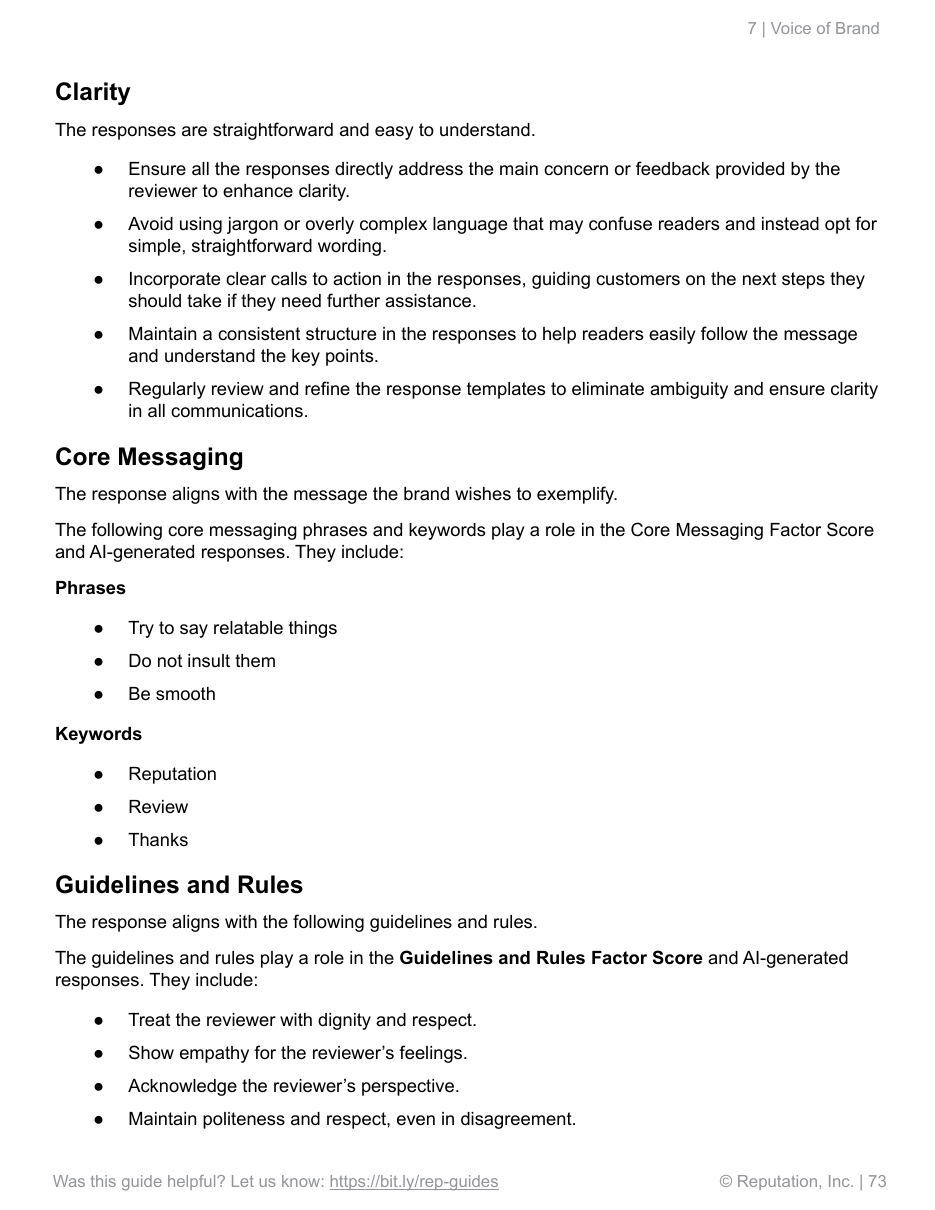
Reputation's own manual lists “Do not insult them” and “Be smooth” under Core Messaging. Those instructions tell the AI how to behave. Neither tells a potential customer anything about your services, your operating practices or the reasons to hire you.
The manual accepts uploaded brand documents and allows ten messages per Core Messaging configuration. Its scoring checks alignment with the brand's guidelines. These examples show brand expression, not the selection of substantive business information for an individual review.
Its personalization guidance centers on the reviewer's name and details from the review. One rule says, “Repeat positive phrases from the reviewer in your response.” That personalizes the acknowledgment. It does not demonstrate adding useful business information the reviewer did not supply.
Our assessment: polite, consistent writing is a basic requirement. Calling it Core Messaging does not make the response more informative.
Configuration and limit, p. 68 ↗Messaging examples, p. 73 ↗Personalization guidance, p. 74 ↗
02 / Birdeye
Birdeye analyzes sentiment and topics, uses business context and supports conditional instructions. Our assessment of its documented controls: the weak point is managing useful, varied business information across thousands of responses.
Relevance still needs a second decision. Its shown writing prompt says “Apply all relevant rules below.” When several business messages match a review, the system still has to choose what helps and what to omit. A complaint about a failed repair should not become a sales pitch about the company’s expertise. The guide does not demonstrate that choice among approved business messages.
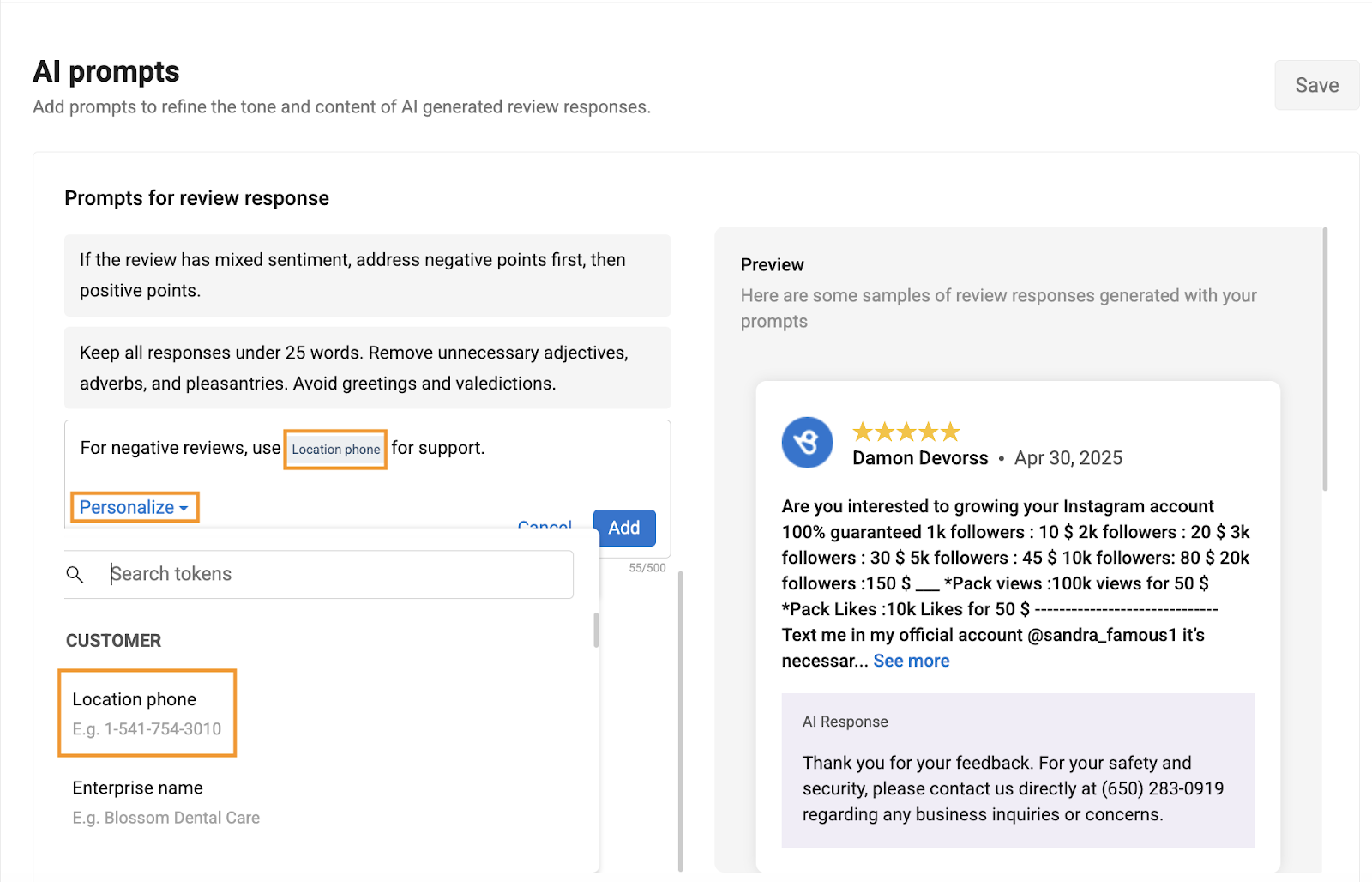
Rewording is not substantive variety. The AI Prompts editor shown here caps each entry at 500 characters. Conditions and alternative phrases in that entry share the same space. The alternatives are embedded in the instruction, with no separate controls for each option. Its sample alternatives vary how the business expresses happiness or thanks. Our concern is repetition of the same business point, even when the adjectives change.
A warning does not resolve competing instructions. Birdeye checks prompts against brand guardrails and asks users to avoid conflicts. Passing that check does not decide which of several allowed business messages deserves space, or when a positive message would sound dismissive in a mixed review.
A changed review needs its history. Birdeye documents a trigger for updated reviews. The shown workflow does not demonstrate comparing the revision with the original review and previous response. That comparison matters when a customer changes an unresolved complaint to say the problem was fixed.
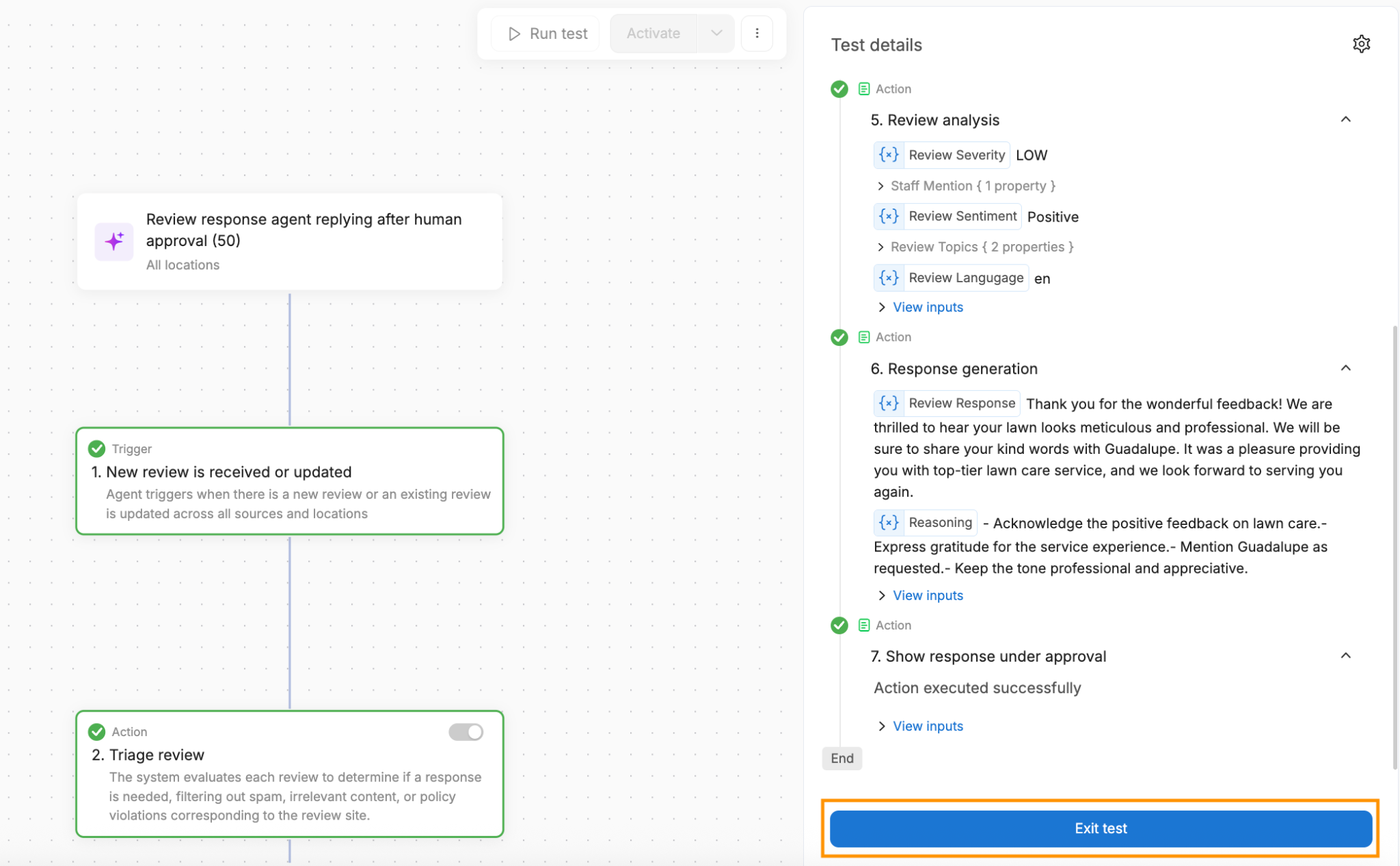
The explanation stops short of the Message decisions. Its worked reply thanks the reviewer, repeats the lawn-care praise and promises staff recognition. Its reasoning explains tone and acknowledgments. It does not show which business messages were considered, used or left out. At scale, managers need those decisions to understand why useful information was added or missed.
You must build the business-specific instructions. Birdeye provides defaults and can generate a general brand profile from a website. Custom response instructions, conditions and workflow adjustments still need writing and testing. As policies, services and locations multiply, a prompt list becomes more difficult to keep coherent.
RightResponse AI creates Messages for approval, supports multiple approved content options within each Message, and manages company, brand, region and location scope. Its Planner decides which relevant Messages are worth using; the product shows which were relevant and used. That is the control we believe review responses need at scale.
Prompt editor and rules ↗Current agent guide ↗Brand Identity guide ↗
03 / Podium
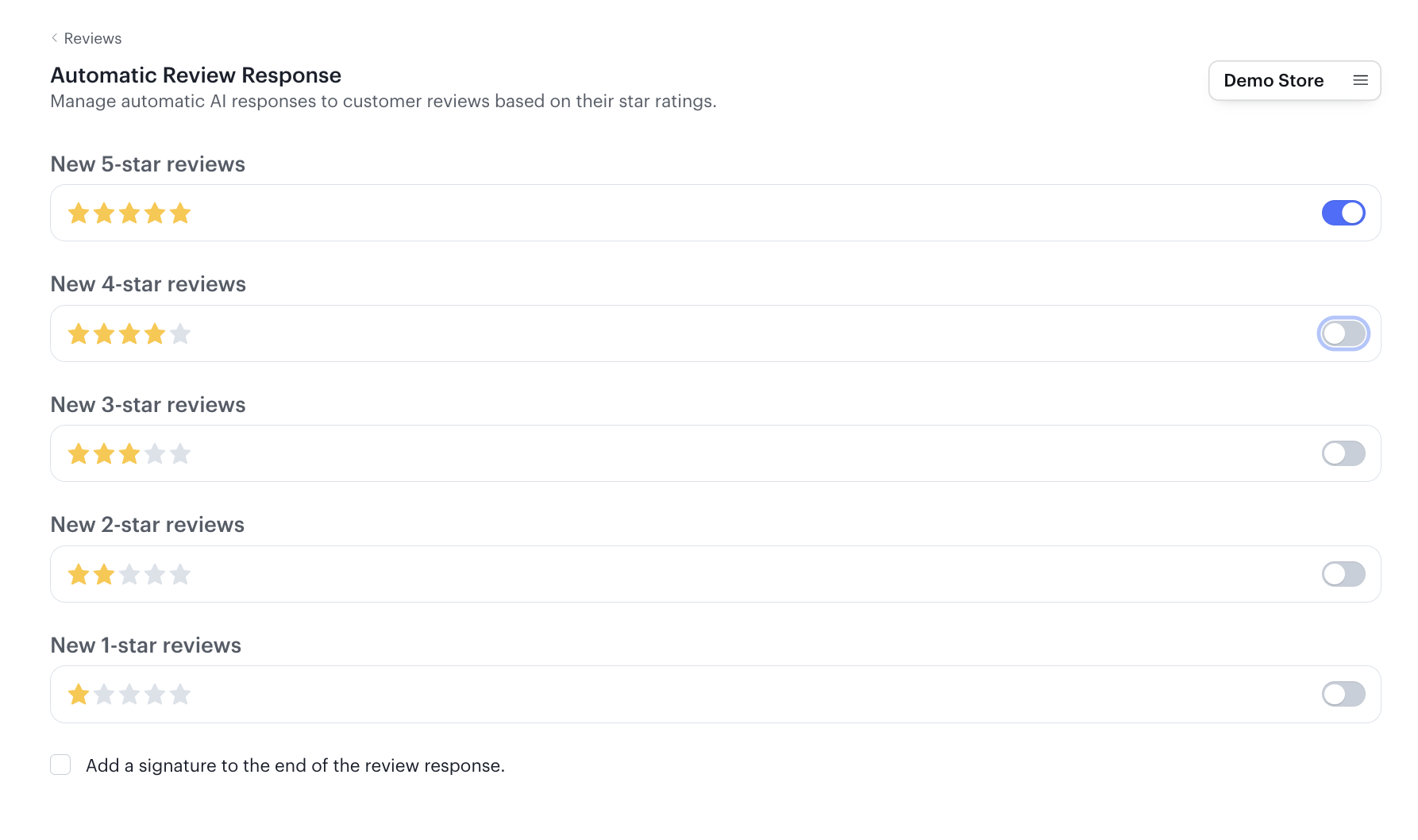
Podium's public review-response guide shows automatic replies by star rating and an optional signature. Its illustrated reply thanks a customer for their praise. Those controls explain which reviews get a reply; they do not explain how the AI decides what useful business information to add.
Podium separately documents FAQ sources for its AI Employee's conversations with leads. That is evidence for answering sales inquiries. The announcement does not connect those sources to public-review responses.
Our assessment: convenient response automation is clear. The case for informed business messaging in review replies has not been demonstrated.
04 / SOCi
SOCi's documentation describes configurable directives for matters such as names, tone and length. Its January 2026 update provides an interface for viewing and changing agent instructions. Those are concrete writing controls. The word “training” does not establish how the system selects business information for a particular review.
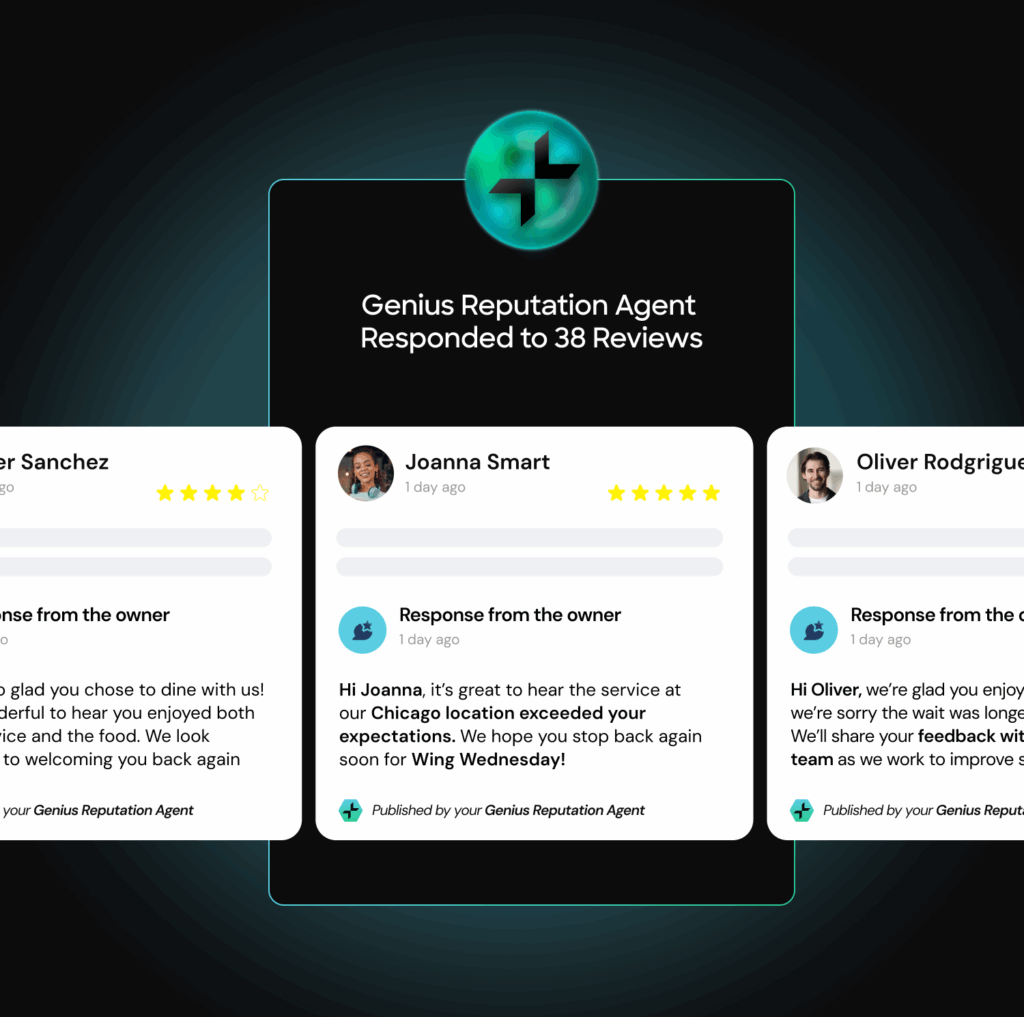
SOCi's current product illustration adds a restaurant promotion to a reply. But the original review is replaced with gray lines. We cannot see whether the promotion was new information, where it came from or why it belonged.
Our assessment: a promotional sentence is visible. A demonstrated process for choosing a useful business message is missing.
Documented directives ↗Training interface ↗Product illustration ↗
How RightResponse AI does it
RightResponse AI creates approved business Messages for you to review, manages where they apply, and selects what belongs in each response. Company, brand, region and location Messages are managed in the same interface.
Identify the experience, topics and concerns that the response needs to address.
Consider the approved messages, assess relevance and choose the information that belongs. Leave out messages that do not help.
Plan the response, write it in the chosen voice and check the result before it reaches your publishing workflow.
Writing useful AI instructions takes work. RightResponse AI creates business Messages for you to review and approve, using what it learns about your business. You can correct the details and keep them current as your services change.
You bring the business knowledge. We turn it into Messages the responder can use.
A Message can contain multiple approved content options or instructions. For a Message about water heater expertise, those options might describe specialist training, the repair process or how the team explains a customer’s choices.
RightResponse AI selects what fits the review. That gives responses different useful information to draw on.
Create as many Messages as your business needs.
Each Message connects approved business information or instructions to its purpose, the conditions for using it, and the company, brand, region or locations where it applies. A Message can also contain multiple approved content options.
An approved Message
Business information or instructions
Has a type
Content, Instructional or Pillar
Has a business scope
Company, brand, region or location
Has conditions
The review situations that make the Message relevant
Contains content options
One or more approved business details or instructions
Our AI uses this structured context to identify relevant Messages. The Planner then decides which belong in the response and how to incorporate them.
Apply each Message where it belongs and manage all four levels in the same interface. These examples show how different information can have different scope.
Company
Information that applies across the company.
Brand
Details for the businesses operating under that brand.
Region
Information for locations in the applicable region.
Location
Details specific to the location receiving the review.
First, where does the Message apply? Then, does it belong in this response?
You can inspect the business messages considered relevant to a response and see which were actually used. In this real product example, both messages were used: the company's experience and its scheduling practice.
That makes the information behind the reply visible. You can review the result and keep improving the messages your business wants to communicate.
Explore the RightResponse AI responder →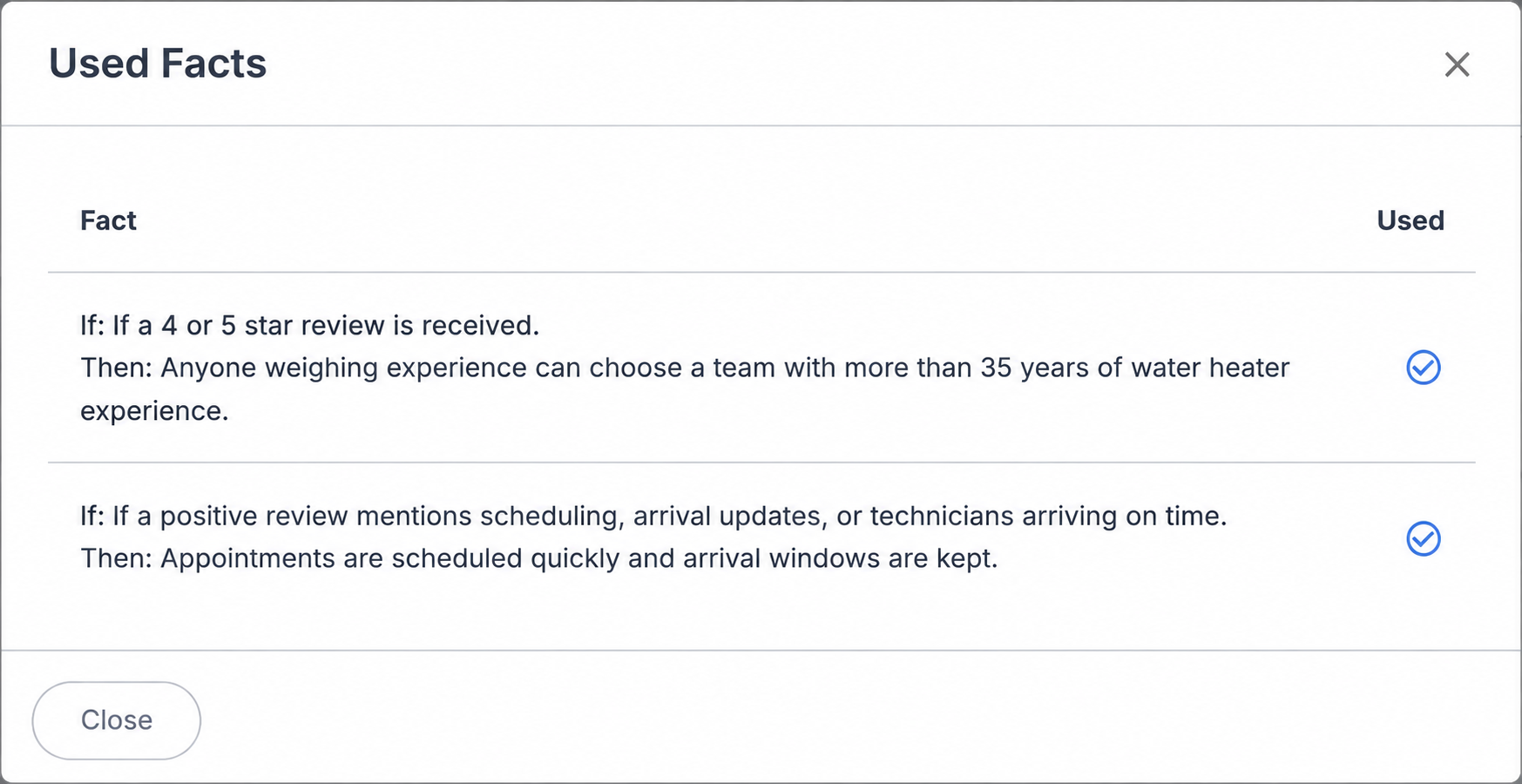
RightResponse AI compares the updated review with the original review and the previous response, identifies what changed, and writes a new response using that history.
If a customer changes a complaint to say the problem was resolved, the follow-up can acknowledge the resolution.
A one-star review can be full of praise. A five-star review can describe a bad experience. RightResponse AI identifies the mismatch and plans the response around what the customer actually wrote.
A happy customer should receive a warm acknowledgment, even if they accidentally selected one star.
Compare the price, too
Pro includes 200 review responses per month, AI review requests, map rank tracking and competitor analysis. Pro+ increases response capacity to 500 and adds advanced automation. Competitor Voice of Customer requires a Pro or Pro+ subscription and separately purchased packs sized for the number of competitors and reviews to analyze.
| Plan | Price | Price source |
|---|---|---|
| RightResponse AI Pro | $29 | Current monthly rate per location |
| RightResponse AI Pro+ | $44 | Current monthly rate per location |
| Birdeye Starter | $299 | Third-party report, January 13, 2025 |
At that reported Birdeye price, its subscription costs about 10 times Pro and 7 times Pro+.
Birdeye now provides prices by quote. This example compares subscription prices from the sources shown; included products and allowances differ. RightResponse AI rates checked October 21, 2026.
Current RightResponse AI plans →Reported Birdeye price ↗Current Birdeye pricing ↗
Buyer questions
RightResponse AI’s Message-Informed Review Responses (MIRR), also described as business-informed review responses, add approved business information that was not in the review, selected because it fits the review and helps its readers. A response can acknowledge the customer's experience and also explain something useful about your services, team or business practices.
The next customer may be reading that exchange while deciding whom to hire. Repeating that a plumber was knowledgeable tells them what the review already said. Explaining the plumber's ongoing training gives them another reason to trust the business. Changing the tone or inserting a name does not, by itself, add that information.
An approved business message is information or an instruction your business has approved for use in review responses.
A Content Message adds a specific business fact when it relates to the review, such as the training your technicians receive. An Instructional Message tells the AI how to handle part of the response, such as using Danny when the review says Dan or Daniel. A Pillar Message introduces a core business strength, such as being a local, family-owned company, when that information fits the response.
Content and Pillar Messages can add information the reviewer did not supply. An Instructional Message guides the writing; it does not necessarily add a new business fact.
RightResponse AI creates business Messages for you to review and approve, using what it learns from your website, reviews and business information. You check that the details are accurate and reflect what you want prospective customers to understand. Keep them current as your services and practices change.
RightResponse AI allows a company to create as many business Messages as it needs for review responses.
RightResponse AI first understands the review and identifies approved Messages that may be relevant. Its Planner then decides whether including a Message would make the response more useful before the reply is written. Relevance is only the first test: a detail can relate to the review without being worth adding.
You can inspect which Messages were considered relevant and which were actually used. The product currently labels this view Used Facts. If no Content or Pillar Message belongs, the response can leave them out. Instructional Messages can still guide how the response is written.
Message-Informed Review Responses are useful when the added information helps someone understand the business. Adding business Messages is not a reason to append the same slogan, promotion or list of services to every reply. A review about a careful water heater repair may justify a detail about technician training. It does not automatically justify every plumbing service you sell.
RightResponse AI selects Messages for the individual review and can leave business information out when it would not help. Multiple approved content options give it different useful details to draw on. Your Message library, brand voice and review of the finished replies all matter. You can revise a response or change its underlying Messages if the writing becomes repetitive.
RightResponse AI lets a business apply each Message at the company, brand, region or individual-location level, all within the same interface. A company-wide service promise, a brand-specific policy, a regional offer and a location’s specialist services can each have the appropriate scope.
Where a Message applies and whether it belongs in a particular response are separate decisions. Scope gives the responder the appropriate business context; selection determines which information helps with this review. The method works across industries, provided the approved information is accurate for the business receiving the review.
The customer's concern comes first. An approved Message can supply a useful contact route or explain a relevant business practice, but it should not turn a complaint into an advertisement or claim that an unresolved problem has been fixed.
RightResponse AI checks for risk, plans how to address the review and uses approved instructions when a conversation should move out of public view. It is designed to acknowledge the experience without inventing what happened or accepting unverified blame. Sensitive or personal details are removed from the version used for drafting, and higher-risk cases can be routed to a person. You can require human approval before publication.
For an updated review, RightResponse AI compares the new version with the original review and the previous response. It identifies what changed and creates a new response using that history. If a customer updates a complaint to say the issue was resolved, the reply can acknowledge that resolution.
When the star rating and written review disagree, RightResponse AI detects the mismatch and plans around what the customer actually wrote. A one-star review full of praise should not trigger an apology to a happy customer. A five-star rating should not make the response ignore a written complaint.
RightResponse AI lets you review and edit a review response before publication, change its tone, give the Planner instructions about what to include or exclude, or regenerate it. From a notification email, you can open the response for editing, schedule it or publish it immediately, including from a phone.
If you want automatic publishing, you choose the eligible star ratings and can set separate criteria for reviews with and without text. Publishing controls include a delay and selected publishing hours. You can keep responses on hold or choose not to respond. Using MIRR does not require giving up human approval.
To evaluate an AI review responder, give it a real review and a few approved business messages. Ask it to show which information it selected, why that information belongs and where it appears in the finished response. Include a complaint and a review where no additional business information would help. Judge the replies, not just the settings or the names of the AI features.
Message-Informed Review Responses describe a method. Another platform can demonstrate it by meeting those same tests. Our assessment draws on a 107-page review of vendor documentation and examples, with follow-up checks of Birdeye’s current instructions and pricing sources. It is not a paid-account performance benchmark.
To evaluate RightResponse AI, try it for seven days with 1,000 usage credits. The trial includes most Pro features. No credit card required. Use your own reviews and compare the result with what your team would be comfortable publishing.
Try RightResponse AI for seven days with 1,000 usage credits. The trial includes most Pro features. No credit card required.
This assessment draws on a 107-page review of vendor-published documentation and examples, with follow-up checks of Birdeye’s current instructions and pricing sources. We assessed the documented capabilities and illustrated responses. Sources reviewed September 5–8, 2026. RightResponse AI publishes this comparison and sells a competing product.
We assessed what the documented settings do, what information appears in the example replies and whether the evidence shows a reason for selecting that information. We distinguish product illustrations from worked examples and review responses from other communication channels. Specific new documentation or a reproducible example can change a finding.
Explore the review management software comparisons library →