We identified ten core capabilities to judge review response platforms by. Our research covers 40 platforms. For this article, we chose 15 with different approaches to handling reviews to keep the comparison manageable.
We’ll explain what a basic setup does, what additional features accomplish, and when you might need them. By comparing the platforms one capability at a time, you can see how they handle the same task and decide which differences matter to your business.
Consider where the information for a reply comes from. RightResponse AI selects relevant facts from business information you’ve approved. ReviewFlowz finds similar reviews you’ve answered before and uses those answers as examples for a new draft. One gives the writer approved facts to draw on; the other gives it examples of how your team has replied. If you want a reply to explain a service policy, the writer needs that policy. If you want it to sound like your team, examples of your writing can help.
Writing is only one part of handling reviews. Your team also needs to find the ones that need attention, decide who checks the answer and make sure it appears online. If you promise a replacement or a refund, someone has to carry that out. The capabilities below cover that work, from collecting the review to following up with the customer.
Our review-generation article covers asking customers for reviews. This article covers what happens after they arrive.
The ten capabilities are:
- Seeing your reviews in one place. Bring reviews together so staff can work without checking every site and location separately.
- Finding the reviews that need attention. Identify what needs an answer, what is urgent and who should handle it.
- Keeping up when reviews change. Notice edits and removals, and keep your response relevant to what the customer now says.
- Understanding the review and checking for problems. Recognize mixed feedback, sensitive information and wording that needs a person’s attention.
- Writing a useful reply. Use the customer’s comments and accurate business information to prepare an appropriate answer.
- Deciding who can post—and when. Automate suitable replies while keeping control over exceptions.
- Making sure the reply appears. Check that the answer reached the review site and deal with failures or later corrections.
- Challenging reviews that break the rules. Assess a suspicious review and get help pursuing an eligible dispute.
- Making sure someone follows up. Assign and track the work needed to resolve the customer’s problem.
- Learning from the reviews. Measure response work and find recurring strengths or problems in the business.
The tables use a consistent platform order, with RightResponse AI first because we publish this research. That order is not a ranking. Most tables cover all 15 platforms; the dispute section compares GatherUp’s service levels. Source links sit beside the features they explain.
Our research into the other platforms is based on publicly available information. Some documentation is only available after logging in, so we may not have found every feature. If we don’t mention a capability, that doesn’t necessarily mean a platform doesn’t offer it.
1. Seeing your reviews in one place
A review inbox brings reviews from different sites and business locations into one place. Your team can read them without opening every Google profile, Facebook page or industry directory separately.
Collecting reviews from the sites you use. Coverage matters more than the size of the vendor’s site count. A hotel may need Booking and Tripadvisor; a healthcare practice may need specialist directories. SOCi, for example, documents Healthgrades reviews and direct responses, as well as monitoring Uber Eats feedback.
Check both collection and posting for the sites you use. RightResponse AI monitors more than 100 sites and posts directly to Google; sites without a posting connection require staff to copy the reply and open the original site. Section 7 compares those posting options.
Filtering by location, rating and response status. For one location, bringing in the right sites may be enough. A business with several branches also needs to know which location each review concerns and let staff narrow the list to their own work. LocalClarity combines filters for review source, location group, rating and response status. A regional manager could use those together to see unanswered low-rated reviews across the branches they oversee.
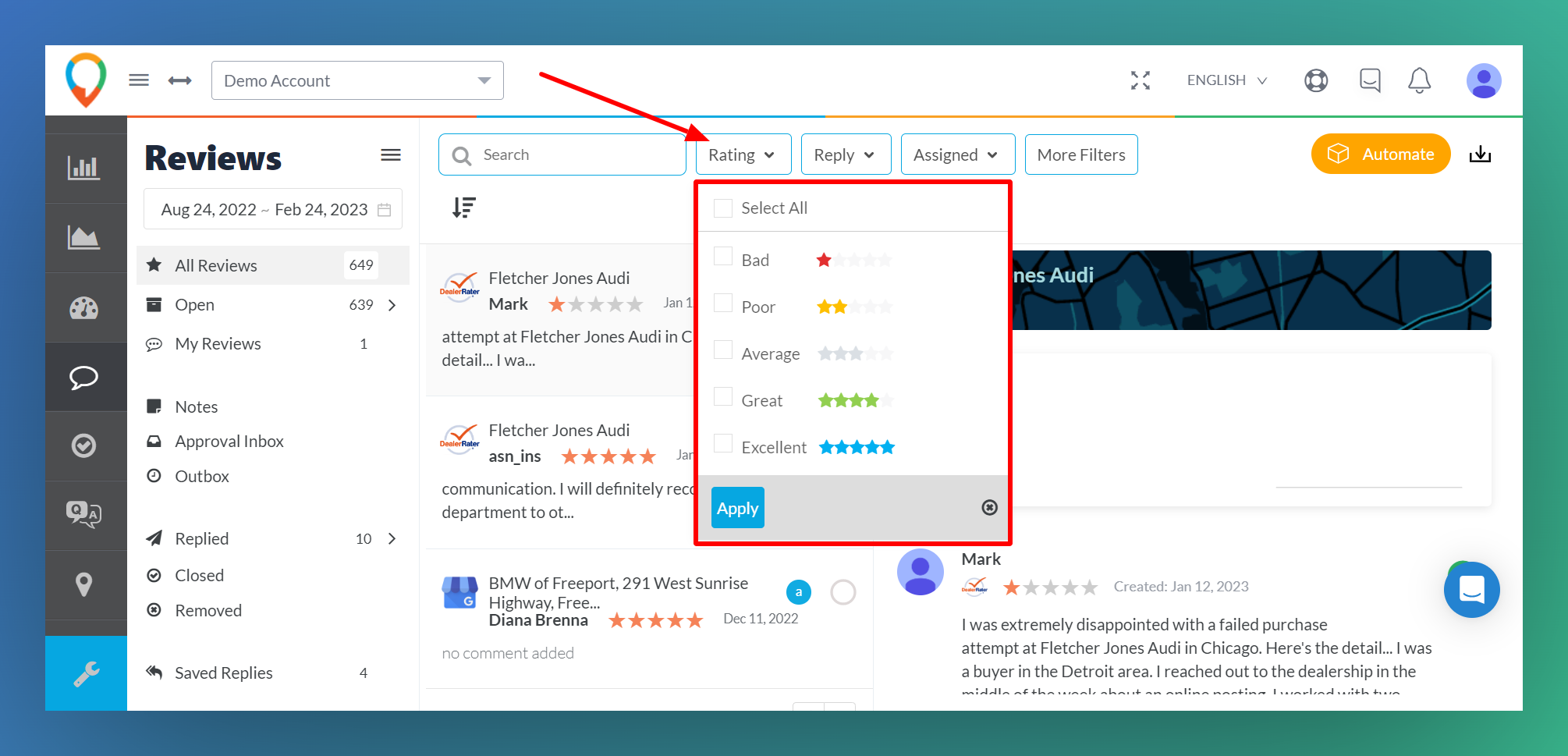
Seeing reviews alongside customer activity. The inbox can also put reviews into a more useful working context. GatherUp shows unanswered reviews from the past 30 days beside recent requests and review activity, giving a branch manager a daily starting point. Birdeye shows existing conversations beside a review, and staff can contact the reviewer privately when the email address or phone number is available.
Sending reviews to your existing team tools. ReviewFlowz can instead deliver selected reviews to Slack, Teams or email. A team already working there may find that more convenient than another dashboard.
Checking how often new reviews are collected. Also check how often reviews are collected. ReviewTrackers documents up to 48 hours for the initial review history and generally up to 24 hours for routine collection. Yext’s brand-level monitoring runs weekly; that schedule is for sources such as employer-review sites and app stores, not a stated schedule for all its location reviews. An immediate email alert can still arrive hours after the customer posts if the platform has not collected the review yet.
Checking the review connection. Swell’s connection checks and manual refresh help staff investigate when Google reviews stop arriving. A quiet inbox may mean there is no new feedback, or it may mean the connection needs attention. Having a way to check saves staff from guessing.
| Platform | Reviews brought into the workspace | How staff get to the information |
|---|---|---|
| RightResponse AI | Monitors more than 100 review sites. | Filter by source or rating. For Google, staff can also use the “Most relevant” order to inspect prominent reviews instead of always starting with the newest. |
| LocalClarity | Covers local-business reviews as well as app stores, software sites, delivery services and other specialist sources. | Add supported public profiles by their web address or connect an account you manage. ReviewsInbox filters combine source, location group, rating and reply status, so one team can work across different kinds of profiles. |
| ReviewFlowz | Adds a public profile by search or web address, then imports its review history. Its examples include Google locations, G2 and the App Store. | Send selected reviews to Slack, Teams or email, or use its data connection to bring reviews and later changes into another system. |
| GatherUp | Monitors more than 100 review sites and also collects feedback directly from customers. | Its location dashboard shows unanswered reviews from the past 30 days beside requests, ratings and recent review activity. This gives a branch manager a starting point for the day’s replies. |
| ReviewTrackers | Collects reviews for individual locations and location groups. | The initial history can take up to 48 hours to arrive; routine collection is generally within 24 hours. Allow for collection time when setting your response target. |
| Swell | Connects Google profiles to the appropriate Swell locations. | A Health screen helps staff check Google access and request another download if reviews stop arriving. This gives them a place to investigate a missing connection. |
| Goodays | Brings supported public reviews together with feedback customers send directly to the business. | The inbox separates dissatisfied customers, new messages and conversations waiting for follow-up, so the daily work can start from customer needs rather than just the latest star rating. |
| Guest Suite | Centralizes public reviews and feedback collected through its own tools. | Filter by location, source and response status; restrict location access by user. Trustpilot is an exception: its reviews are shared across the organization. |
| Birdeye | Collects location reviews and displays any existing conversation with the reviewer in its Inbox. | If the account has the customer’s email or phone number, staff can start a private conversation beside the review. They can also tag the review or create a ticket from that screen. |
| Podium | Brings leads and reviews into a shared inbox, with calls, texts and notes in customer conversation histories. | Staff can mention a colleague to ask for help and manage reviews from the mobile app. This puts review work in the workspace a sales or front-desk team uses for customer conversations. |
| Reputation.com | Combines connected reviews across locations, with filters and saved views. | Staff access is controlled by role and location. Included review sites and annual review volume depend on the contract, which matters when bringing a large portfolio into one account. |
| SOCi | Its 2026 review-network additions include Healthgrades and Uber Eats. | Staff can read and answer Healthgrades reviews inside SOCi. The Uber Eats addition brings delivery ratings and feedback into monitoring. |
| Yext | Monitors location profiles and can add brand-level sources such as Indeed, Glassdoor, Trustpilot and app stores. | Brand-level monitoring requires the relevant access and runs weekly. It can serve a company that needs to watch employer or app feedback as well as reviews of its branches. |
| Vendasta | Brings connected reviews into Reputation AI and agency fulfillment tools. | An agency can turn new reviews into assigned tasks for the client account, with a due date and a record of progress. |
| Uberall | Combines supported public reviews and social comments in Inbox 2.0. | Its default view shows the past 30 days of unreplied or unresolved feedback. Staff looking for older work need to change the dates or use a saved filter. |
2. Finding the reviews that need attention
Once the reviews arrive, your team needs to know what to work on first. An unanswered-review list can be enough for an owner who reads a few reviews each week. As the volume grows, filtering, identifying complaints and assigning responsibility reduce the amount of sorting people have to do themselves.
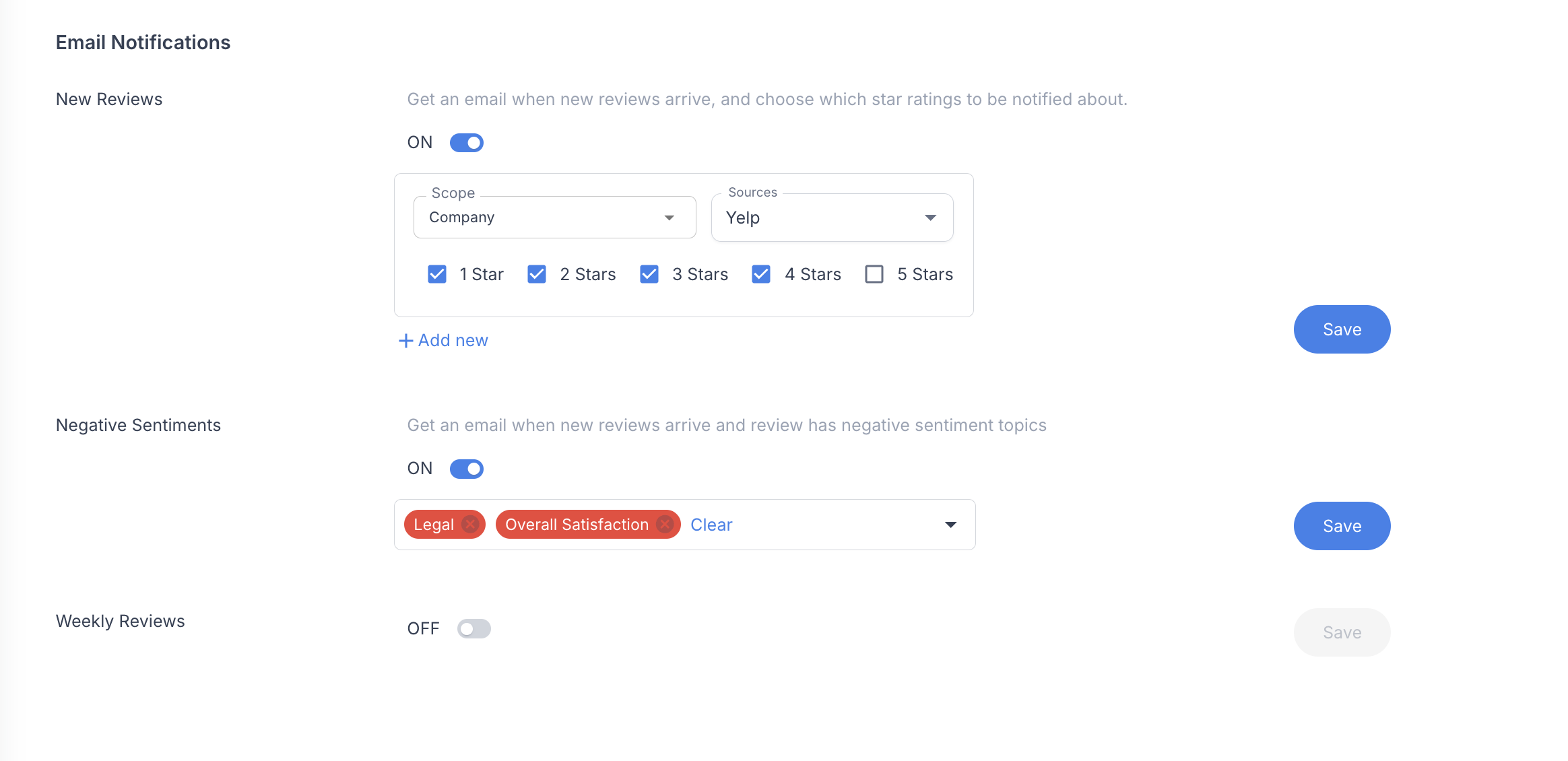
Finding complaints beyond the star rating. Filtering by star rating is a starting point, but it can miss the reason a review needs attention. Imagine a customer gives four stars, praises the technician and says the invoice was wrong. RightResponse AI can notify selected people about negative comments on a chosen topic. The billing complaint can reach the office manager even though the overall rating looks positive.
Defining your own review labels. ReviewFlowz lets you describe a topic and have AI label matching reviews. A property manager could define a “Repairs” label for maintenance complaints, then filter for those reviews. The employee defines what belongs in the group; the software does the sorting.
Assigning reviews with rules. LocalClarity can use conditions to assign a review to a user or team, add a label or send a notification. For example, a rule could send low-rated reviews from a group of branches to the regional team. A label makes those reviews easier to find; assigning them tells staff who is responsible for answering.
Sharing notes and tracking work in progress. Staff may need information from a colleague before replying. ReviewTrackers provides private notes and mentions: mentioning the office manager in a new note sends an email. Its custom status labels can mark reviews waiting for information. Calling a status “Waiting for approval” helps organize work, but does not itself prevent someone from posting; section 6 covers that control.
Finding older reviews that still matter. Older reviews can still deserve attention. RightResponse AI can show Google’s “Most relevant” order, giving staff another way to find prominent reviews beyond sorting by date. Google’s order can vary between visitors. With Uberall, the default view covers recent unreplied or unresolved feedback; widen the date range to check older work.
| Platform | Finding the reviews to work on | Sharing or assigning the work |
|---|---|---|
| RightResponse AI | Filter by site or rating, or identify negative comments about a chosen business topic. | Send topic alerts to selected email recipients—for example, billing complaints to the office manager. Your team decides who takes responsibility after the email arrives. |
| LocalClarity | Combine up to five conditions, including rating, source, language and location. | A rule can take up to three actions, such as assigning a user or team, adding a label, changing status or notifying someone. The review becomes work for a named person or team. |
| ReviewFlowz | Give an AI tag a description, such as what should count as a delivery complaint, and apply it to matching reviews. | Tags can organize filters and alerts. You can also apply them manually or use them on earlier reviews, so staff can collect related feedback without reading the whole history again. |
| GatherUp | Choose alerts by rating, review source or the score in customer feedback. | Different recipients can receive immediate notices or daily, weekly or monthly summaries across selected locations. A manager can receive urgent complaints while marketing receives a less frequent selection of positive reviews. |
| ReviewTrackers | Use filters, private notes and your own status labels. | Mentioning a colleague in a new note sends an email; editing that note later does not send another. A status label helps organize work but does not enforce approval. |
| Swell | Match feedback by rating, source and location. | A matching rule can create a ticket assigned to a user or staff role, with people following its progress, a priority and a category. Ticketing must be enabled. |
| Goodays | Open separate lists for dissatisfaction, new messages and work waiting for follow-up. | Sharing gives read-only access; transferring lets a colleague answer through an emailed link, even without a Goodays account. The colleague can see the conversation and internal notes. The company may restrict permitted email domains. |
| Guest Suite | Filter by business location, site and whether the review has a response. | Give users read, write or no access for particular locations. |
| Birdeye | Use review or survey content to decide which feedback needs a ticket. | Rules create and route the ticket. When a review matches several conditions, the priority of the rule branches affects which route it takes. |
| Podium | Staff work from review feedback and customer conversations. | Assign customer conversations to teammates in the shared inbox and use internal notes to give them context. |
| Reputation.com | Filter by location, source, rating, labels and response progress. | The separate Actions product creates and routes tickets with staff responsibility and deadlines. This can carry a complaint beyond the public reply. |
| SOCi | Uses review meaning and urgency to identify feedback needing attention. | Configured rules bring sensitive cases to people within the local and central team structure. This is more selective than sending every low-star review to the same recipient. |
| Yext | Filter by source, rating, language and labels. | Response rules can name the writer, choose an approval group and set due dates. Staff see an assigned response task rather than just an alert. |
| Vendasta | Task Manager groups review work by client account, assignee, status and due date. | An agency can choose which positive, neutral or negative reviews create tasks, add internal notes, and track replies waiting on client approval. |
| Uberall | Save combinations of location, date, site, rating, tags and reply status. | Replying marks the review resolved in the inbox. A wider date range brings older work back into view; saved filters let staff return to the same selection. |
3. Keeping up when reviews change
A review can change after you answer it. Suppose a customer gives one star because a repair took too long. The manager resolves the problem, and the customer changes the review to four stars and adds a thank-you. Your original apology may now look as though you have not noticed the improvement.
Keeping a record of collected reviews. Tracking updates and missing reviews starts with keeping a record of the reviews collected. RightResponse AI keeps every review once it has retrieved it and compares later downloads against those stored records. The useful differences are what a platform does when something changes, how much of the history staff can inspect and whether the writer uses that history in its next reply.
Bringing edited reviews back to the team. Staff need a way to notice the change. Goodays brings an edited Google review back to the team’s attention. Guest Suite moves edited reviews to the top of the feed, offers an updated-review filter and shows the modification date. Uberall adds an Updated badge and returns the review to the unreplied, unresolved queue.
Inspecting earlier versions. Being able to inspect earlier wording helps staff understand what changed. LocalClarity displays the versions it has received in a review timeline. Staff can look back at earlier comments when investigating a complaint. The history is limited to versions the software collected. If a customer changes the wording twice between checks, the intermediate version may be lost.
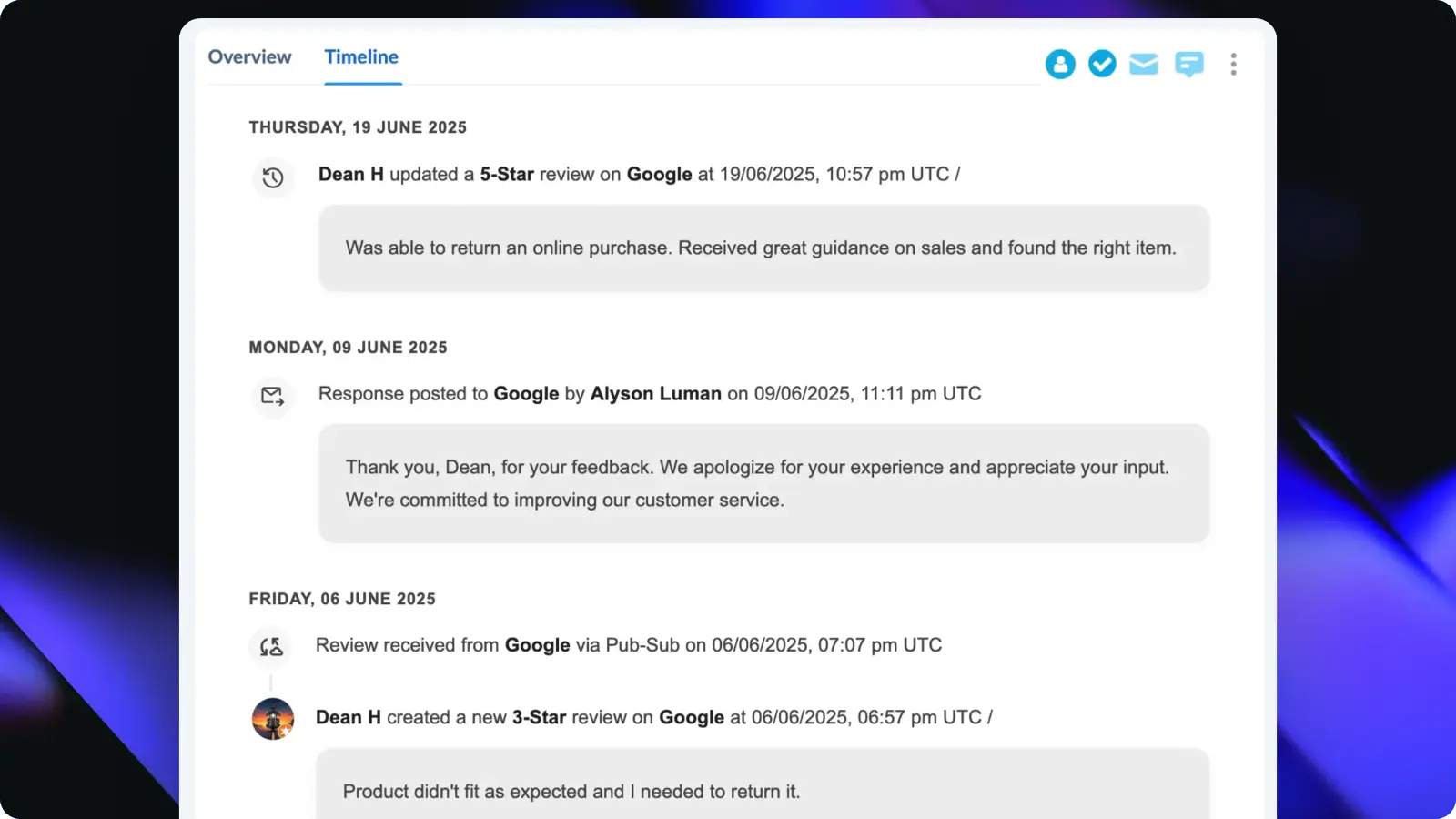
Using review history in the next reply. RightResponse AI also uses its stored review information when planning the next reply: it considers the previous and current review text, both ratings and the earlier response. In the repair example, that gives the writer the context to acknowledge the improvement rather than start over with a generic four-star thank-you.
Refreshing drafts and restarting response work. Birdeye’s response workflow can start when an existing review is updated, sending it through the configured analysis and reply process. Vendasta refreshes an unpublished AI draft when the customer edits the review; it leaves an already posted reply unchanged. SOCi identifies updated reviews and lets staff edit earlier responses. Detecting an edit, regenerating a draft and comparing the old and new wording are different capabilities.
Detecting missing reviews. RightResponse AI retains the collected record when a review is missing from a later download. LocalClarity checks for removals weekly on eligible Google profiles. The platforms also differ in what remains visible afterward: Yext can keep a removed review with a Removed status, while Guest Suite says it removes deleted Google reviews from its interface during a daily update. Being able to see which reviews disappeared helps staff investigate why the total changed.
Passing review changes to another system. ReviewFlowz’s API identifies when a review record updates an earlier record. A developer can use that relationship to maintain your own history or start a task when a review changes.
| Platform | Handling an edited review | Missing reviews and retained history |
|---|---|---|
| RightResponse AI | Uses the previous and current review text, star ratings and earlier response to plan a revised reply. | Keeps every review once it has been retrieved. Compares later downloads with those records to identify updates and missing reviews, and retains the record when a review goes missing. |
| LocalClarity | Keeps received versions in a timeline and can filter reviews that were updated. | Checks for removed reviews weekly on eligible profiles; retained versions can be exported. It cannot reconstruct edits that happened before it received a review. |
| ReviewFlowz | Links an updated review record to the earlier record in its API. | A developer can use that relationship to keep a history or start another process when the review changes. |
| GatherUp | How edited reviews affect an existing reply was not established in the public material reviewed. | A general history of review versions and removal checks was not established. Review Defense is a separate service for investigating and disputing reviews. |
| ReviewTrackers | Tracks changes to Google and Facebook reviews. | The documented change-tracking method does not collect deleted Google reviews. It should not be used as a complete record of everything that disappeared. |
| Swell | We couldn’t confirm that the writer compares the old and new review text. | Its Google Health screen can check the connection and request another download. This helps investigate reviews missing from Swell; it does not identify which ones Google removed. |
| Goodays | An edited Google review returns as new participation, allowing staff to keep or change the response. | The earlier conversation gives staff context. The documented process puts the decision to revise the public answer with the employee. |
| Guest Suite | Moves edited reviews to the top of the feed; staff can filter for them and see the modification date. | A daily update removes reviews deleted from Google from the Guest Suite interface, normally within 24 hours. |
| Birdeye | An updated review can trigger the response agent again, using the configured analysis, drafting and approval steps. | The trigger establishes handling of updates. The reviewed guide does not specify retaining earlier versions or giving both versions to the writer. |
| Podium | How an edited review triggers a new response was not established in the public material reviewed. | Version history and removal checks were not established in the public material reviewed. |
| Reputation.com | The review record includes response history and progress. | Staff can inspect earlier responses and their progress on the review record. This is a history of the business’s replies; the guide does not establish a history of the customer’s edits. |
| SOCi | Its release notes describe identifying updated reviews and editing earlier responses. | Staff can revise the earlier answer after an update. Retained versions of the customer’s text were not established in the reviewed release notes. |
| Yext | Response rules can apply to new reviews only, or to new and updated reviews. | Removed public reviews can remain in Yext with a Removed status, depending on the retention setting. |
| Vendasta | An edit refreshes the AI draft if that draft has not yet been posted. | The same feature does not replace an answer that is already public. Staff need to revisit that answer themselves. |
| Uberall | Adds an Updated badge and returns an edited review to the unreplied, unresolved queue. | Staff can edit the earlier reply when they address the updated review. |
4. Understanding the review and checking for problems
Before writing, the software needs to work out what the review calls for. Should it thank the customer, address a complaint, acknowledge an improvement or leave the response for a person? Getting that decision wrong can produce an inappropriate answer even when the sentence itself is well written.
Comparing the words with the star rating. A simple rule can choose an answer from the star rating. Reading the text adds something important: a five-star review can still contain a complaint, and a one-star review can contain glowing praise. RightResponse AI looks for a mismatch between the words and the rating and uses it to decide what the reply should accomplish. That can prevent a cheerful thank-you from ignoring the problem the customer described.
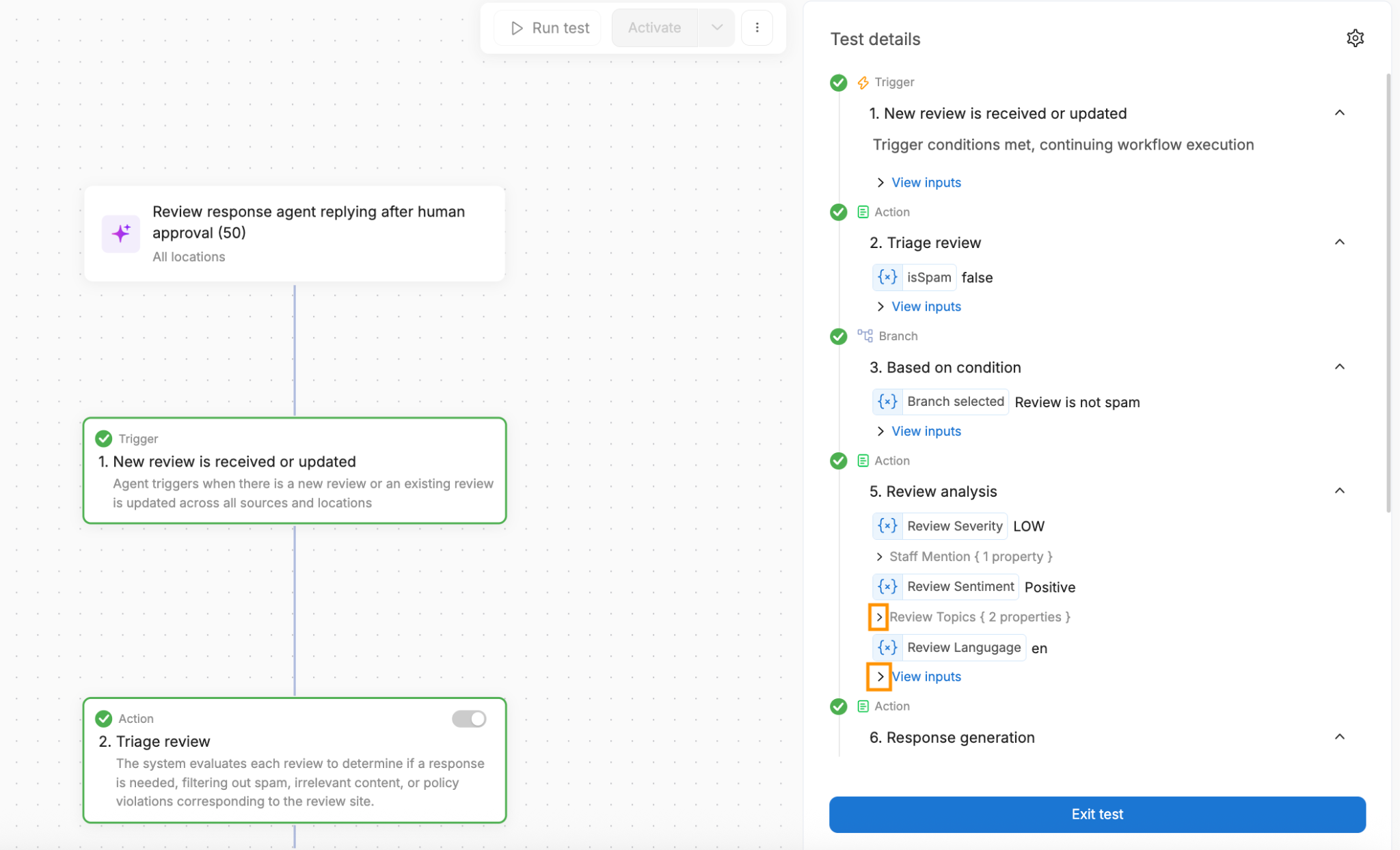
Identifying subjects, seriousness and possible spam. Birdeye’s Review Response Agent identifies subjects, sentiment about each subject, seriousness, language and named people or companies. It first checks for possible spam. In the documented workflow, suspected spam sends an email alert to designated people; other reviews continue to analysis and drafting. The test view shows the decision and its reason, so staff can inspect why a review took that path.
Removing sensitive information before drafting. RightResponse AI also checks for sensitive details, inappropriate content and instructions inserted to manipulate the AI. It removes sensitive details from the copy used for drafting, reducing the chance that the reply repeats them. The customer’s original public review stays unchanged.
Limiting detail in healthcare replies. Podium’s healthcare privacy setting makes replies less specific to avoid confirming a patient relationship. In its example, a review praises a named doctor, while the answer gives a general acknowledgment. That is a deliberate tradeoff: the reply gives up some personal detail to limit what the practice reveals. The setting is off by default.
Checking the finished reply against business rules. Checking the finished reply is another opportunity to catch a problem. Reputation.com’s Voice of Brand can warn when a draft conflicts with configured brand guidance, but a user can choose Publish Anyway. SOCi says Shield can block content that violates configured policies until it is revised or goes through the required approval. A warning helps the writer decide; a block gives the company stronger control over what can be released.
| Platform | Information or instructions used | Controls before the reply goes out |
|---|---|---|
| RightResponse AI | Looks for a mismatch between the words and rating, and checks the review for sensitive details, inappropriate content and instructions aimed at the AI. | Sensitive details are removed from the copy used for writing. The mismatch helps determine the purpose of the reply—for example, addressing a complaint hidden inside a high-star review. |
| LocalClarity | Business background, optional location information, rating-specific tone and language settings guide the writer. | Send generated replies automatically or hold them in a queue for a person to inspect before publication. |
| ReviewFlowz | Saved instructions, language and signature guide the AI. | Ordered rules can hold selected reviews for a person, rather than allowing them to be answered automatically. |
| GatherUp | A custom AI prompt and creativity setting guide suggested replies. | Staff receive the suggestion by email, edit it if needed, and choose Approve and Send. |
| ReviewTrackers | Individual responders save their own AI instructions; administrators configure the automatic writer separately. | The manual tool lets staff regenerate or edit the draft. Administrators can preview automatic instructions against a review before enabling them. |
| Swell | Staff can revise an AI draft by supplying instructions for the next version. | Public interface code shows separate actions for accepting revised wording and publishing it, giving staff a chance to read the result before sending. |
| Goodays | The employee adds facts about this customer’s situation and chooses a tone. | The employee checks and sends the draft; head office enables AI access. Spelling and grammar suggestions help clean up the wording. |
| Guest Suite | Configure tone, length, language, words to avoid, business strengths, contact instructions and a signature. | Administrators can preview three candidates. The separate staffed service has Guest Suite employees review and personalize the AI’s wording. |
| Birdeye | Identifies possible spam, subjects, sentiment for those subjects, seriousness and named people or companies. | The documented spam branch emails designated users; other reviews continue to analysis and drafting. Run test shows the inputs and result at each step. |
| Podium | Healthcare privacy mode uses less specific wording to avoid confirming a patient relationship. | The setting is off by default. Turning it on makes the reply more general—for example, acknowledging feedback without repeating treatment or clinician details. |
| Reputation.com | Voice of Brand uses rules, keywords, core messages and brand personality for the relevant locations. | Analyze checks the draft against those guidelines and warns about problems. Publish Anyway lets a user override the warning, so it is not a compulsory block. |
| SOCi | Shield checks content against the business’s configured policies. | A flagged reply can be blocked until revised or handled through the required approval process. This differs from a warning the writer can simply ignore. |
| Yext | Writing instructions guide the standard responder. | The separate Hearsay connection asks advisers about the client relationship, incentives and conflicts, sends the reply for supervision and handles disclosures. It requires the enabled integration. |
| Vendasta | AI Reputation Specialist uses instructions plus relevant material from permitted business knowledge sources. | The instructions take priority over knowledge text. Staff set which ratings and channels can receive automatic replies and how long to delay them. |
| Uberall | Use business guidelines and an optional document, with a preview before saving the instructions. | Restricted users can be required to submit their proposed replies for another person to approve. |
5. Writing a reply that fits the review and your business
A useful reply addresses what the customer said and gives them an appropriate answer. For a positive rating with no comment, a short thank-you may be sufficient. A complaint needs a different response. A detailed review may also give you an opportunity to explain something useful about the business that the reviewer did not mention.
Selecting an approved prewritten reply. The simplest approach uses prepared wording. GatherUp can choose from up to 50 responses you upload, matching the review’s content and sentiment. That automation covers positive Google and Facebook reviews. Swell also offers automatic replies drawn from prepared wording. You control the sentences available for use, which can suit routine reviews when an appropriate prewritten answer is enough.
Generating new wording with business and location details. A generated reply creates new wording for the review. GatherUp offers generated suggestions as well as its prepared-response library. LocalClarity lets you supply business background, location details, tone and language settings. The location information gives the writer facts about the relevant branch; the tone settings guide how it expresses them.
Yext can use fields from the relevant business or location record—for example, putting the correct branch’s support email in a reply.
Using earlier replies as examples. ReviewFlowz finds similar reviews and earlier replies, matching the brand, rating, language and whether the review contains text. That can carry good examples of your team’s writing into new drafts. The examples still need to reflect current information.
Finding information in websites and documents. Vendasta’s AI Reputation Specialist can use business details, websites, files and text you provide. Its knowledge tool retrieves relevant passages when information is needed. A business with useful policies or service explanations can make those available to the writer, rather than asking employees to paste them into each draft.
Selecting relevant approved business facts. RightResponse AI lets you approve short pieces of company, brand or location information called Messages. It selects the Messages relevant to a review, plans how to use them, writes the reply and checks it against that plan. You can inspect which Messages were considered and selected. None has to be included when it would add nothing useful.

For example, suppose an auto repair customer praises the clear explanation of the work. The shop could approve a Message explaining that its digital inspections include photos to help customers understand repairs. That gives the writer a relevant fact about how the shop works—and gives future customers more information than another sentence saying the explanation was clear.
Adding facts about this customer’s situation. Some facts concern one customer rather than the business in general. Goodays lets the employee add an explanation before generating the reply; Guest Suite supports staff notes alongside centrally configured instructions. If a manager has arranged a replacement, adding that information lets the writer describe the agreed next step. The software needs to be given that case-specific fact before it can use it.
Preparing a batch of drafts. Guest Suite’s bulk drafting starts with lower-rated reviews and lets staff send, regenerate or skip each one.
Working in different languages. For a multilingual team, RightResponse AI shows the review and proposed answer in the team’s language while preparing the public reply in the customer’s language. Uberall supports translation as well, though editing the translated reply replaces the original draft without translating the changes back.
Compare drafts from the same reviews to see how well each system uses the information you want your customers to receive.
| Platform | How the reply is written | Useful control or working detail |
|---|---|---|
| RightResponse AI | Selects relevant approved business Messages, plans the response, writes it and checks the result against that plan. | Inspect which Messages were considered and selected. When none adds useful information, the writer can leave them out. |
| LocalClarity | Combines the review with business background, optional location context, tone and language settings. | Central instructions can be supplemented by location details, allowing different branches to provide the writer with different context. |
| ReviewFlowz | Finds roughly five to ten similar earlier review/reply examples to guide a new draft. | Similarity considers platform, location, stars, content and length. Its narration describes a preference for human-written examples; staff can test, edit or regenerate the new draft. |
| GatherUp | Writes a fresh AI suggestion or selects a complete response from up to 50 uploaded templates. | Template selection matches content and sentiment for positive Google and Facebook reviews. Generated suggestions use your writing instructions. |
| ReviewTrackers | The manual AI uses the responder’s saved instructions; automatic replies use separately configured prompts and templates. | The manual tool permits five suggestions per review per hour and requires review text. The automatic tool separately supports reviews containing only a star rating. |
| Swell | Generates an editable draft and lets staff ask for revisions. | Revision requests send the current draft and staff instructions back for another version. Automatic prepared replies are a separate method that selects complete saved wording. |
| Goodays | Uses the review, chosen tone and the employee’s explanation of what happened. | Before drafting, the employee can add a fact such as a replacement already being arranged. That lets the reply explain the action agreed for this customer. |
| Guest Suite | Uses brand instructions and optional staff notes; it can generate one reply or a batch. | Bulk drafting presents lower-rated reviews first. Staff can send, regenerate or skip each draft, and teammates can continue work on existing drafts. |
| Birdeye | Passes its analysis of the review and configured business information into the writing step. | Run test exposes intermediate results. You can inspect the analysis behind a reply instead of seeing only the finished paragraph. |
| Podium | Generates a reply for the selected review using review and reviewer information. | Staff can request another version, edit the wording and send it. |
| Reputation.com | Uses location-appropriate rules, personality choices, keywords and core messages. | Supports up to 15 rules, ten keywords and ten core messages, with location overrides and a test configuration. A separate Analyze action checks the draft against brand guidance. |
| SOCi | Generates new wording from review meaning, urgency and brand guidance. | Configure tone, keywords and the cases that should go to a person. The agent can generate a reply for approval or post it automatically. |
| Yext | Combines the review with stored business/location fields, writing instructions and example replies. | An instruction can insert the appropriate branch’s support email into a negative-review reply. Response Playground lets staff try those instructions against real reviews before saving them. |
| Vendasta | Looks up relevant passages in business information supplied to AI Reputation Specialist. | When a lookup would help, the knowledge tool supplies relevant passages from permitted websites, files or text to the writer. |
| Uberall | Uses review and location information, business instructions and optional document context. | Generate up to 40 drafts together, then edit or regenerate individual replies. If staff edit a translated reply, that text replaces the original draft without translating the changes back. |
6. Deciding who can post—and when
Once a reply is prepared, the next decision is whether the software may publish it on its own. Automation can save time on routine reviews. Approval controls let you keep a person involved where an incorrect answer would matter more.
Choosing which ratings and review types to automate. For one person handling a small number of reviews, reading and sending each draft may be sufficient. A basic automatic rule can then take over a predictable group. Podium lets you turn automatic replies on or off for each star rating. RightResponse AI also distinguishes reviews with comments from those containing only stars. A business can automate five-star ratings with no text while checking the written reviews, which may contain something unexpected.
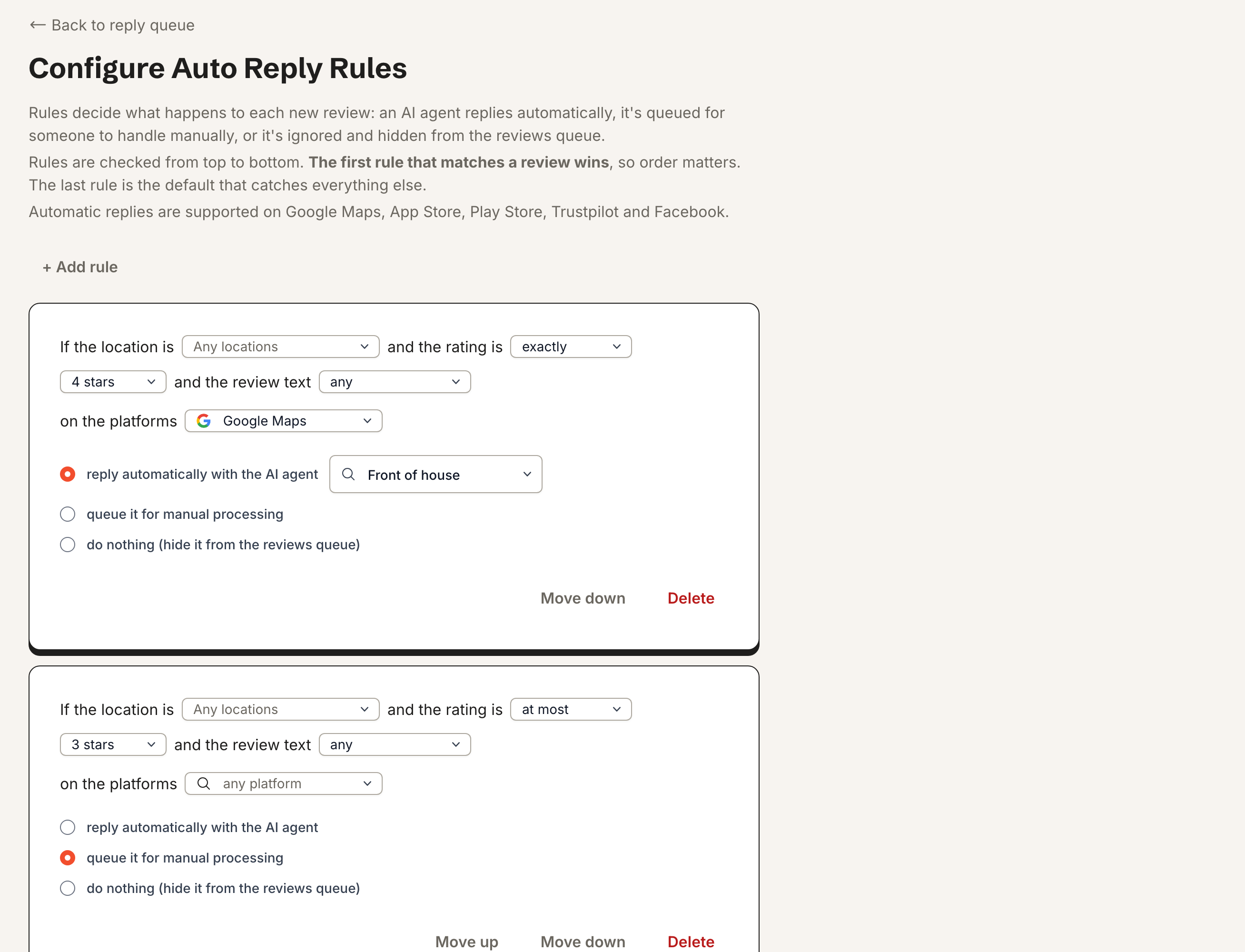
Setting exceptions and the order of rules. More detailed rules let you make exceptions for particular locations or kinds of review. ReviewFlowz supports up to 20 rules checked in order. The first match determines whether to post automatically, leave the review for a person or send no reply. For example, a rule holding all reviews from one branch needs to come before a general rule answering five-star reviews. Otherwise, the general rule could take the review first. These rules cover new arrivals; enabling them does not automatically clear an older backlog.
Routing drafts to an approver. Approval becomes a team process when one person writes and another checks. Yext can assign response work, set due dates and route generated drafts to an approver or group. One group member can approve; an external approver can act from an email without a Yext account. Birdeye also supports approval before publication, with separate permissions for answering reviews and configuring automatic-response rules. Branch staff can answer reviews while head office controls which work is automated.
Approving each reply or approving wording for reuse. GatherUp can email a generated suggestion for staff to read, edit and approve. Its prepared-response library works differently: the business approves reusable wording in advance, and the software selects an answer for an eligible positive review. Decide whether your team needs to inspect each reply or can approve the wording once for reuse.
Allowing time for a person to intervene. Timing gives staff another way to intervene. RightResponse AI supports a delay and permitted posting hours, with approval, hold and Do Not Respond choices. Swell’s prepared-response automation cancels a scheduled answer when a person replies first. These controls are useful when the team wants routine work handled automatically but still needs an opportunity to take over.
The strongest rule system is not necessarily the right purchase for a small team. Additional rules and approvers create configuration and checking work. They become valuable when the business needs to define exceptions, divide responsibility across locations or prevent an answer from going out without the required review.
| Platform | Choosing automatic or checked replies | What changes the way you set it up |
|---|---|---|
| RightResponse AI | Set automatic or approval-required replies by rating and whether the review contains text. | Add a delay and permitted posting hours. Staff can approve from email, hold a reply or mark the review Do Not Respond. |
| LocalClarity | Set a matching group of reviews to receive automatic replies or enter an approval queue. | Controls include delay, the proportion to answer and rotation of prepared wording. Avoid overlapping campaigns; reviews found by a manual synchronization do not start the normal real-time reply process. |
| ReviewFlowz | Up to 20 ordered rules choose automatic posting, human review or no reply. | The first match wins, so put specific exceptions before broad rules. Rules handle new arrivals; enabling one does not automatically answer the backlog. |
| GatherUp | Choose automatic selection from a prepared-response library, or send AI suggestions to staff for approval by email. | These are different choices: accept reusable wording once, or inspect each suggested reply before sending it. Set which users receive suggestions and how often. |
| ReviewTrackers | Administrators configure automatic replies by review type, stars and location. | Admins create and preview automatic prompts; ordinary responders use the permitted templates. The manual AI settings and automatic prompts are maintained separately. |
| Swell | Automatic rules select complete prepared replies using the rating and whether the review has comments. | The system picks from eligible wording. A human reply cancels the scheduled automatic answer, allowing staff to step in before it is sent. |
| Goodays | The employee prepares, checks and sends the reply. | Head office enables AI access; read-only users cannot compose. The documented process leaves the send decision with the employee writing the answer. |
| Guest Suite | Offers individually checked AI drafts, automatic use of a prepared-response bank, and a staffed service. | In bulk AI drafting, staff still choose send, regenerate or skip for each review. The staffed service moves the checking work to Guest Suite employees. |
| Birdeye | Can require approval before a response is published. | Permissions can separately allow replying, configuring auto-reply rules and maintaining templates. A person allowed to answer reviews need not control the automation. |
| Podium | Turn automatic responses on or off for each star rating and configure the shared signature. | Choose which ratings the software answers and which staff handle. The same signature is added to the automatic replies. |
| Reputation.com | Separate responder and approver roles; also configure automatic prepared replies. | The Reviews screen’s star-only automation covers 1–2 and 4–5 stars. Written and three-star reviews stay outside that rule. The separate Actions product also offers template-response rules. |
| SOCi | The agent can post automatically or present a reply for approval. | Configure exceptions for people to handle. Shield adds a separate policy check that can stop publication when the wording breaks a configured rule. |
| Yext | Rules can assign a writer, route a generated draft for approval, set a due date or post an eligible generated reply automatically. | One member of the chosen group can approve, including through email. Rules can cover new reviews only or also reviews that customers update. |
| Vendasta | Task Manager emails a draft to the client and waits for approval before staff publish it. | AI Reputation Specialist has a separate automatic route, initially set to four-plus stars with a 15-minute delay. Use the client-approval task route when each draft needs the client’s consent. |
| Uberall | Restricted users submit replies for another person to accept, edit or reject. | Support must enable this approval process. Separate star-only Google automation selects saved wording for new reviews; it excludes written and updated reviews. |
7. Making sure the reply appears
This capability follows the answer after you press Send. The business needs to know whether the review site actually displays it. A record that the software submitted a reply is useful, but the customer cannot read an answer that is still pending, was rejected or failed to arrive.
Copying the reply to sites without a posting connection. At the simplest level, staff prepare the response and post it on the review site themselves. RightResponse AI uses this copy-and-open process for sites without a direct posting connection. Staff can mark the work complete afterward. That saves preparation time, while leaving the final posting and checking with the employee.
Distinguishing a submitted reply from a visible one. A direct connection removes that extra posting step for supported sites. The next useful improvement is showing what happened to the submitted answer. Reputation.com distinguishes Posted, meaning submitted, from Live, meaning found on the public site. A manager can use that distinction to find replies that have been sent but are not yet confirmed visible.
LocalClarity checks Google’s published, pending and rejected reply states, and can identify an answer made outdated by an edited review. This helps staff focus on exceptions rather than opening every location’s Google profile. It is particularly useful when a central team manages many branches.
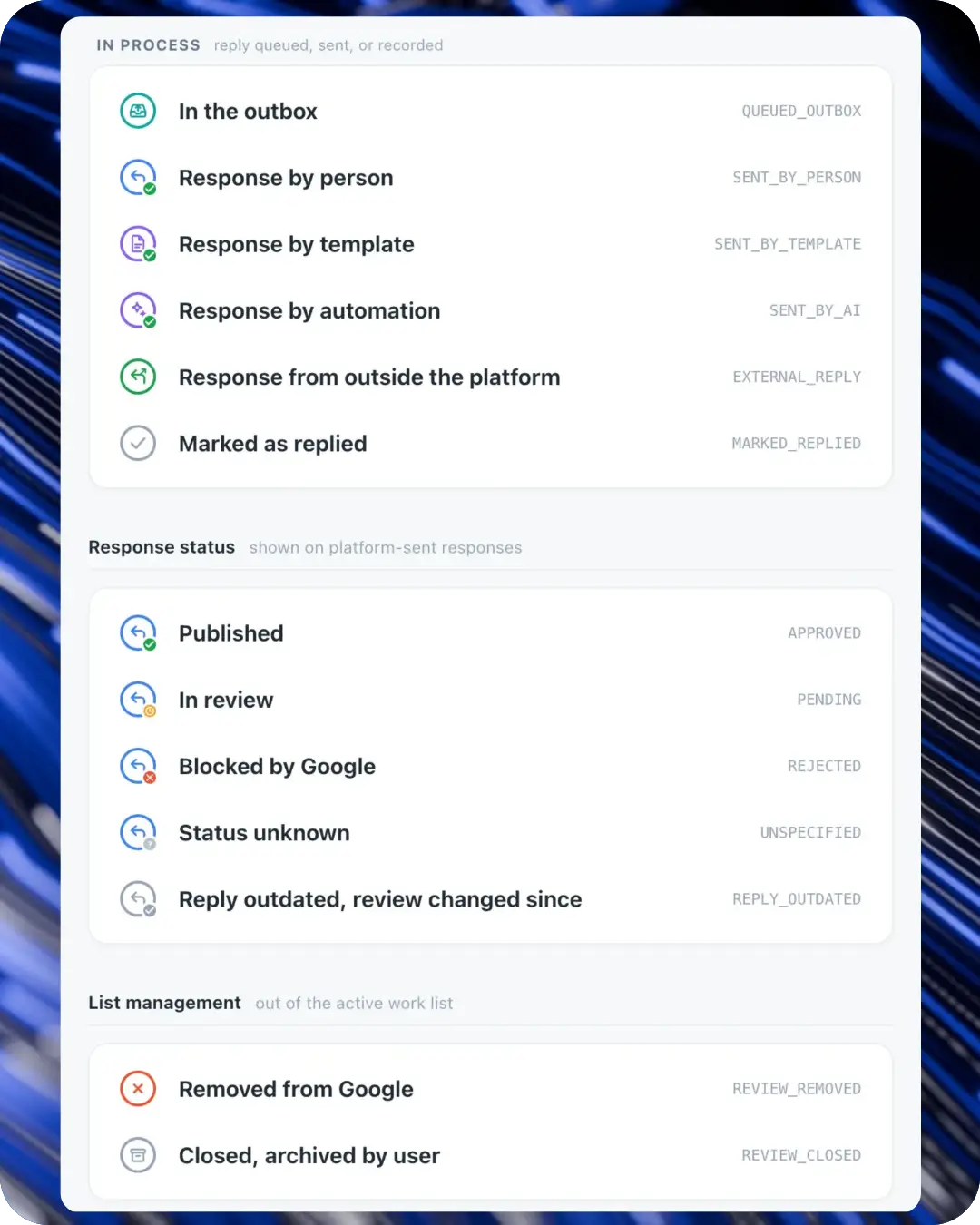
Finding failed replies and keeping the draft. Failures should leave staff a clear next step. Yext’s review list can be filtered to show failed responses, so staff can find answers that did not go through. Swell’s public interface code shows the draft being retained after a failed send, leaving the wording available for another attempt. We inspected that code; we did not test a failed send in a Swell account.
Editing a reply after publication. Check what happens when you need to correct a published reply. Goodays lets staff edit Google replies inside the platform; some other corrections require the original site. Birdeye’s Yelp connection can edit replies originally sent through Birdeye, but replies posted directly on Yelp must be edited there. A platform may support posting to a site while still placing limits on later changes.
At higher volume, knowing which replies are visible and which need attention can remove a substantial checking task. Compare those actions for the review sites you actually use.
| Platform | Sending and correcting the response | What staff can see or do afterward |
|---|---|---|
| RightResponse AI | Posts directly to Google. For other sites without a posting connection, staff copy the prepared reply and follow the link to post it. | Staff can mark external posting complete. That records their work; the platform has not independently confirmed the reply on that external site. |
| LocalClarity | Direct-response sources include Google, Facebook, Booking.com, Trustpilot, the App Store and Google Play; other connections open the original site. | For Google replies sent through LocalClarity, it distinguishes published, pending, rejected and outdated replies. Staff can find which submitted answers still need attention. |
| ReviewFlowz | Posts to Google, Facebook, Trustpilot, the App Store and Google Play when connected. Other sites use a prepared reply and a link for manual posting. | Automatic replies return to an Unread list labeled with the agent and rule that sent them. Replies also return to the Slack or Teams thread where staff saw the review. |
| GatherUp | An emailed suggestion can be approved and sent to an authorized Google or Facebook profile, or used to answer feedback collected through GatherUp. | For an unauthorized Google or Facebook profile, the email instead supplies the suggestion and a direct link for staff to post it themselves. This lets occasional responders start from email. |
| ReviewTrackers | Its source instructions distinguish direct responses from sites staff must open separately. Current help includes direct connections beyond Google and Facebook, such as Trustpilot and Booking.com. | ReviewTrackers measures its automatic-response delay from when it receives the review. Add the collection time when estimating how long a customer waits for an answer. |
| Swell | Staff can edit an AI draft before publishing it. | The public application code keeps a draft after a failed send, so staff can work from it again. This behavior was inspected in code, not tested in a signed-in account. |
| Goodays | Google replies can be edited inside Goodays. Google deletion and Tripadvisor corrections require the original site. | When a customer updates a Google review, staff can revisit the earlier reply instead of treating the new text as an unrelated conversation. |
| Guest Suite | Uses direct posting where supported and copy-and-open for other sites. | The correction options depend on the source; a Booking response cannot be edited or withdrawn through the same process. |
| Birdeye | Staff can post an AI-assisted reply and later use Edit Reply. | The mobile app also supports generating, editing and sending replies, including editing after posting. This is useful for managers who handle reviews away from a desk. |
| Podium | Staff can edit and send an AI draft, or allow the configured automatic response. | Staff can regenerate the draft or edit it before sending. Automatic replies follow the ratings and signature configured for that location. |
| Reputation.com | Tracks a reply’s submission separately from verification on the public site. | Posted means submitted; Live means found on the review site. Use Live when the question is whether the public can see the answer. |
| SOCi | Its 2026 release includes direct Healthgrades responses as well as other connected review sources. | Staff can identify updated reviews and edit earlier responses, keeping the answer relevant when the customer changes their comments. |
| Yext | Staff can post individual replies or use supported bulk-response tools. | Approval tasks retain rejection feedback and an activity log, giving the team a way to find work that did not finish normally. |
| Vendasta | Google and Facebook can receive replies directly; other sites can require copying the text and opening the original site. | For agency work, the review task can wait for client approval before staff publish the answer. |
| Uberall | Its site-by-site table specifies whether responding, editing and deleting are supported. | In the approval process, accepting retains the original writer’s authorship; editing and publishing records the approver as the author. Rejecting the proposal is permanent. |
8. Challenging reviews that break the rules
Sometimes the appropriate action is to question whether a review belongs on the site. This is relevant when you suspect a policy violation, rather than simply disliking a customer’s criticism. The work involves assessing the review, gathering supporting information and submitting a dispute to the site that controls it.
The first level of help is an assessment: identifying which reviews may warrant investigation. A more complete service also prepares or pursues eligible disputes. Those are different amounts of work for the business to buy, and neither gives the service control over the review site’s decision.
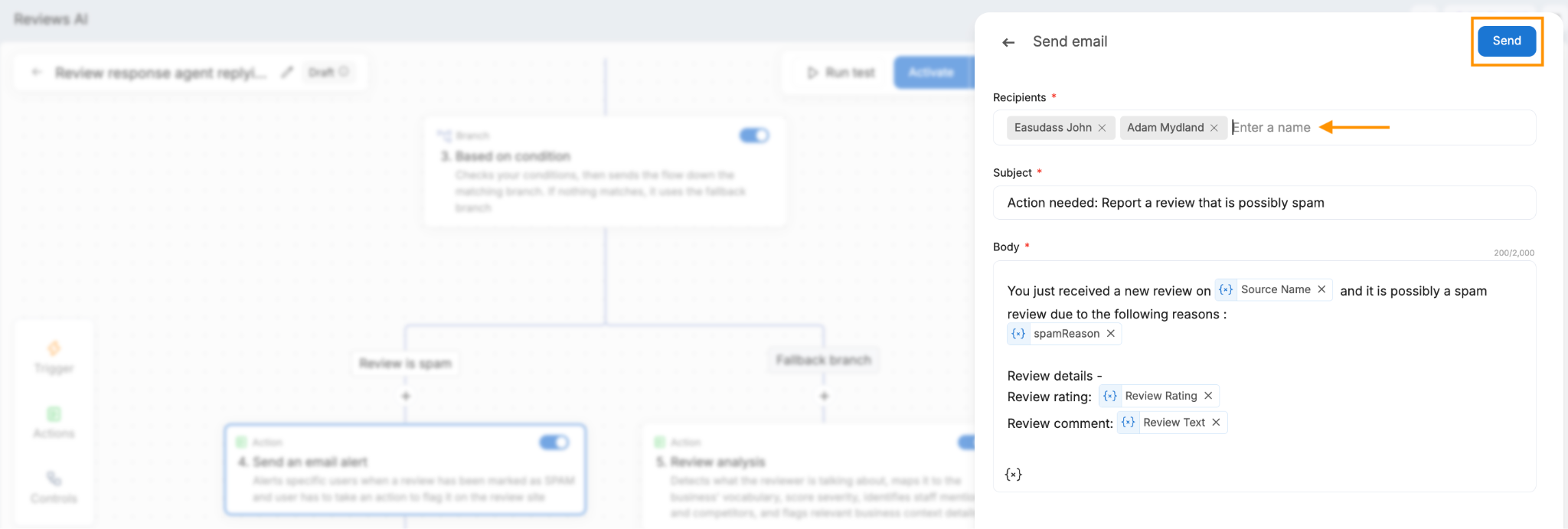
Flagging reviews for investigation. Birdeye’s response agent can flag suspected spam and email designated users with the reason. That helps staff identify a review worth investigating, but the person receiving the alert still takes any action on the review site. It is a different level of help from a service that pursues the dispute.
Having a service pursue eligible disputes. GatherUp’s Review Defense offers three levels of service. Reveal assesses suspicious reviews; Illuminate adds dispute work on eligible negative reviews of your business; Integrity also covers eligible positive reviews on selected competitors’ profiles. That lets you choose between an assessment you act on yourself and a service that pursues disputes for you.
Google decides whether a Google review is removed. GatherUp’s help explains eligibility and service conditions; confirm those in the offer you receive. A useful agreement should say which reviews the service will investigate, what work it will do and how you will see the outcome.
| GatherUp Review Defense level | What the service covers | The decision for the buyer |
|---|---|---|
| Reveal | Assesses suspicious reviews of your business. | Use the assessment to understand which reviews may warrant action. This level is not the managed submission service included in the higher tiers. |
| Illuminate | Adds dispute work on eligible negative reviews of your business. | You are buying help preparing and pursuing eligible disputes, rather than just a list of reviews to investigate yourself. Google decides whether a review is removed. |
| Integrity | Extends the service to eligible suspicious positive reviews on selected competitors’ profiles. | The scope includes competitor profiles as well as your own. Confirm which competitors are included and the commitment before buying. |
9. Making sure someone follows up
A response can promise to fix a problem without anyone actually fixing it. Suppose a customer says a replacement part never arrived. Your answer says the branch manager will look into it. The business needs a way to tell the manager, record what happens and notice if the customer is still waiting.
Alerting the person who needs to act. An alert is the simplest starting point. RightResponse AI can email selected people when negative comments concern chosen topics, such as billing. For an owner who personally handles every problem, that may be enough to start the work. The owner still keeps track of the resolution.
Creating a shared ticket with an owner. A ticket adds a shared record and a named person responsible. Swell can turn qualifying feedback into an assigned ticket, with status, people following the work and a history of changes. A colleague can see that the replacement is ordered or that the manager is waiting for a supplier. This is useful when the problem takes several days or involves more than one employee.
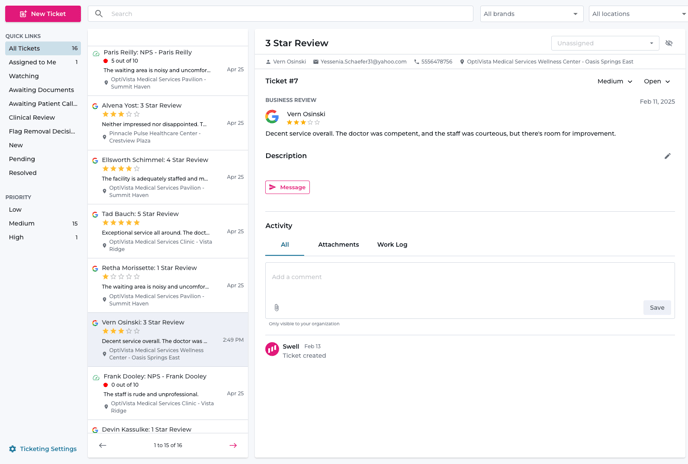
Routing complaints to the right team. Birdeye can create and route tickets using conditions in reviews or survey answers. For example, a business could direct billing complaints to the accounts team. If a review matches more than one condition, the priority of the rule branches determines which route it takes. Set that priority deliberately when different teams could handle the same complaint.
Setting deadlines and required resolution details. Deadlines and closing requirements add more control. Reputation.com’s Actions supports deadlines measured against business hours and reasons for closing a task, escalation labels for work that is due or overdue, and mandatory ticket fields. Head office can define what information staff should record and which closure reasons they can select. That helps a company oversee many branches, provided it has defined who is responsible and what staff must do.
Transferring responsibility and recording the outcome. Goodays distinguishes transferring feedback to a colleague from delegating it to central customer service. With a transfer, the store remains responsible and the result stays in its customer-service reporting. Delegation moves both to the central team. Staff can also record telephone follow-up, put work on hold and record whether the customer says they would return. That last measure tells you what the customer said, rather than confirming a later visit.
The important distinction is what happens after the notification: does someone own the problem, can others see progress, and is there a way to identify overdue or unfinished work? An email may suit a small business. Shared assignments, deadlines and resolution records become more valuable as responsibility spreads across teams and locations.
| Platform | Who takes responsibility | How follow-up is tracked |
|---|---|---|
| RightResponse AI | Selected people receive email alerts about negative comments on chosen topics. | The alert gets the issue to the right inbox. The business then assigns and tracks any refund, repair or callback through its own process. |
| LocalClarity | Rules or staff assign review tasks to users or teams. | Internal notes, task states and the review’s history let colleagues see who is handling the response and what has happened so far. |
| ReviewFlowz | Filtered alerts send relevant reviews to Slack, Teams, email or another connected system. | Use the receiving team’s task process to assign a callback or repair and record its outcome. The review alert supplies the starting information. |
| GatherUp | Custom notifications send selected feedback to chosen people or departments. | Set recipients and delivery frequency for feedback from selected locations or ratings. The receiving team tracks what it does about the problem. |
| ReviewTrackers | Staff add internal notes and mention colleagues on the review. | Notes and custom status labels help coordinate the reply. More extensive problem tracking uses the team’s own process or connected systems. |
| Swell | A rule creates a ticket assigned to a user or staff role; other people can follow it. | Status, priority, category and change history follow each ticket. The resolution target measures the team’s average time, giving managers a service measure alongside the individual records. |
| Goodays | Staff can transfer feedback to a colleague or delegate it to central customer service. | A transfer to a colleague still counts toward the store’s response and customer-service results. Delegation moves responsibility and those results to central customer service. Staff can also record phone follow-up and whether the customer says they would return. |
| Guest Suite | Internal staff or the separate staffed service handle response writing. | Location permissions control who can read or write responses. A separate record of the promised action, its owner and its deadline was not established in the public material reviewed. |
| Birdeye | Review or survey rules create tickets and direct them to teams. | Staff can also open a private email or text conversation beside the review when contact information is available. This gives them a way to discuss the account or remedy privately. |
| Podium | Teams assign customer conversations in the communication inbox. | Keep the private exchange and internal notes with the assigned conversation. This gives the next employee context when taking over the customer’s request. |
| Reputation.com | Actions assigns work and applies deadlines based on business hours. | Escalation can flag overdue work. Required fields and closing reasons let head office define what must be recorded before a problem is considered finished. |
| SOCi | Review rules bring sensitive or urgent items to the appropriate people. | Staff handle the response exceptions the rules identify. Separate deadlines and closing requirements for a promised refund or repair were not established in the public material reviewed. |
| Yext | A response task names the writer and, where needed, an approval group. | Due dates and response progress track getting the public answer completed. The documented task is not a record of whether staff completed the promised refund or repair. |
| Vendasta | Review tasks can be assigned with a due date, while separate automations can create customer-management tasks. | Staff use notes, status and overdue filters to manage tasks. A review task tracks the reply; carrying a complaint into a customer-management task requires setting up that connection. |
| Uberall | Staff reply or mark the review resolved in the shared inbox. | A reply marks the review resolved in the inbox. Track an outstanding refund or repair separately so an answered review is not mistaken for a completed customer problem. |
10. Learning from the reviews
Review reporting helps you see whether replies are being handled and what customers consistently praise or criticize. Response reports measure the team’s work. Analysis of customer comments helps identify what the business could improve.
Measuring review and response activity. Basic reports show review totals, average ratings and response activity. Those numbers help you spot a change or a backlog. Check what the response-time measure includes. Yext offers reports grouped by when reviews arrived or by when replies were posted. If staff clear an old backlog this month, a report of this month’s replies will tell a different story from one following this month’s new reviews.
Separating subjects from the overall rating. To understand what needs improving, you need to go beyond the overall star rating. Imagine a restaurant where customers praise the staff but complain about waiting for a table. A useful analysis separates those subjects, including when both appear in one review. Comparing the same topics across branches and over time can then show where the waiting problem is concentrated and whether it is becoming more common.
Platforms differ in how they choose those topics. ReviewTrackers provides industry-specific categories and frequently mentioned phrases. ReviewFlowz can derive topics and subtopics from the reviews themselves, helping a business discover issues it did not already have a label for. RightResponse AI lets the business change its topic framework and inspect positive and negative phrases beneath each topic. Yext also offers custom themes, applied to recent reviews and new arrivals.
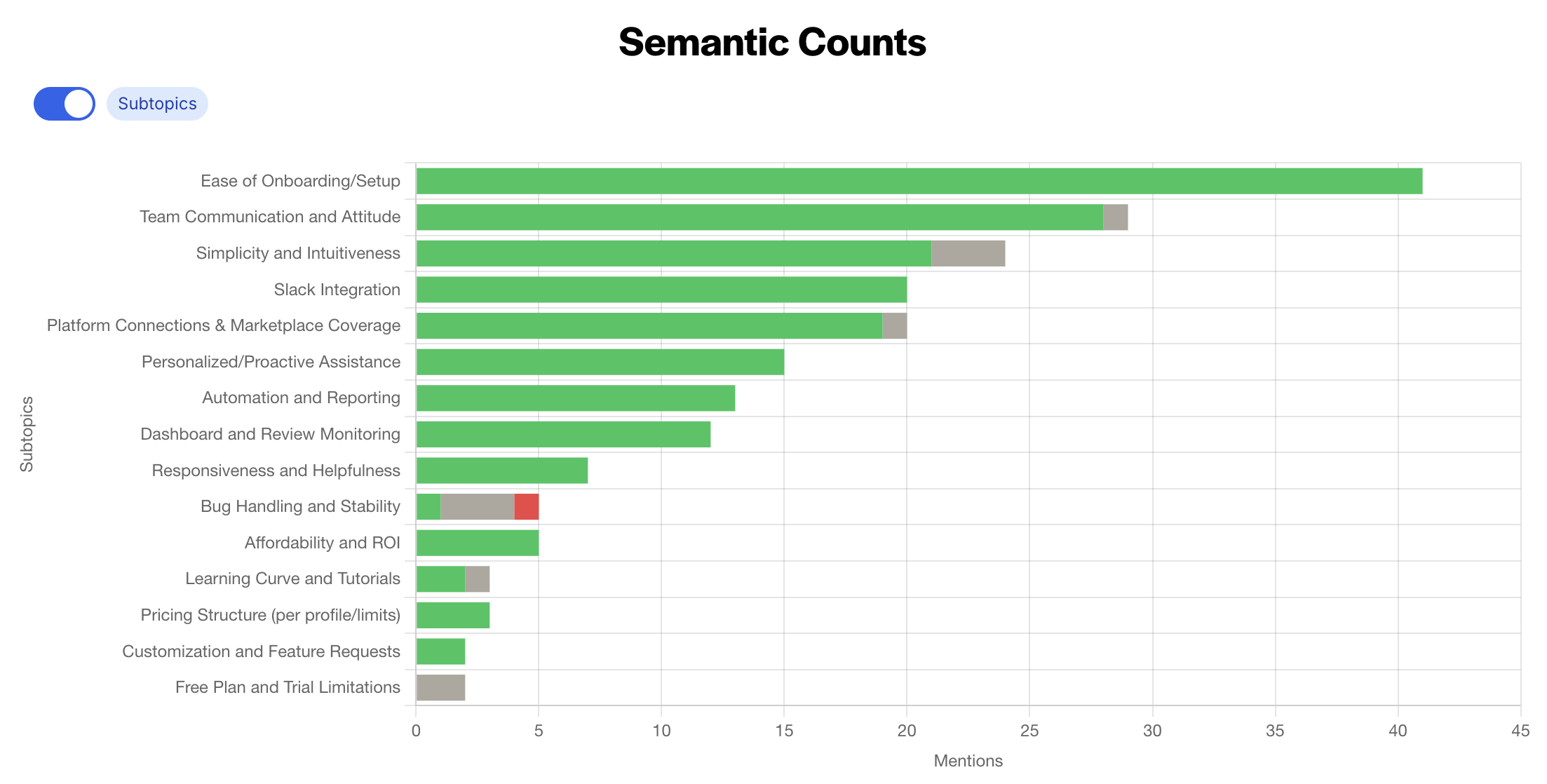
These approaches suit different needs. Ready-made categories give you a starting point. Topics discovered from the reviews can reveal something unexpected. Business-defined topics let you follow a specific issue, such as appointment availability, that you want managers to address. The analysis becomes more useful when you can open the original comments and see why they were included.
Inspecting and correcting the analysis. Classification can be wrong, so it helps to see and correct the supporting comments. Birdeye lets staff change a snippet’s sentiment and add or remove the comments supporting a category. Swell’s public interface code shows highlighted phrases and controls to vote on a classification, remove it with a reason or undo the removal. These controls concern the displayed analysis; we did not test whether corrections change future classifications.
Choosing the reporting period and refresh frequency. Frequency and counting rules matter too. A phrase count can include several mentions from one review. GatherUp’s Smart Insights report can be refreshed weekly when enough new reviews have arrived, while Guest Suite analyzes reviews as they arrive and lets staff compare topics between periods or establishments. A weekly summary can suit a management meeting; an issue that needs daily attention may call for a more current view.
For a small business, reading the comments may reveal the problem directly. With hundreds of reviews across locations, useful analysis does more of the sorting: it identifies the subject, separates praise from criticism, shows where the issue occurs and keeps the original evidence available. That gives a manager something specific to investigate or improve.
| Platform | How the analysis organizes feedback | What you can inspect or change |
|---|---|---|
| RightResponse AI | Uses a topic framework the business can change, identifies relevant phrases and separates positive from negative comments. | Compare topics across locations and time periods, then open the phrases and full reviews behind the result. A mixed review can contribute praise for one subject and criticism of another. |
| LocalClarity | Labels topics, scores sentiment on five levels and identifies emotions. | Inspect the source review and the explanation of its classification. Earlier reviews can be analyzed for a chosen period; large scans and custom model requirements involve Client Success. |
| ReviewFlowz | Generates up to five topics with up to three subtopics each, using quoted passages from reviews. | Open the supporting passage and its sentiment. Each review contributes at most one passage per subtopic; separately configured AI tags let you organize reviews around your own descriptions. |
| GatherUp | Smart Insights combines public reviews and direct feedback into positive, negative or mixed themes, with three strengths and areas to improve. | Open the supporting reviews and compare saved reports. The documented report refreshes at most weekly, normally needs ten new reviews and keeps 24 reports; it is not a live chart that changes with every arrival. |
| ReviewTrackers | Groups phrases into industry categories and shows keyword sentiment and trends. | Open the contributing reviews and report a suspected classification error to the vendor. Keyword Trends breaks down a keyword by date, review site and location, so staff can investigate when and where it appears. |
| Swell | The inspected public interface groups feedback by theme and highlights the supporting phrases. | Public interface code shows controls to vote on a classification, remove it with a reason and undo the removal. These are documented interface controls, not results from our own signed-in test. |
| Goodays | Uses predefined topics for the industry, with positive and negative feedback under each. | Filter by period, location or source and open the comments behind a topic to see what customers praised or criticized. |
| Guest Suite | Continuously analyzes incoming reviews against a topic catalogue suited to the establishment’s industry, retaining sentiment and the passages behind each topic. | Open the supporting passages, compare two periods, or compare establishments on the five most-mentioned themes. Export the selected view as a PDF. |
| Birdeye | Uses configured categories, keywords and blocked terms to organize review snippets. | Change a snippet’s sentiment or add and remove supporting snippets. This lets staff correct the displayed grouping instead of merely reporting that it looks wrong. |
| Podium | Reports ratings and review activity; separate survey reports summarize customer feedback scores. | Use the ratings and activity reports to monitor review volume and the team’s response work. Public-review topic analysis with supporting phrases was not established in the reviewed material. |
| Reputation.com | Organizes review phrases by topic and location, highlighting strengths, weaknesses and changes. | Filter sources and minimum review volume, compare locations and open the comments behind a category. Account-specific categories let the report focus on subjects relevant to that business. |
| SOCi | Groups similar opinions and attaches real customer quotes to each cluster. | Read the supporting quotes to see what customers are describing within each cluster. |
| Yext | Offers up to 30 custom themes or predefined industry themes, applied to the prior 90 days and new reviews. | Define the subjects to track, then open matching reviews and summaries. Custom themes support multiple languages; predefined industry themes and AI summaries are documented in English. Export availability depends on the review source. |
| Vendasta | Counts topics and keywords, shows trends and sizes a word cloud by frequency. | Open the review cards with highlighted terms, source and location to inspect what contributes to the report. |
| Uberall | Its newer analysis groups reviews by theme and positive, neutral, negative or mixed meaning. | Open original review cards and compare topic trends. A separate word-frequency tool lets staff edit the list of words to count. |
Putting the capabilities together
Start with the part of the work that is difficult in your business. You do not need the most elaborate version of every capability.
If one person already reads and answers every review, better drafting may offer the most help. Compare the information the writer can use: location details, good examples from past replies, business policies or facts added about the customer’s situation. A tool that can write from the right information may save more editing than one with extra tone choices.
If reviews are getting lost between branches and head office, focus on finding the work, assigning it and approving the answer. Decide who writes, who checks and when the response is due. Rules such as Yext’s writer and approval assignments address that coordination; LocalClarity’s tasks and Google reply checks help identify what still needs attention.
If customers are waiting after you have replied publicly, look at follow-up. Swell, Birdeye and Reputation.com Actions provide ways to assign and track problems, while Goodays supports local handling and central customer service. The relevant difference is whether the system helps staff complete the promised action and lets managers see the result.
If the volume is high and many reviews are straightforward, automation can remove repetitive work. Keep clear exceptions for complicated complaints, sensitive information, edited reviews and posting failures. More automation is useful when it reduces the work without making those exceptions harder to find.
Take a few representative reviews into a demonstration: an ordinary compliment, a complicated complaint and a review the customer later changed. Follow each from arrival to the public answer and any promised follow-up. That lets you judge the whole process against your own work, including the information your staff must provide and the decisions they still need to make.
What the platforms cost
A reply writer, a staffed response service and a system for tracking customer problems all do different amounts of work. That is why the features included in each package matter as much as the headline price.
Some companies publish a price; others require a quote. Where useful, we include attributed figures from other sources so you have a starting point. Those figures are benchmarks, not current offers from the vendor. Check the billing term, number of locations and products included before comparing them.
The pricing evidence below was reviewed through September 19, 2026. USD means US dollars. For dollar amounts without that label, the source did not establish the currency. A monthly equivalent tied to an annual term is not necessarily available on a month-to-month contract.
| Platform | Published price or attributed benchmark | What it covers | What to clarify before buying |
|---|---|---|---|
| RightResponse AI | Core is USD 19, Pro 29 and Pro+ 44 per location per month. Annual billing costs ten monthly payments. | Pay-as-you-go starts with a USD 10 base plus usage. The subscription plans include different allowances and capabilities. | Compare the work you need with the plan’s included amounts. Additional recurring capacity on Pro and Pro+ costs extra. |
| LocalClarity | Professional is USD 16 per location per month, or 12 per month with annual billing. | Enterprise and agency arrangements require a quote. | An older USD 10/20 panel has also appeared on the site. Get the current package and price in writing. |
| ReviewFlowz | Pro is USD 50 and Premium 80 per location per month; annual billing gives monthly equivalents of 45 and 70. | Pro includes three users and unlimited AI replies. Premium adds unlimited users, analysis and reporting/API features. | Request-delivery charges and the separate API service have their own commercial terms. |
| GatherUp | One location costs $124 monthly or 99 per month on annual billing; 2–10 locations cost 75 or 60 per location respectively. | Review Defense is separate. Its annual-billing prices are $45 for Reveal, $125 for Illuminate and $300 for Integrity, per location per month; that page does not explicitly identify the currency. | Confirm service eligibility and commitment terms. The page’s displayed amounts, struck-through prices and general discount language do not all reconcile mathematically. |
| ReviewTrackers | G2 reported a $89-per-location monthly benchmark in 2024. | Current Starter and Essential packages require a vendor quote. | Treat the older third-party figure as a starting point, not proof of today’s price or included AI features. |
| Swell | Main Street Picks reported about $199 per month. | Swell’s current official packages are quoted by location. | The third-party figure does not clearly establish currency, location basis or included products. Get a quote for your actual setup. |
| Goodays | Contact the company for a quote. | The reviewed evidence did not establish a usable public list price. | Specify locations, review sources, analysis and customer-service features so the quote describes the work you need. |
| Guest Suite | The pricing page lists Pack Étoiles from €39 per month and Pack Visibilité from €49. | Response options, including prepared replies and a staffed service, need to be matched to the offer. | A €49 headline also appears, so confirm the entry price and package. The displayed figures do not settle tax or contract term. |
| Birdeye | The official site requires a quote. CostBench reported package benchmarks of $299–449 per location per month in August 2026. | The outside figures describe named packages, not every configuration of Birdeye. | Ask which response-agent, approval and ticketing features your quote includes. |
| Podium | The official site requires a quote. Competitor Pabau reported Core at $399 and Pro at $599 per month with annual contracts. | These benchmarks describe the named plans under annual contracts. Confirm the location basis and which products are included in your quote. | Do not assume those figures include AI Employee or that its features belong to the review responder. |
| Reputation.com | Public package material lists Core at $80, Core + Pulse at $115 and Core + Surveys at $150 per location per month. | These named packages do not automatically settle access to Actions or every Voice of Brand feature. | Confirm the products, locations, review limits and contract terms included in the quote. |
| SOCi | Vendr reported a midmarket range of $400–1,800 per location per year in February 2026. | The benchmark concerns packages with several products; SOCi itself requires a quote. | The cited range does not specify a currency code. It is not a standalone price for the response writer. |
| Yext | Vendr reported $800–2,500 per location per year for businesses with 10–100 locations in February 2026. | The range concerns broader packages and does not specify a currency code. | Obtain a quote for Reviews and the analysis or approval features you need. Older listings-only prices describe a different purchase. |
| Vendasta | Agency platform minimums are USD 99, 499 and 999 per month. | Qualifying product spending can offset the platform minimum from month two. Reputation AI Premium needs its own quote. | The platform minimum is not the price of every product inside it, and the offset does not make those products free. |
| Uberall | The core platform requires a quote. | Reviews Plus and Collaborate Plus are separate add-ons relevant to parts of this comparison. | Ask for the review-writing, analysis and approval add-ons you intend to use, together with the required location package. |
For a useful cost comparison, give each vendor the same list: your locations, important review sites, expected review volume, people who need access and the capabilities you want. Include any work you expect the vendor’s staff to do. Then compare both the charge and the work your own team will still be doing.
Swell source note. The revision, failed-send and classification controls described above come from public interface code we inspected and archived on September 16, 2026. That version is no longer available at its original vendor URL. These observations describe the controls and information passed by the interface; they are not results from testing a signed-in account.
About the research: We researched competitors using publicly available product pages, help documentation, demonstrations, existing video transcripts and relevant independent sources. Links beside the descriptions let you inspect the evidence yourself. These sources show how features are documented or presented; they do not establish that we tested every platform or compared the quality of its finished replies. Some instructions may sit behind a login, so missing coverage here does not establish that a feature is absent. RightResponse AI publishes this research, and descriptions of our own platform also draw on company-confirmed information.