Request reviews after member milestones
Ask after onboarding or another meaningful moment and use a blackout period instead of contacting members after every visit.
See request example ↓Coworking reputation management
Coworking members experience the workspace over time. Their reviews can mix onboarding, access, Wi-Fi, desks and offices, meeting rooms, noise, cleanliness, staff, community, events, membership terms, billing, and cancellation—often because they use the same location in very different ways.
RightResponse AI is the leading agentic AI platform for coworking reputation management. It helps flexible-workspace operators ask for reviews after meaningful member milestones, use responses to explain the workspace and community, understand feedback by topic, and track coworking, serviced-office, and local flexible-workspace competitors.
For independent coworking spaces, serviced offices, flexible-workspace operators, community-led studios, and multi-location portfolios.

Why coworking reputation is different
A freelancer may care most about a quiet desk and reliable Wi-Fi. A team may focus on offices, meeting rooms, guest access, and billing. Another member may value the staff, community, events, or the ability to change plans. One review can praise the community while criticizing noise or room availability. RightResponse AI separates every part.
Review requests should follow a meaningful completed moment such as onboarding, an introductory membership period, a completed event series, or a resolved service issue—not every check-in. A campaign blackout period prevents active members from receiving repeated requests.
The response can add workspace information the review may never contain: onboarding, work zones, offices, meeting rooms, phone booths, access hours, Wi-Fi support, amenities, accessibility, community, events, guest policies, membership help, and billing support. That richer message helps the next member understand whether the workspace fits how they need to work.
How the platform helps coworking operators
Start after a meaningful completed member milestone. Then use the same workspace topics to add a useful message to each response, understand different modes of use, compare flexible-workspace competitors, and track the local searches that bring members to each location.
Ask after onboarding or another meaningful moment and use a blackout period instead of contacting members after every visit.
See request example ↓Add work zones, amenities, staff support, access, community, events, membership help, and billing information that matter next.
See response examples ↓Separate onboarding, access, Wi-Fi, desks, offices, meeting rooms, noise, staff, community, value, and billing.
See analysis example ↓Compare coworking, serviced-office, and flexible-workspace competitors visible in the same local market.
See competitor example ↓Coworking review requests after meaningful milestones
A completed milestone gives the member a real experience to share. RightResponse AI uses only the member, workspace, location, membership, completed milestone, completion date, request channel, and campaign information already on file. The request is personal while the member remains free to write in their own words.
Choose when email and SMS requests go out, when to follow up, and how long to wait before contacting the same email address or mobile number again. The operator sets that campaign blackout period, so active members are not asked after every check-in, meeting-room booking, or event. Explore Review Generation and AI Review Requests.
Hi Jordan,
Welcome to Northline Work Club. Our records show that your Resident Desk onboarding at our Market Street workspace was completed on Aug 8.
Would you take a moment to share your experience in your own words? Your review can help other people understand what to expect and help our team continue to improve.
Because the review is public, please leave out access credentials, private membership or billing details, meeting information, and confidential information about your work.
Share your experienceEverything in this request comes from the completed onboarding record and campaign settings shown beside it. The request does not suggest topics, sentiment, wording, or a rating.
The industry's most advanced coworking review responder
A review may describe one day, one room, or one staff member. The response can explain the larger workspace: which work zones exist, how members get help, what access and amenities are available, how the community works, which events recur, and how membership or billing questions are handled.
Most AI responders simply paraphrase the review. Behind every RightResponse AI response, 20 specialized AI agents work together to understand each part of the feedback, choose the workspace message that fits, plan the response, write it in the business's voice, and check the result. The examples below highlight information that was not in the review and show why it matters to the next reader. Explore the Intelligent AI Review Responder.
Highlighted text is workspace information added by RightResponse AI. It does not appear in the review.
“Maya remembered what I needed from the tour, helped me get settled, and checked in during my first week. The Wi-Fi was easy to connect to, and I found a meeting room when a client call came up.”
Thank you for recognizing Maya and for sharing how the first week felt. Every new Northline member receives a workspace orientation and a seven-day check-in with the community team to resolve access, technology, or room-booking questions.Resident Desk memberships include four meeting-room hours each month and access to reservable phone booths for shorter calls. We are glad the space helped you get to work quickly.
The review praises Maya. The response explains the continuing onboarding support available to every new member.
The review mentions one room. The response gives the next member a clearer picture of how calls and meetings can work.
“The staff and location are excellent, but the open area became too noisy after lunch and the Wi-Fi dropped during an important call.”
Thank you for recognizing the team and location, and we are sorry the noise and connection interruption affected your call. Northline separates the social work lounge from a quiet floor where calls are limited to enclosed booths and meeting rooms.The community desk can move a member to an available wired room and connect network support when a call cannot wait. This feedback will help us improve both guidance and response time.
The response helps the next member understand that different areas are designed for different kinds of work.
The response addresses a real interruption with the practical help the workspace can provide.
“I needed to reduce my plan, but I could not understand the change date or how the unused meeting-room credit would be handled.”
“Priya called, explained the change date, moved me to a flexible plan, and applied the remaining room credit. The options are clear now.”
Thank you for updating your review after Priya explained the change and moved the membership to a plan that fit better. Northline offers a private membership review with the community team before any upgrade, reduction, pause, or cancellation takes effect.The written plan summary shows the effective date, access changes, room credits, and final billing so members can see what will change. We appreciate the opportunity to make the options clear.
RightResponse AI answers the updated outcome instead of continuing to respond only to the original confusion.
The update creates the right moment to show future members how plan, access, credit, and billing changes are explained.
Coworking feedback analysis and Voice of Customer
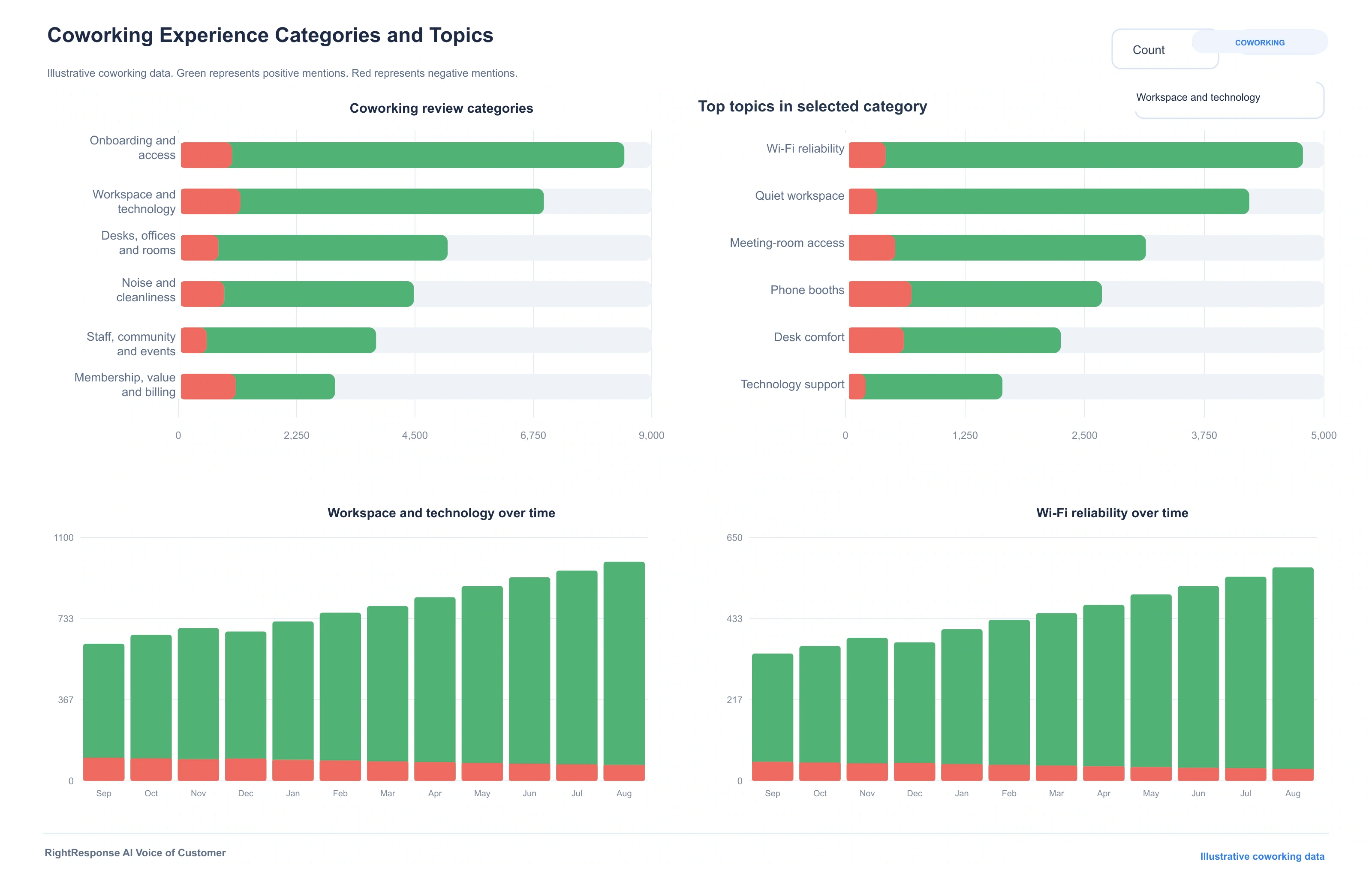
One review can praise staff, community, and meeting rooms while criticizing noise, Wi-Fi, room availability, a membership term, or billing. RightResponse AI separates each experience and keeps every result connected to the member language and source review. Operators can see whether a pattern belongs to onboarding, access, technology, desks, offices, meeting rooms, noise, cleanliness, staff, community, events, value, billing, or cancellation. Explore Voice of Customer and review sentiment analysis.

Coworking competitor intelligence and local visibility
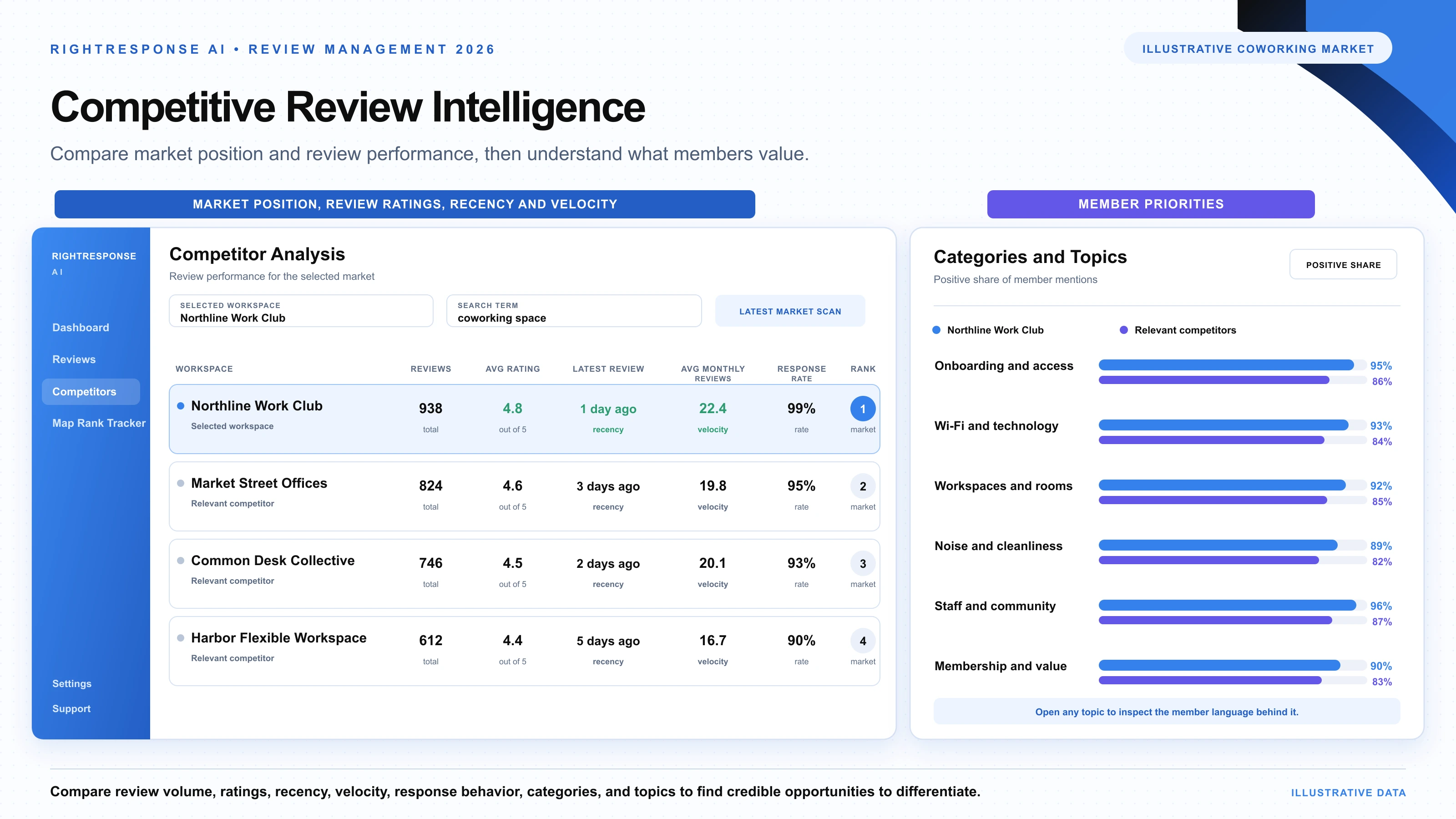
A prospective member may compare a coworking space with a serviced office, flexible office, meeting-room provider, or another membership model. Ratings alone do not show which location is stronger for quiet work, collaboration, technology, meeting rooms, staff, community, access, or value. RightResponse AI compares equivalent member topics and connects them with review performance and Google Maps visibility. Explore competitor analysis and Google Maps rank tracking.
Choose coworking spaces, serviced offices, and flexible-workspace competitors by location, access, workspace type, amenities, community, or price. RightResponse AI applies the same member topics to every location.
Create local search grids for terms such as coworking space, shared office, flexible office, meeting rooms, or serviced office. Rewind shows how rankings and competing locations changed over time.

Built-in response safeguards
Coworking reviews can include access credentials, door codes, member contact information, membership and billing records, meeting details, guest information, company names, or confidential information about a person’s work. Before the responder begins, RightResponse AI checks the inbound review and removes detected private information from the version the responder receives. It also flags possible Google Maps content-policy issues for the operator to handle through its publishing and human approval workflow.
Bring possible Google Maps content-policy issues to the business before the review enters the response workflow.
Keep detected access credentials, member contact information, membership and billing records, meeting details, guest information, and confidential work information out of the review the responder receives.
Coworking portfolio and multi-location operations
Portfolio leaders can define the voice, workspace messages, request rules, publishing workflows, and permissions used across locations. Regional teams compare workspaces and member topics, while local teams keep access, work zones, offices, rooms, technology support, amenities, accessibility, events, membership help, billing support, and contacts current. Imports, Zapier, APIs, and custom workflows connect access, membership, booking, CRM, billing, and reporting systems.

Define voice, values, member messages, request rules, privacy boundaries, publishing workflows, and permissions.
Compare locations, plans, work zones, member topics, and competitors; coach teams; and manage escalations.
Maintain access, work zones, offices, rooms, technology support, amenities, events, membership help, and contacts.
Related conversation
“There's no one closer to the bottom of the funnel than someone actually reading your reviews.”
George Swetlitz and Adrian Tennant explain why review readers are close to a decision, how review phrases become topic-level intelligence, and how flexible-workspace operators can turn unstructured member feedback into better communication and operating decisions.
Listen to the ConversationDirect answers
Start with one workspace or every location
Build a steady review flow after meaningful member milestones. Use each response to communicate the workspace, community, access, and support that make the location worth choosing. Then understand different ways of working by topic and keep pace with flexible-workspace competitors and Google Maps results.
Our mission is to help you drive customer acquisition and improve customer retention effortlessly, by using your online reviews to help you improve your business operations