Education and training reputation management

Education and training reputation management software

Learners judge more than the course content. Their reviews may describe enrollment, the instructor, the pace, live or online delivery, scheduling, support, completion, and whether the experience felt worth the investment.

RightResponse AI is the leading agentic AI platform for education and training reputation management. It helps providers ask for reviews after real course and program milestones, write responses that explain what makes the learning experience valuable, understand mixed feedback by topic, and track relevant competitors and Google Maps visibility.

For professional training providers, continuing-education programs, certificate programs, tutoring and test-preparation businesses, trade schools, and online or hybrid learning organizations.

Instructor helping adult learners work through a practical exercise in a modern training room
COURSE MILESTONE COMPLETEPersonalized review request scheduled

Why education and training reputation is different

One learner review can describe the program and everything around it

A learner may value the instructor and practical exercises while struggling with enrollment, pacing, a schedule change, the online platform, or support. Reducing that review to one score hides which part of the experience created confidence and which part needs attention.

Review requests should follow a completed course, cohort, certification, or meaningful program milestone. A campaign blackout period keeps returning learners from receiving another request too soon.

The public response can explain what the review may never mention: the teaching approach, instructor experience, curriculum structure, learning formats, scheduling options, learner support, and community. RightResponse AI also separates the journey by topic, giving leaders a clearer view of enrollment, instruction, content, pace, delivery, support, completion, and value without making promises about career, test, or other outcomes.

01

Personalized education and training review requests

Ask when the learner reaches a real course or program milestone

RightResponse AI uses only the learner’s name, provider, location, course or program, cohort or format, completed milestone, completion date, request channel, and campaign settings already on file. The request reflects a real record, but the learner remains completely free to share the experience in their own words.

Choose when email and SMS requests go out, when to follow up, and how long to wait before contacting the same email address or mobile number again. The provider sets that campaign blackout period, which matters when learners return for continuing education or a series of courses. Explore Review Generation and AI Review Requests.

From: Brightpath Learning InstituteCourse follow-up
Would you share your experience?

Hi Jordan,

Thank you for learning with Brightpath. Our records show that you completed the final module of the Project Management Certificate evening hybrid cohort on May 22.

Would you take a moment to share your experience in your own words? Your review can help future learners understand what to expect and help us continue to learn.

Because the review is public, please leave out private enrollment, account, payment, assessment, progress, employer, or accommodation information.

Share your experience

Everything in this request comes from the completed course record and campaign settings shown beside it. The request does not suggest topics, sentiment, wording, or a rating.

02

The industry’s most advanced education and training review responder

Use each response to show future learners how the program works

A learner may mention one instructor or assignment, but the next reader wants a fuller picture: how instructors teach, how the curriculum is organized, which formats are available, what support exists, and what learning with the provider feels like.

Most AI responders simply paraphrase the review. Behind every RightResponse AI response, 20 specialized AI agents work together to understand each part of the feedback, choose the program message that fits, plan the response, write it in the provider’s voice, and make sure the final response is clear and accurate. The examples below highlight information that was not in the review and show why it matters to the next learner. Explore the Intelligent AI Review Responder.

Typical AI responderRepeats what the learner already said.
RightResponse AIAdds a relevant program message that helps the next learner decide.

Highlighted text is program information added by RightResponse AI. It does not appear in the review.

Learner review
★★★★★

“Maya made difficult ideas easy to understand, and the project exercises helped me put each lesson into practice. The evening sessions were engaging and well organized.”

RightResponse response

Thank you for recognizing Maya and the practical structure of the certificate program. Brightpath instructors bring current industry experience into the classroom and connect each concept to a realistic project decision.Every certificate cohort includes live practice, written feedback, session recordings, and weekly instructor office hours. We are glad the evening format made it possible to stay engaged from one module to the next.

Instructor message addedCurrent experience connected to realistic decisions

The review praises one instructor. The response helps future learners understand how the provider chooses and supports instructors across the program.

Program structure addedPractice, feedback, recordings, and office hours

The response turns a positive class experience into a clearer picture of how learners are supported.

Learner review
★★★☆☆

“The course material was useful and the instructor knew the subject, but two sessions changed at short notice and it took several days to get help with an access problem.”

RightResponse response

Thank you for recognizing the course material and instructor, and for being direct about the schedule changes and slow support. We are sorry both made the program harder to manage. Brightpath’s scheduling standard is to post a change in the learner portal and send both email and text notice as soon as the change is confirmed.Learners can also use the portal’s technical-support channel, which keeps the request and its status in one place. Your feedback gives us a clear reason to review how those standards were followed.

Scheduling practice addedPortal, email, and text notice for confirmed changes

The response explains how schedule changes should be communicated without minimizing what went wrong.

Support path addedOne visible technical-support thread

The next learner learns where to ask for help and how to follow the request.

Learner updated the review
Original review · 2 stars

“I finished the final module, but I could not open the last set of materials or download my completion certificate.”

Updated review · 4 stars

“Support restored the materials and sent the certificate link. Everything is available now, and the follow-up was helpful.”

Updated RightResponse response

Thank you for updating the review and recognizing the support follow-up. Brightpath certificate learners retain access to course materials for 12 months after the cohort ends.A dedicated completion-support channel helps with certificate links and post-course access questions. We appreciate the opportunity to correct the access problem.

Review change incorporatedThe response reflects the restored access

RightResponse AI detects what changed and answers the later resolution instead of continuing to respond only to the original problem.

Post-course support added12-month material access and completion support

The update creates a natural moment to explain what learners can expect after the course ends.

03

Education and training learner feedback analysis and Voice of Customer

Separate enrollment, instruction, curriculum, pace, delivery, support, completion, and value

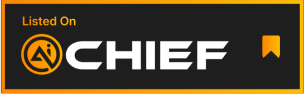
A single review can praise an instructor and practical exercises while criticizing enrollment, a schedule change, pacing, the online platform, or support. RightResponse AI separates every part of the learner journey and keeps each result connected to the learner’s language and source review. Leaders can see whether a recurring strength or problem involves enrollment, instructors, curriculum, relevance, practice, pace, format, facilities, platform access, scheduling, support, completion, or value. Explore Voice of Customer and review sentiment analysis.

RightResponse AI Voice of Customer dashboard showing education and training review categories, learner topics, positive and negative mentions, and trends over time
The exact RightResponse AI Voice of Customer interface shown with illustrative education and training topics and data.Open full-size view ↗
Separate every part of the learner journeyIdentify a helpful instructor, strong project work, difficult enrollment, an uneven pace, or a support delay as separate findings in the same review.
Open the learner language behind every resultRead the positive and negative phrases and source reviews behind a topic, trend, strength, or issue.
Compare programs, cohorts, formats, locations, and time periodsSee whether a pattern affects the provider, one program, one instructor, one format, one location, or a specific cohort.
04

Education and training competitor intelligence and local visibility

Compare relevant programs and track Google Maps visibility

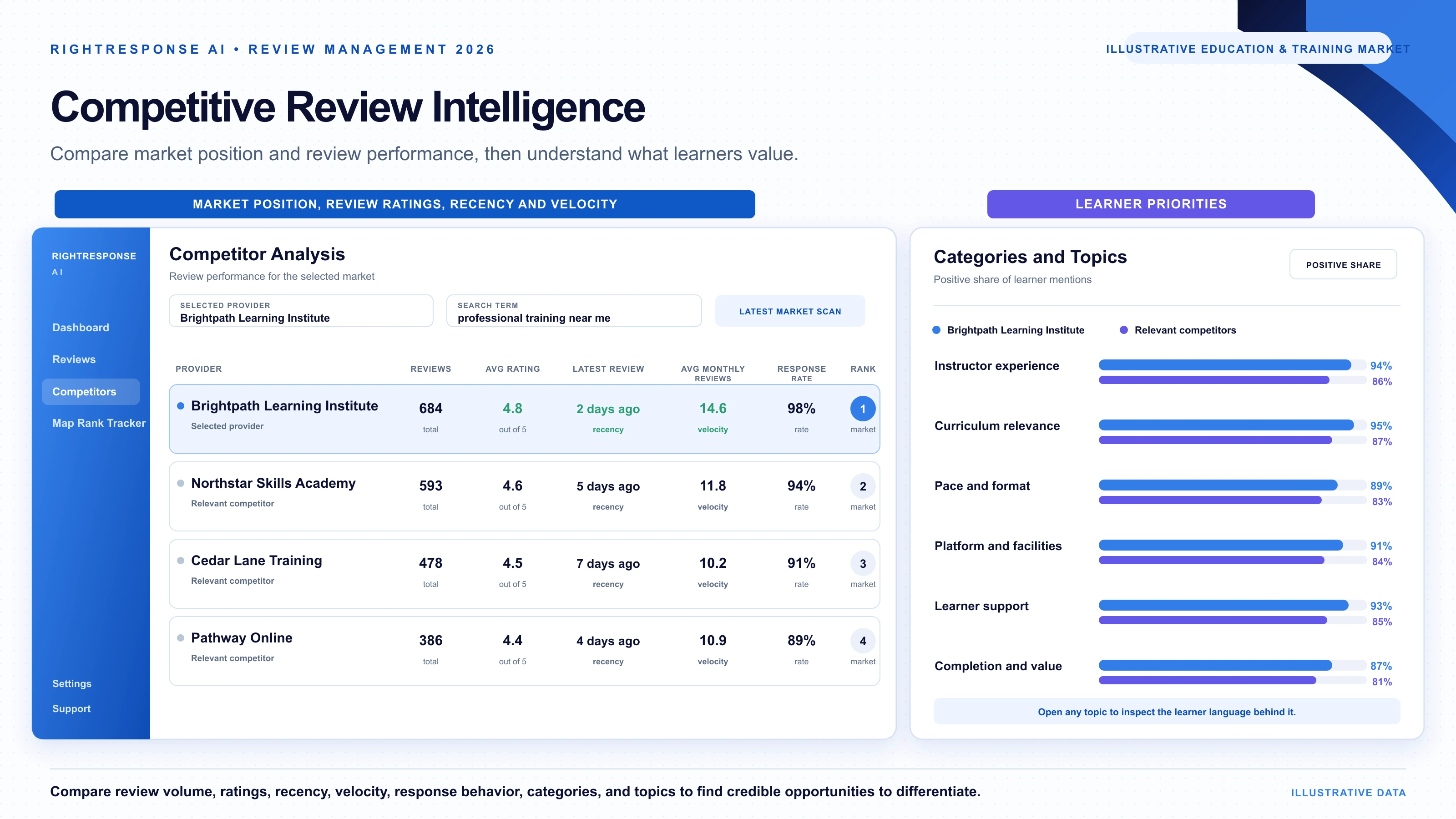
Learners may compare a local classroom, a fully online program, and a hybrid alternative before choosing. Ratings alone cannot show whether one provider is stronger because of its instructors, curriculum, practical work, pace, format, platform, support, scheduling, or value. RightResponse AI compares the same learner topics across relevant providers, then connects those findings with current market position and local search visibility. Explore competitor analysis and Google Maps rank tracking.

Compare equivalent learner experiences across relevant providers

Choose competitors with similar programs, subjects, formats, audiences, credentials, or locations. RightResponse AI applies the same education and training topics to every provider, so local, online, and hybrid comparisons remain grounded in equivalent parts of the learner experience.

  • Enrollment, instruction, curriculum, pace, format, platform, support, completion, and value
  • Ratings, review volume, recency, velocity, and response behavior
  • Learner reviews behind every competitor result

Track Google Maps visibility for local learning searches

Create search grids around each location and track the terms people use, such as professional training near me, certificate program, tutoring, test preparation, continuing education, or another relevant subject. Rewind shows how rankings and competing providers change over time.

  • Local education and training terms with custom grid size
  • Ranking competitors at every search point
  • Location-level visibility and scan history
RightResponse AI education and training competitive review intelligence dashboard comparing market position, review ratings, recency, velocity, learner priorities, and relevant providers
Illustrative education and training market view comparing market position, review ratings, recency, velocity, and learner priorities.Open full-size view ↗

Built-in response safeguards

Remove private learner information before the responder sees the review

Education and training reviews can include contact details, enrollment identifiers, account or payment information, assessment results, progress records, employer or sponsor information, accommodation details, or other private information that should not be repeated publicly. Before the responder begins, RightResponse AI checks the inbound review and removes detected private information from the version the responder receives. It also flags possible Google Maps content-policy issues for the provider to handle through its publishing and human approval workflow.

Flag inbound reviews that may create policy risk

Bring possible Google Maps content-policy issues to the provider before the review enters the response workflow.

Remove private information before the responder begins

Keep detected enrollment, contact, account, payment, assessment, progress, employer, sponsor, accommodation, and other private information out of the review the responder receives.

Education and training operations

Coordinate provider standards, program oversight, and local knowledge

Learners should recognize the same teaching and support standards across a provider while still understanding what each program, format, and location offers. Leadership sets the voice and response rules, program and regional leaders see where support is needed, and local teams keep instructors, courses, formats, schedules, enrollment, facilities, platform access, learner support, completion resources, accessibility, and contacts current. Imports, Zapier, APIs, and custom workflows can connect course milestones and publishing work to the systems the provider already uses.

Provider leadership

Set the provider standard

Define voice, values, program messages, prohibited topics, request rules, publishing workflows, and permissions.

Program or regional leadership

See where support is needed

Compare programs, cohorts, formats, locations, learner topics, and competitors; find outliers; coach teams; and manage escalations.

Program or location

Keep learner information current

Maintain instructors, courses, formats, schedules, enrollment, facilities, platform access, support, completion resources, accessibility, and contacts.

IN CLEAR FOCUSCustomer Reviews as Strategic Intelligencewith George Swetlitz

Related conversation

Why education and training review readers are close to choosing a program

“There’s no one closer to the bottom of the funnel than someone actually reading your reviews.”

George Swetlitz and Adrian Tennant explain why review readers are close to a decision, how review phrases become topic-level intelligence, and how providers can turn unstructured learner feedback into clearer communication and better operating decisions.

Listen to the Conversation

Direct answers

Education and training reputation management questions

When should an education or training provider ask a learner for a review?
Ask after a completed course, cohort, certification, or meaningful program milestone. Use only the learner’s name, provider, location, course or program, cohort or format, completed milestone, completion date, request channel, and campaign settings the provider actually has. Invite every eligible learner and do not suggest topics, sentiment, wording, or a rating.
Why is a campaign blackout period important for returning learners?
A learner may take continuing-education courses or move through several modules and programs. The provider chooses how long to wait before contacting the same email address or mobile number again, preventing repeated requests while preserving a steady flow tied to real course and program milestones.
What can an education or training provider communicate in review responses?
Responses can explain the teaching approach, instructor experience, curriculum structure, practical work, learning formats, scheduling options, platform or facility experience, learner support, completion resources, accessibility, and community. RightResponse AI selects the message that fits what the review discusses instead of adding the same information to every response.
How can a provider write useful responses without promising learner outcomes?
A response can explain how the program teaches, what experience instructors bring, how practice and feedback work, which formats and support are available, and what learners can expect after completion. It should not promise employment, advancement, test results, certification, or any other individual outcome.
How does RightResponse AI keep private learner information out of responses?
Before the responder sees a review, RightResponse AI detects and removes private information from the version used for response generation. This includes detected enrollment, contact, account, payment, assessment, progress, employer, sponsor, accommodation, and other private details. The responder does not receive those details to repeat.
How does RightResponse AI handle an updated education or training review?
RightResponse AI detects when a learner changes a review and incorporates what is different into the response. If an update describes restored course access, a corrected certificate link, support follow-up, a schedule resolution, or another change, the response can address that update instead of continuing to answer only the original review.
What can providers learn from Voice of Customer analysis?
Voice of Customer analysis separates enrollment, instructors, curriculum, relevance, practice, pace, format, facilities, platform access, scheduling, support, completion, and value. One review can be positive about instruction and negative about scheduling, and every result remains connected to the learner’s language and source review.
How can an education or training provider compare relevant competitors?
Choose competitors with similar programs, subjects, formats, audiences, credentials, or locations. RightResponse AI applies the same education and training topic framework to every selected provider, compares equivalent learner experiences alongside ratings, review volume, recency, velocity, and response behavior, and keeps the source reviews available.
How does Google Maps rank tracking work for education and training providers?
Choose the local search terms, geographic coverage, grid configuration, and scan schedule that matter to each location. RightResponse AI measures rankings from multiple points across the market, identifies providers appearing for the same searches, and uses Rewind to show how visibility changed over time.
How does RightResponse AI support multi-program and multi-location providers?
Provider leaders can define voice, program messages, request rules, publishing workflows, and permissions across programs and locations. Program and regional leaders can compare the same learner topics across cohorts and formats, while each team keeps its instructors, courses, formats, schedules, enrollment, facilities, platform access, support, completion resources, accessibility, and contacts current. Imports, Zapier, APIs, and custom workflows can connect the platform to existing systems.

Start with one program or the entire provider

Help future learners understand why your program is worth choosing

Build a steady review flow after real course and program milestones. Use each public response to communicate the teaching, people, structure, support, and community that make the learning experience different. Then understand the learner journey by topic and keep pace with relevant competitors and Google Maps results.