Home security reputation management

Home security reputation management software

A home-security customer is buying confidence as well as equipment. They need to understand the system, the service terms, and how to get help without feeling pressured or left with confusing controls.

RightResponse AI is the leading agentic AI platform for home security reputation management. Collect reviews and surveys, communicate what makes your business worth choosing through review responses, understand customer feedback, and keep track of competitors and Google Maps visibility.

For home alarm companies, security-system installers, camera specialists, and multi-location security service providers.

Home-security installer explaining everyday system controls to a homeowner without revealing codes or security layouts
SYSTEM HANDOVER COMPLETEPersonalized review request scheduled

Why home security reputation is different

Home-security reviews reveal whether the system and service are easy to trust

Consultation, equipment choices, installation, app setup, monitoring explanations, and later support all affect the experience. A neat installation can still lead to frustration if the customer does not understand an alert, a subscription, or whom to call.

Public reviews help the next customer decide whether to contact you. Private surveys give your team more room to understand the experience and identify improvements. You need both a steady flow of feedback and a useful way to act on it.

01

RightResponse AI Review Requester

Collect home security reviews and customer surveys

Ask after installation and customer training are complete. Keep personalization useful but avoid including system layouts, access codes, or other security-sensitive details.

Choose email, SMS, or QR requests to suit the customer experience. Set the send timing, follow-ups, and campaign blackout period—the number of days before the same email address or mobile number can be contacted again. Explore RightResponse AI Review Requester.

From: Northstar Home SecurityService follow-up
Would you share your experience?

Hi Casey,

Thank you for choosing Northstar Home Security for your system installation. Ben completed your customer training and handover on August 18.

Would you take a moment to leave a review? Your feedback helps other customers know what to expect and helps our team improve.

Illustrative example. Customer and business names, service details, and campaign settings are fictional.

02

RightResponse AI Intelligent AI Review Responder

Add important business messages to home security review responses

Responses can explain your consultation approach, customer training, service options, and support process. They should communicate your value without revealing a customer’s equipment layout, access details, or security routines.

Most AI responders paraphrase what the customer already said. RightResponse AI uses 20 specialized agents to understand the review, select relevant business Messages, plan the response, and write it in the business's voice. Those Messages add useful values, expertise, services, standards, or local information that the customer did not mention. This shows real engagement and gives the next reader concrete reasons to choose the business. Your team controls the Messages, voice, publishing rules, and approvals. The examples below highlight every addition. Explore the RightResponse AI Intelligent AI Review Responder.

Typical AI responderRestates what the customer already said.
RightResponse AIAdds relevant business messages that help the next customer choose.

Illustrative examples. Customer reviews, business names, and business Messages are fictional. Highlighted text is business information added by RightResponse AI. It does not appear in the review.

Customer review
★★★★★

“Ben explained the options without pressure, installed everything neatly, and made sure we understood the app before leaving.”

RightResponse AI response

Thank you for recognizing Ben’s explanation, installation, and app walkthrough. Northstar’s handover includes a guided walkthrough of everyday system use and how to reach support.We explain the selected equipment and service options separately so customers can understand what they are choosing. We are glad the handover helped you feel comfortable using the system.

Business message addedTraining with the installation

The response explains the service that helps customers use their purchase confidently.

Business message addedClear service choices

Future customers learn that equipment and ongoing service are distinct decisions.

Customer review
★★★☆☆

“The equipment works, but I found the explanation of the ongoing service confusing and had to ask for clarification.”

RightResponse AI response

We are glad the equipment is working and are sorry the ongoing service was not explained clearly. Northstar provides the selected service details in writing and identifies the contact for account questions.Our handover distinguishes technical-support questions from service-account questions. Please contact our service office so we can walk through the information with you.

Business message addedWritten service information

The response shows how customers can review the terms without exposing an individual account.

Business message addedSupport routes

It helps future customers understand where to turn when they need an answer.

Customer updated the review
Original review · 2 stars

“I was having trouble understanding the app notifications and had not received a clear explanation.”

Updated review · 4 stars

“The support team walked me through the app and the notification choices. It makes much more sense now.”

Updated RightResponse AI response

Thank you for updating your review after the app walkthrough. We are glad the notification choices are clearer. Customers can request support with everyday system use after installation.Our team uses the installed product’s guidance to explain the available controls and support options. We appreciate the opportunity to make the experience easier.

Business message addedHelp after handover

The response adds a support commitment without discussing this customer’s settings.

Business message addedCustomer-focused explanations

Future customers see how explanations stay tied to the system they actually have.

03

RightResponse AI Voice of Customer

Understand home security feedback by topic

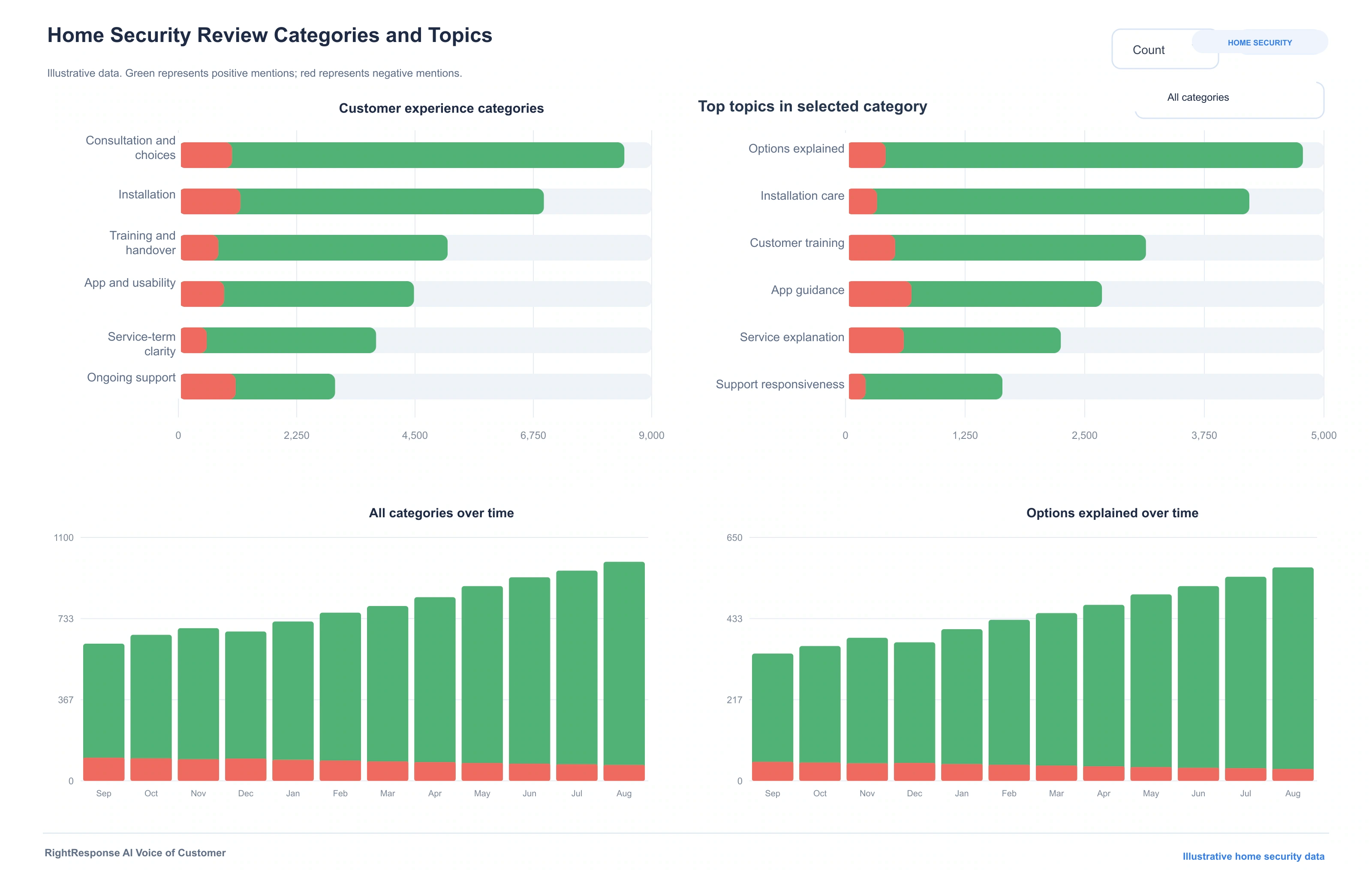
Separate sales advice, installation, training, app usability, service-term clarity, and ongoing support. Positive equipment comments should not hide confusing account or support experiences. RightResponse AI analyzes reviews and surveys by topic and sentiment, so praise for one part of the service does not hide a concern about another. Explore RightResponse AI Voice of Customer.

RightResponse AI Voice of Customer with illustrative home security categories, customer topics, positive and negative mentions, and trends
The exact RightResponse AI Voice of Customer interface shown with illustrative home security topics and data.Open full-size view ↗
Separate mixed feedbackKeep praise and concerns separate, even when a customer includes both in the same review or survey.
Read the evidenceOpen the customer’s words and source feedback behind a finding, trend, strength, or concern.
Find the patternCompare installation teams, service plans, and branches while keeping private account and system details out of public communication.
04

RightResponse AI Competitive Review Intelligence and Map Rank Tracker

Compare home security competitors and Google Maps visibility

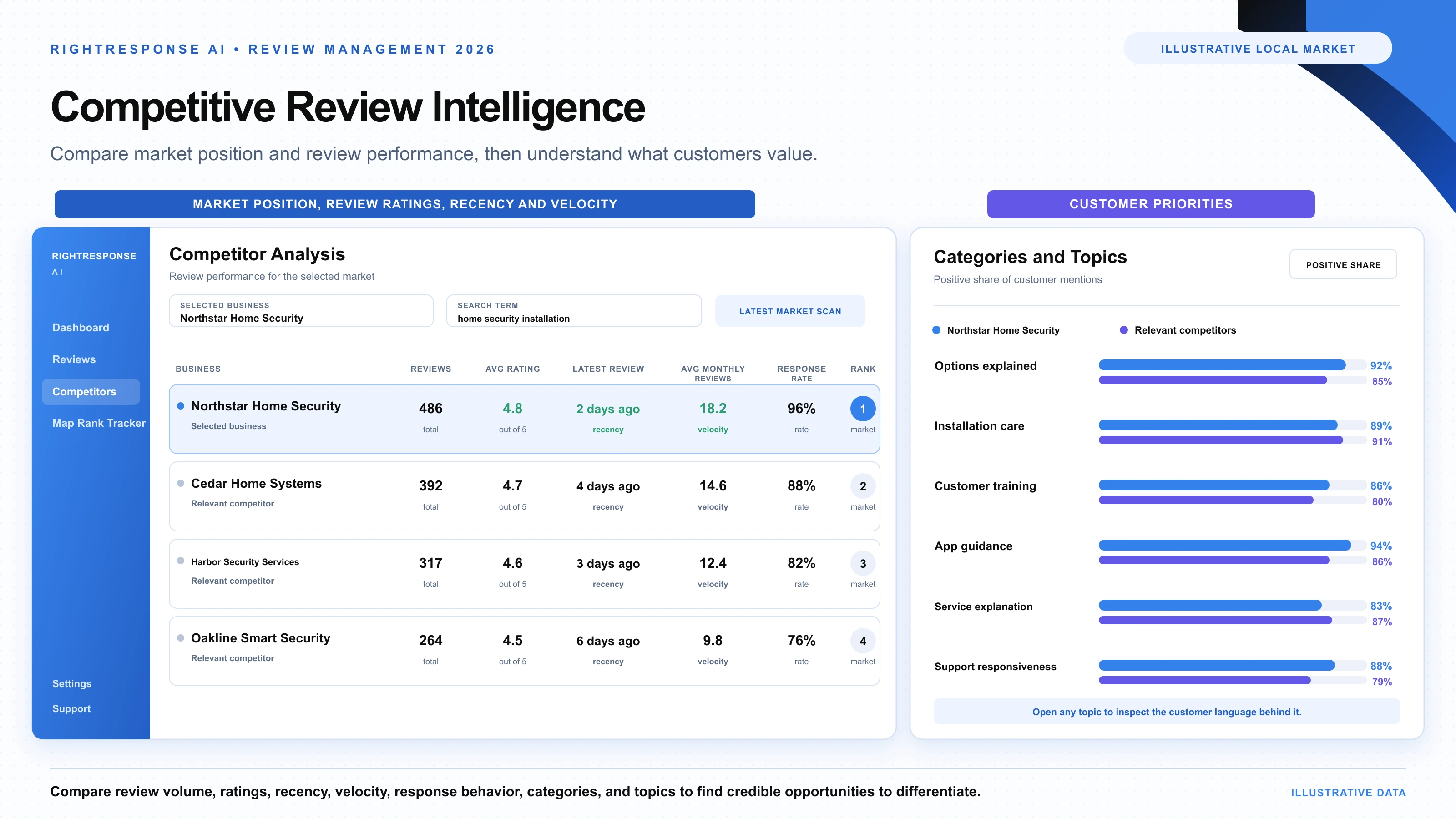
New devices, changing service offerings, and local installers can shift the market. Review topics show whether customers value easier setup, clearer terms, or stronger support.

Compare relevant home security businesses

Compare providers with relevant installation, monitoring, camera, or smart-home services in the same market. Apply the same customer-topic model to each business so you can see where the experience differs.

  • Options explained, Installation care, Customer training, and other service topics
  • Ratings, review volume, recency, velocity, and response behavior
  • Source reviews behind the comparison

RightResponse AI Competitive Review Intelligence →

Track Google Maps visibility across your market

Track searches such as “home security installation”, “security camera installation”, “home alarm company” from points across the area you serve. Rewind shows how visibility changes over time.

  • Search terms and grid coverage chosen for your market
  • Ranking competitors at each search point
  • Location-level rankings and scan history

RightResponse AI Map Rank Tracker →

RightResponse AI home security competitive review intelligence showing market position, review ratings, recency, velocity, and customer priorities
Illustrative home security market view comparing market position, review ratings, recency, velocity, and customer priorities.Open full-size view ↗

Built-in response safeguards

Protect private customer information before response generation

A public review may contain private contact details, home addresses, access instructions, and payment information. RightResponse AI checks the inbound review and removes detected private information from the version the responder receives. Your team controls publishing and human approval.

Flag inbound reviews that may create policy risk

Bring possible Google Maps content-policy issues to the business before the review enters the response workflow.

Remove private details before the responder begins

Remove detected private contact details, home addresses, access instructions, and payment information from the review before the responder processes it.

Brand, team, and multi-location management

Keep brand standards consistent and local information useful

Set shared Messages, tone, request rules, publishing workflows, and permissions. Local teams keep the service information current, while leaders compare customer experience across locations. Imports, Zapier, APIs, and custom workflows connect your existing systems.

Brand leadership

Define the shared standards

Set brand values, business Messages, response tone, approval rules, and team permissions.

Operations leaders

Compare teams and locations

Compare installation teams, service plans, and branches while keeping private account and system details out of public communication.

Local service team

Maintain local information

Keep consultation approach, service options, training, technical support, account contacts, and product guidance current.

IN CLEAR FOCUSCustomer Reviews as Strategic Intelligencewith George Swetlitz

Related conversation

Why review readers are close to choosing a business

“There's no one closer to the bottom of the funnel than someone actually reading your reviews.”

George Swetlitz and Adrian Tennant discuss how review responses influence people near a buying decision, and how customer feedback becomes useful operating and market intelligence.

Listen to the Conversation

Direct answers

Home security reputation management questions

When is the right time to ask for a review after home security work?
Ask after installation and customer training are complete. Keep personalization useful but avoid including system layouts, access codes, or other security-sensitive details.
How does a personalized review request use our service records?
Review Requester uses the customer and service information you provide, such as the service, team member, completion date, and a useful visit note. It can connect through imports, Zapier, APIs, or a configured workflow. The invitation uses known facts and leaves the customer free to describe the experience.
Can we collect private surveys as well as public reviews?
Yes. Use public reviews to help future customers evaluate the business and private surveys to understand the experience in more detail. Review Requester supports email, SMS, and QR requests. Set the timing, follow-ups, and campaign blackout period; the same email address or mobile number is not contacted again during that period.
What makes RightResponse AI different for home security review responses?
The Intelligent AI Review Responder uses 20 specialized agents to understand the review and select relevant business Messages. Those messages can add information about consultation approach, service options, training, technical support, account contacts, and product guidance that the reviewer did not mention. The result gives future customers useful reasons to choose the business instead of simply paraphrasing the review.
What happens when a customer updates a review?
RightResponse AI detects the updated review and uses what changed to prepare a revised response. A later explanation, follow-up visit, or completed adjustment can be acknowledged instead of continuing to answer only the original complaint.
What can Voice of Customer reveal about home security feedback?
Separate sales advice, installation, training, app usability, service-term clarity, and ongoing support. Positive equipment comments should not hide confusing account or support experiences. Every finding remains connected to the relevant words and source feedback, so the team can inspect the evidence. Compare installation teams, service plans, and branches while keeping private account and system details out of public communication.
How do competitor analysis and Map Rank Tracker work together?
Compare providers with relevant installation, monitoring, camera, or smart-home services in the same market. Competitive Review Intelligence compares the same experience topics alongside ratings, review volume, recency, velocity, and response behavior. Map Rank Tracker measures visibility from multiple points for selected searches, identifies ranking competitors, and uses Rewind to show change over time.
Can one platform support multiple teams or locations?
Yes. Leadership can set brand Messages, tone, request rules, publishing workflows, and permissions. Each location keeps its consultation approach, service options, training, technical support, account contacts, and product guidance current. Teams can compare customer topics across locations while using their own local information in responses.
What should stay out of a home-security review response?
Do not publish access codes, system layouts, account details, or security routines. RightResponse AI removes detected private information from the inbound review before the responder processes it, and your business Messages should also avoid sensitive customer-specific information.
Can responses explain monitoring and support?
Yes, using your actual service options and support process. Keep the description specific to what your business offers; do not invent response times, monitoring coverage, or guarantees of protection.

Start with one team or every location

Manage home security reviews and customer feedback in one platform

See how your real customer feedback and business Messages work together in RightResponse AI. Start a trial or book a conversation about your team, services, and locations.