Google reviews influence who gets considered and which business gets chosen. That makes review generation a legitimate marketing priority. The challenge is to pursue more reviews without turning the request process into a hidden rating filter.
The practical distinction is simple. You are required to let real customers leave reviews. You are not required to ask every customer after every interaction. The selection rule matters. A completed transaction, a valid contact method, a sensible cooldown, or a service milestone can define who receives a request. Expected happiness should not determine who receives the public-review invitation.
This guide explains what review gating is, what Google and the Federal Trade Commission actually say, where judgment is required, and how to build a higher-converting request program around personalization and ease.
What Is Review Gating?
Review gating is a process that identifies customers believed to be satisfied and then directs only those customers to a public review site. Customers who appear unhappy are sent to a private form, customer-service channel, or dead end instead.
A common version begins with a question such as, “How was your experience?” A positive answer opens Google. A negative answer opens a private feedback form and removes the public-review option. The problem is the branch itself. The business has used predicted sentiment to control who sees the public invitation.
Review gating is different from offering private feedback. A business can invite private feedback, contact a customer about a problem, and run a recovery process. Those activities become problematic when they replace or conceal the customer's ability to leave a public review.
| Decision | Practices to avoid | Responsible request design |
|---|---|---|
| Who receives the public invitation? | (Review Gating) Customers selected because the business expects a positive rating. | Customers selected by objective rules such as a completed service, eligible transaction, location, campaign, or cooldown. |
| What happens after a customer signals dissatisfaction? | (Review Gating) The public-review link disappears or the customer is sent only to private feedback. | Private recovery is offered without blocking or hiding the public-review path. |
| What does the request ask for? | A five-star review, a positive review, or praise for a named employee. | An honest description of the customer's real experience. |
| How is context used? | The message scripts the desired opinion. | Real details help the customer remember the experience while leaving the opinion entirely to the customer. |
| How are incentives handled? | A benefit is tied to posting, changing, removing, or expressing a particular sentiment. | Google reviews are requested without incentives. Other platforms require their own policy review and any necessary disclosure. |
| What is measured? | The program optimizes for positive ratings alone. | The program measures delivery, clicks, completed reviews, rating mix, text depth, channel performance, location performance, and customer recovery. |
Clear Rules, Clear Gating, and the Judgment Zone
The best operating policy should distinguish three different kinds of decisions. Treating every decision as equally prohibited makes the program timid and less useful. Treating every gray area as harmless creates unnecessary risk.
| Zone | Examples | Operating approach |
|---|---|---|
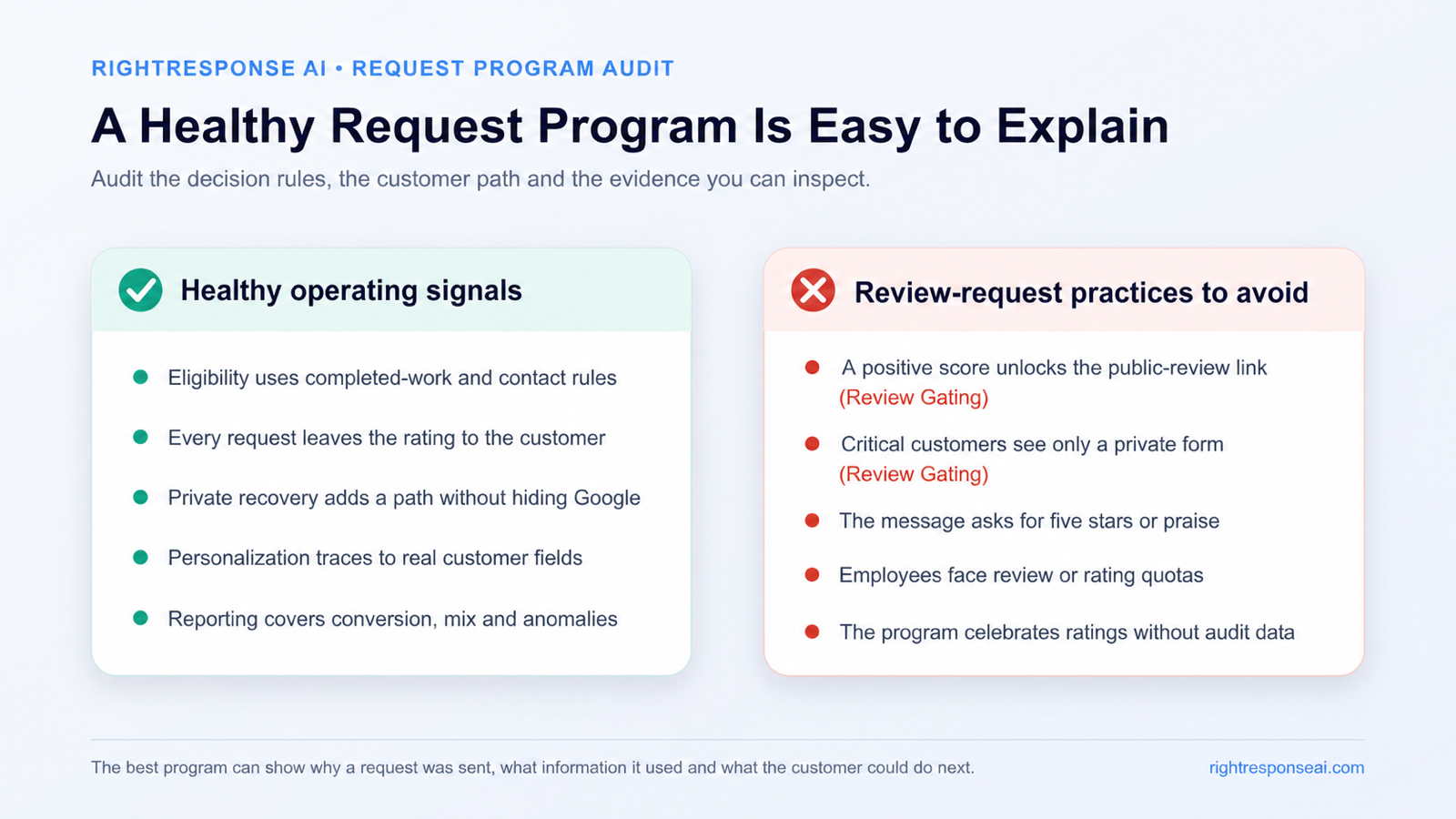
| Clearly sound | Ask a genuine customer after a completed interaction. Use a direct link to the correct profile. Personalize with real context. Invite an honest review. Let the customer choose the rating and wording. | Standardize these practices and make them easy for teams to use. |
| Clear review gating or manipulation | Reveal Google only after a high satisfaction score. Route criticism to a private form while hiding the public option. Pay for a positive review. Ask for five stars or require specific praise. | Remove these branches, incentives, and instructions from the workflow. |
| Judgment zone | Delay a request during an active service dispute. Offer a private recovery page while keeping the public path available. Ask in person. Use customer context, timing, and campaign eligibility without using expected sentiment as the gate. | Document the purpose, preserve customer choice, review platform rules, and consider how the overall pattern may look to automated fraud systems. |
You do not have to ask a customer during an active conflict
If a customer is clearly upset and the business is actively trying to solve the problem, sending an automated request at that moment can be tone deaf. Pausing that communication can be reasonable. The distinction is whether the business is managing timing or permanently using dissatisfaction to hide the public-review path.
The customer remains free to leave a review. The business can provide a private contact route and focus on recovery. After the interaction is resolved, an objective campaign rule can determine whether another communication is appropriate.
A private page can support recovery without becoming a gate
A private feedback form is useful when it captures contact information, assigns an owner, and starts a recovery workflow. It becomes a gate when the public-review option appears only for positive customers and disappears for everyone else.
A better design gives the customer genuine options. The business can say, “Share feedback with our team” and also provide the public-review link. The private route helps the business act. It does not control whether the customer can speak publicly.
In-person requests are a practical judgment call
Asking a real customer to leave an honest review is not automatically improper because the conversation happens at the business. Google does caution merchants against pressuring customers on the premises. There is also a practical concern: a burst of reviews submitted from a business-owned device, shared kiosk, or the same network can resemble an unusual pattern to automated spam systems.
The stronger practice is to give the customer a link or QR code and let the customer decide whether, when, and where to respond on their own device. That reduces pressure and avoids creating an artificial technical pattern around the review activity.
Why Do Businesses Use Review Gating?
The immediate motive is understandable. A higher average rating can help a business look more competitive, and negative reviews often arrive without any prompting. Some industries have infrequent, sensitive, or high-stakes interactions, so satisfied customers may move on while frustrated customers are more motivated to write. A small number of negative reviews can then dominate a thin profile.
Review gating appears to solve that imbalance by suppressing the negative side of the request funnel. It also creates a less representative profile and makes the program dependent on predicting who will say something favorable.
The better answer is to increase participation among genuine customers. Personalization helps because the customer recognizes the interaction and understands why the request is relevant. Timely delivery and a simple link reduce the effort required. Over time, more real participation can reduce the extent to which a few unusually negative experiences define the public profile.
Perfection is not the only conversion signal. Prospective customers read the substance of reviews, the recency and volume of the profile, and the way the business responds. A thoughtful response can communicate knowledge, accountability, care, and the next step to the reviewer and to future customers. A substantial, credible profile with useful responses can be more persuasive than a spotless rating with little context. See our Intelligent AI Review Responder and the broader Review Management Guide for the response side of the system.
What Do Google and the FTC Actually Say?
Google policy and federal consumer-protection rules overlap, but they are not the same thing. Treating them as one rule creates confusion and leads to exaggerated claims.
Google permits requests for genuine reviews
Google tells businesses they can remind customers to leave reviews and can share a direct review link or QR code. Google also says reviews must reflect a genuine experience.
The Google Maps User Contributed Content Policy prohibits merchants from offering incentives for posting, revising, or removing a review. It also prohibits discouraging negative reviews and selectively soliciting positive ones. When a merchant solicits reviews, Google says the merchant should not pressure customers on the premises or request that specific content be included, including an employee's name.
The operating takeaway is useful and narrow: ask for an honest review from a real customer, avoid a sentiment screen, and leave the customer's wording and rating to the customer.
The FTC rule targets several different forms of manipulation
The FTC Consumer Reviews and Testimonials Rule took effect on October 21, 2024. It addresses fake or false reviews, conditioned incentives, undisclosed insider reviews, company-controlled review sites that misrepresent their independence, certain review-suppression tactics, and fake social influence indicators.
FTC staff guidance separately warns marketers not to ask for reviews only from customers they think will leave positive ones. The FTC's current Q&A says the rule itself does not contain a specific prohibition on asking only customers thought to be happy, while noting that the practice could violate the FTC Act. That distinction matters. The safe operating standard is still to avoid using expected sentiment as the selection rule.
The Fashion Nova case involved suppression on the company's own site
The FTC's $4.2 million Fashion Nova matter is often presented as a Google review-gating case. It was different. The FTC alleged that Fashion Nova automatically published higher-rated product reviews on its website while holding lower-rated reviews for approval, which concealed negative feedback from shoppers.
The case is relevant because it shows how seriously regulators treat a distorted review picture. It does not prove that every poorly designed Google review request produces the same legal consequence.
Do You Have to Ask Every Customer for a Review?
No. A review request is a marketing communication, and a business can define which transactions are eligible for that communication. A restaurant might request feedback after online orders with verified contact information. A home-services company might ask after a job is marked complete. A medical group might exclude contacts that cannot receive marketing messages or interactions that require a different communication process.
The criteria should be operational rather than emotional. Good eligibility rules include:
- The service or transaction was completed.
- The recipient actually experienced the business.
- The business has a valid and permitted contact method.
- The customer has not received another request inside the chosen cooldown period.
- The request points to the correct location or provider profile.
- The campaign includes a defined transaction type, service line, or time period.
- Duplicate, employee, test, and invalid records are excluded.
Risk rises when the rule becomes “ask only the people we know are happy.” A salesperson's intuition, a high internal satisfaction score, or a positive survey answer should not be the gate that reveals the public-review invitation.
The most useful distinction is this: selecting a legitimate campaign audience is normal marketing. Selecting an audience because it is expected to produce only positive public sentiment is review gating.
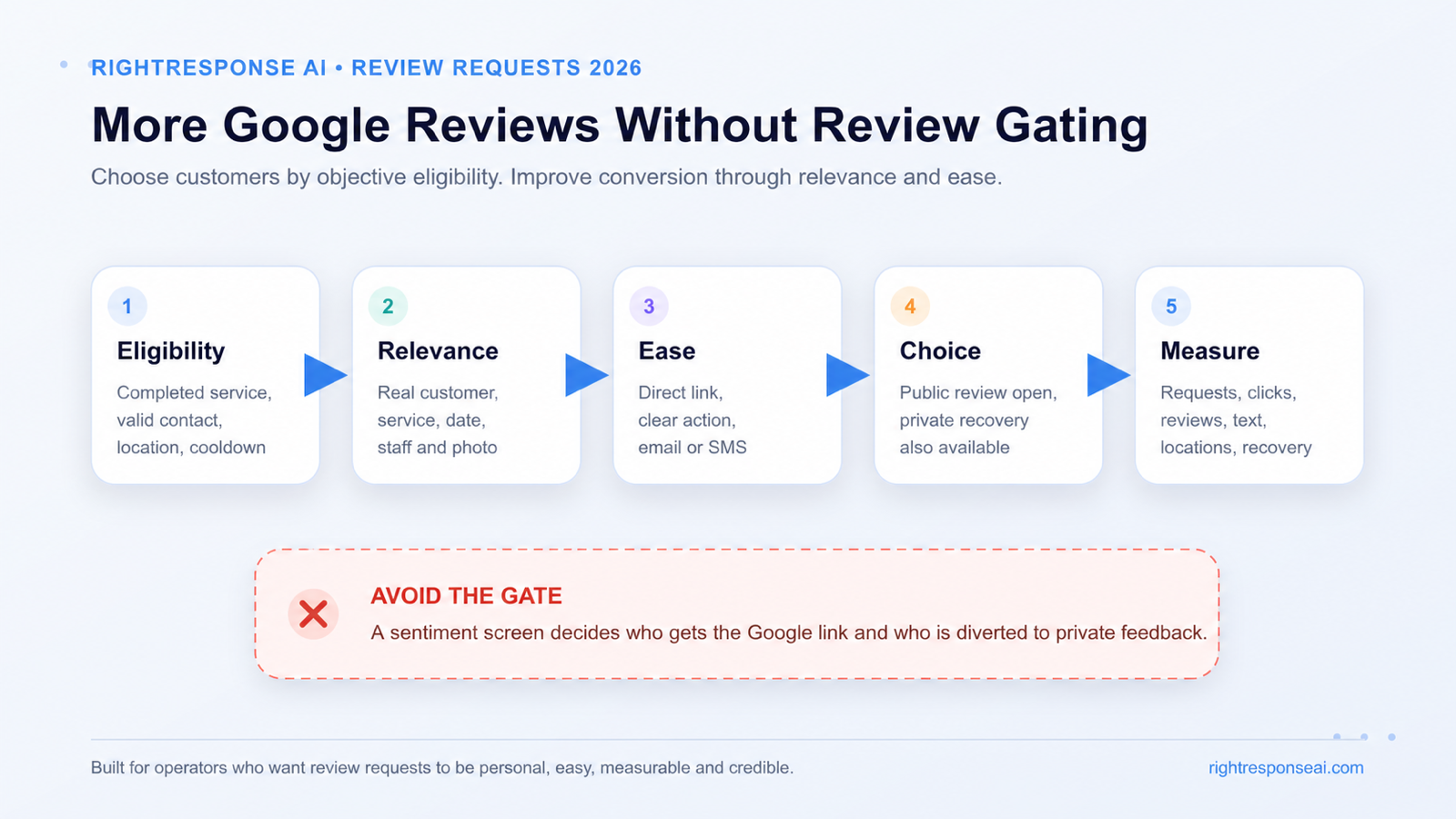
Five Decisions That Produce More Reviews Without Gating
The request itself should be managed as a conversion system. Five decisions determine whether that system feels credible, performs well, and stays clear of sentiment screening.
1. Define objective eligibility
Start with the event that makes a request appropriate. Common triggers include a completed appointment, delivered product, closed service ticket, move-in, repair completion, hotel checkout, or restaurant order.
Document the eligible event, contact rules, exclusions, cooldown, location mapping, and campaign owner. This creates a repeatable process that can be audited. It also stops individual employees from inventing their own selection rules.
2. Make the request relevant
Generic requests are easy to ignore because they give the customer nothing specific to remember. A relevant request can include the customer's name, service date, product or service, location, staff member, milestone, or a photo of the completed work.
Those facts should refresh memory. They should not tell the customer what rating to choose or what opinion to express. Optional questions can help a customer think about the experience, but the request should not require keywords, praise, or a named employee mention in the public review.
This is where AI can add real value. AI can combine approved request instructions with the customer and service fields supplied for that interaction. It can make each message feel written for the person without inventing the experience or manufacturing the review.
3. Remove friction
The customer should be able to act from the device already in hand. Use the direct review link for the correct Google Business Profile. Keep the request concise. Make the primary action obvious.
Email and SMS serve different moments. Email can carry a richer message, a photo, and more context. SMS is immediate and compact. A coordinated sequence can use both, provided the cadence is reasonable and the customer is not repeatedly asked after completing the review.
Ease also matters at the point of work. Teams should be able to add an eligible customer and start a request while the interaction is fresh. A useful platform makes the routine action simple while preserving campaign rules, location mapping, permissions, and measurement.
4. Keep public review and private recovery distinct
Private feedback is valuable. It can alert the business to a service failure, capture contact information, and start customer recovery before an issue grows.
Private feedback should be an additional route. It should not appear only after a low score while the public-review option appears only after a high score. The customer can be offered a way to contact the business privately without losing access to the public review path.
This design creates two useful outcomes. The business learns about recoverable problems, and the public review profile remains an authentic conversation that customers can trust.
5. Measure the entire request funnel
A business cannot improve a request program by looking only at the average star rating. Measure the steps that explain performance:
- Eligible customers
- Requests sent and delivered
- Opens or clicks where available
- Review-page visits
- Completed reviews
- Request-to-review conversion
- Review text versus rating-only reviews
- Rating distribution
- Performance by channel, campaign, location, and employee link
- Time from customer interaction to request
- Follow-up performance and unsubscribe rate
- Private feedback and recovery outcomes
Use the results to improve timing, message relevance, channel mix, and usability. Do not use them to remove customers likely to be critical from the public-review invitation.
Review Request Examples: Gating, Generic, and Personalized
The wording should invite an honest account of a real experience. It should never prescribe the rating.
| Request | Assessment | Why |
|---|---|---|
| “Did we earn five stars? If so, tell everyone on Google.” | Review gating risk | The request conditions the public action on a positive rating. |
| “If you loved your visit, please leave a review. If anything went wrong, tell us privately.” | Review gating risk | Positive customers get the public invitation while dissatisfied customers are diverted. |
| “Please leave an honest Google review about your experience.” | Neutral and usable | The rating and content remain the customer's choice, although the message is easy to ignore. |
| “Hi Maya, thank you for joining us at Vero's Bar and Grill on Thursday. If you have a moment, would you share an honest Google review about your visit?” | Personalized and neutral | Real context makes the request recognizable without scripting the opinion. |
| “Hi Alex, your kitchen faucet repair with Jordan was completed today. We have included a photo of the finished work. If you have a moment, please share an honest review of your experience.” | Personalized and specific | The service, employee, timing, and photo support recall while leaving the review entirely to the customer. |
Industry context can make a request more relevant:
- A hotel can reference the stay and property.
- A property manager can reference a completed maintenance request or move-in milestone.
- A dental practice can reference the visit without exposing sensitive details in the message.
- A restaurant can reference the location and visit date.
- A home-services company can include the completed-work photo.
- A bank or credit union can reference the branch interaction without including account information.
The customer should never be required to repeat the context in the public review. The detail belongs in the request because it makes the message real.
How AI Can Personalize a Request Without Manufacturing the Opinion
Many review-request tools use templates. The same sentence is sent to every customer with a first name inserted. That can automate delivery, but it does little to make the request worth reading.
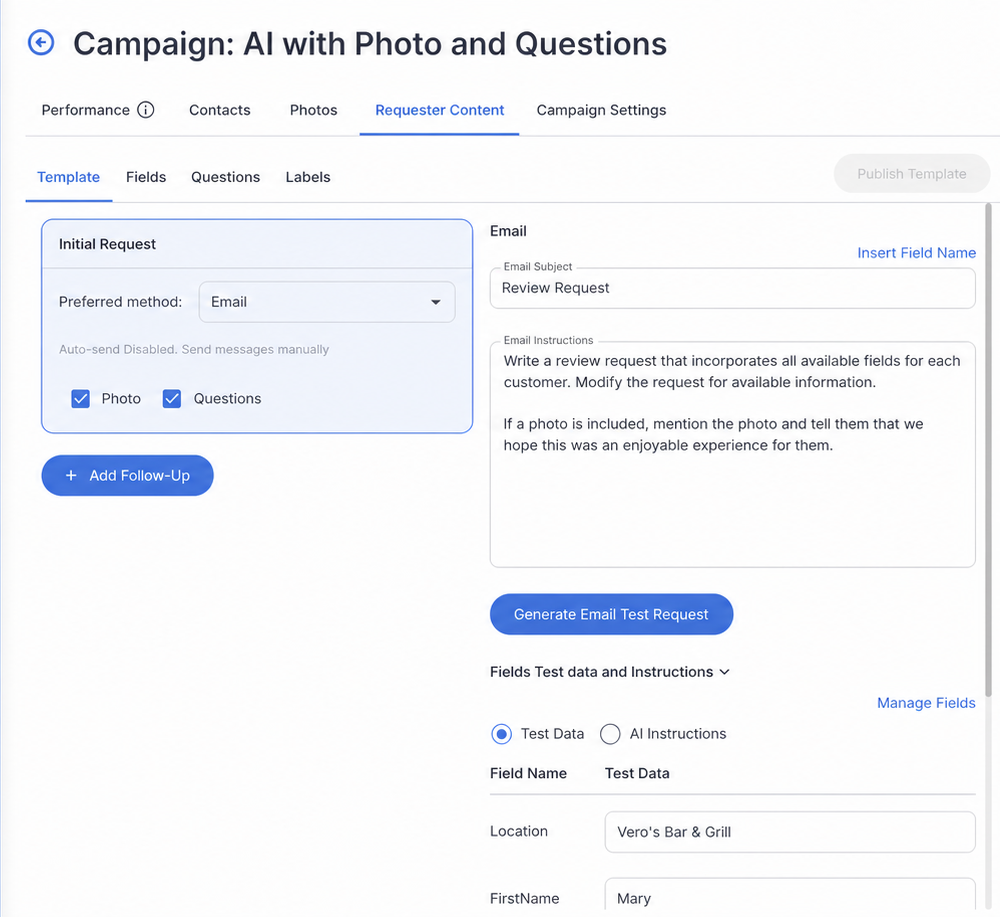
RightResponse AI's Review Requester supports standard templates and AI-powered requests. A business defines a reusable Profile with the fields, instructions, channel, and request approach it wants. The system can then use the available customer and interaction data, such as names, services, products, dates, staff members, and relevant details, to produce a message for that experience.
Email requests can include a relevant photo. SMS requests stay shorter. Teams can use manual sends or connected request integrations where available. Businesses control the timing and can begin with a simple template before adding AI personalization.
The important boundary is the source of the personalization. The system should use real fields supplied by the business. It should never invent a service detail, assume satisfaction, write the customer's review, or tell the customer which rating to select.
Can You Ask Neutral Questions or Include a Photo?
Yes, when they help the customer recall the real experience and remain optional. A completed-work photo can remind a homeowner what was delivered. A restaurant request can show the moment or order associated with the visit. A short question can help the customer reflect on what stood out.
The line to protect is customer authorship. Do not require the customer to include a keyword, employee name, or specific claim in the public review. Do not make the public-review link depend on how the customer answers a question. Do not prewrite a review for the customer to paste.
A useful prompt sounds like “What stood out about your experience?” A manipulative prompt sounds like “Please mention that Jordan provided five-star service.” The first supports memory. The second scripts content and sentiment.
How Should Employees Participate?
Employees often know when the interaction has reached a natural request moment. They can also make the request feel human. Give them a simple path to start an eligible request or share a location-specific link.
Governance matters. Google advises merchants not to pressure customers to leave reviews while on the premises and specifically calls out staff review quotas and requests for content that identifies an employee. A program should avoid turning review requests into a public leaderboard that rewards five-star mentions.
Employee and location links can still be useful for attribution. Measure whether the request was sent, clicked, and completed. Use that data to improve adoption and coaching. Evaluate employees on following the process, not on producing a particular rating or forcing their names into review text.
What Changes for Multi-Location and Franchise Businesses?
A multi-location program needs central rules and local context. Headquarters can define eligible events, approved Profiles, prohibited language, channel rules, follow-up cadence, and reporting. Local teams can supply accurate location, service, staff, and customer context.
The platform should map every request to the correct public profile. It should also let leaders compare request volume, delivery, clicks, review conversion, rating mix, and private-feedback outcomes across locations.
Outliers deserve inspection. A location with unusually high review conversion and almost no critical feedback may have excellent operations. It may also be using a process that filters or pressures customers. The data should make the pattern visible so a person can determine what happened.
A Four-Week Plan to Replace Review Gating and Related Manipulation
Week 1: Audit the current paths
Map every email, SMS, QR code, survey, employee ask, kiosk, and private-feedback form. Identify where sentiment changes the customer's path. Confirm that every link points to the correct location.
Write objective eligibility rules for each campaign. Remove rating-based branches, requests for five stars, conditioned incentives, and any instruction that tells customers what to include.
Week 2: Build two request Profiles
Create one concise template and one personalized request. Define the customer and service fields that can be used. Decide which fields are corporate, brand, location, or interaction specific.
Choose the channel and timing for each eligible event. Add a private contact option for recovery without removing the public-review path.
Week 3: Pilot with a limited audience
Run the process for one service line, location group, or transaction type. Compare delivery, clicks, completed reviews, text depth, rating distribution, and private-feedback volume.
Review a sample of the actual messages. Verify that every personalized detail came from an approved field and that the message remained neutral.
Week 4: Expand, coach, and monitor
Roll out the stronger Profile. Train local teams on eligibility, timing, and customer choice. Give leaders a simple dashboard for campaign, location, and employee-link performance.
Schedule a monthly audit for unusual rating patterns, sudden review spikes, duplicate requests, high opt-out rates, and messages that drift from approved instructions.
How to Evaluate Review Request Software
The software should make responsible practices easier to execute and easier to verify.
| Ask the vendor | What good looks like | Why it matters |
|---|---|---|
| How do we define who is eligible? | Objective campaign rules, transaction triggers, cooldowns, exclusions, and location mapping. | The program should not depend on an employee deciding who seems happy. |
| Can the public-review path be hidden after a low score? | No sentiment branch that reveals Google only after a positive answer. | Private recovery should not become a gate. |
| What can personalize the message? | Approved customer, service, product, staff, date, location, milestone, and photo fields. | Real context can improve relevance without scripting sentiment. |
| Can we control instructions and channels? | Reusable Profiles, templates, email, SMS, timing, manual sends, and integration options. | Different customer moments need different request designs. |
| What can local teams do? | Simple point-of-work actions inside corporate permissions and approved campaign rules. | Ease increases adoption while governance preserves consistency. |
| What does reporting show? | Requests, delivery, clicks, review conversion, rating distribution, text depth, location and employee-link performance, and recovery outcomes. | Operators need the full funnel to improve results and spot anomalies. |
| Can we verify what AI used? | Visible customer fields, request instructions, generated message, edits, approvals, and send history. | AI personalization should be traceable to real information. |
The Operating Advantage
Review gating tries to improve the rating by controlling which customers reach the public-review page. A stronger program improves the request itself.
Make the request timely. Give it real context. Make it easy to act. Leave the opinion to the customer. Measure the whole funnel and use criticism as operating intelligence.
That approach can produce more reviews, richer review text, stronger customer recovery, and a review profile that prospective customers can trust.
See how the RightResponse AI Review Requester combines templates, AI personalization, photos, email, SMS, and flexible workflows. For the full operating system, read Review Management: The Complete Guide for 2026. You can also compare plans or explore our done-for-you review management service.
Frequently Asked Questions
What is review gating?
Review gating is a process that screens customers by expected sentiment and directs mainly satisfied customers to a public review site. Customers who appear dissatisfied are diverted to private feedback or another path that hides the public-review invitation.
Does Google allow businesses to ask customers for reviews?
Yes. Google tells businesses they can remind customers to leave reviews and share a direct review link or QR code. The review must reflect a genuine experience, and the business must not offer incentives, discourage negative reviews, selectively solicit positive reviews, pressure customers on the premises, or request specific content.
Do I have to ask every customer for a Google review?
No. A business can define an eligible campaign audience using objective operational criteria such as a completed transaction, service type, location, valid contact method, or cooldown period. Expected positive sentiment should not be the criterion that determines who receives the public-review invitation.
Can I ask customers for a review when I know they are happy?
A natural request after a successful interaction is understandable. The risk appears when the business builds a process that asks only customers expected to be positive or uses a satisfaction score to reveal the public-review link. Use objective eligibility rules and neutral language instead of predicted sentiment.
Can I offer a discount or gift card for a Google review?
No. Google's policy prohibits incentives such as payments, discounts, free goods, or services in exchange for posting a review, revising a review, or removing a negative review. Other platforms have their own rules, and FTC disclosure and conditioned-incentive requirements can also apply.
Can I collect private feedback before asking for a public review?
Private feedback can support customer recovery, but it should not become a sentiment gate. Do not show the public-review link only after a high score or hide it after criticism. Keep the private contact option additional to the customer's public-review path.
Can AI write personalized review requests?
Yes. AI can use approved customer and interaction fields such as names, services, products, dates, locations, staff members, and relevant photos to create a request that reflects the real experience. The system should not invent facts, assume satisfaction, prescribe a rating, or write the customer's review.
Can review requests include questions or photos?
Yes, when they help the customer recall the experience and remain optional. Avoid requiring keywords, a particular sentiment, or an employee mention in the public review. The customer's rating and wording should remain entirely their own.
Can employees ask customers for Google reviews?
Employees can identify natural request moments and start an eligible request. The program should avoid pressure on the premises, review quotas, five-star targets, or instructions that customers mention an employee. Track process adoption and request performance rather than rewarding a particular rating.
What metrics should a review-request program track?
Track eligible customers, requests sent and delivered, clicks, completed reviews, request-to-review conversion, rating distribution, review text depth, channel performance, location performance, employee-link performance, time to request, follow-up outcomes, opt-outs, and private-feedback recovery.
Build a request program customers recognize
Make the request timely, give it real context, make it easy to act, and leave the opinion to the customer.
Sources and Further Reading
- RightResponse AI, Review Management: The Complete Guide for 2026: The broader review-management operating system for requests, analysis, responses, competitors, and local visibility.
- RightResponse AI, AI Review Requester: Current product capabilities for templates, AI personalization, photos, email, SMS, Profiles, and request workflows.
- Google Maps User Contributed Content Policy: Official rules for genuine reviews, incentives, pressure, requested content, and selective solicitation.
- Google Business Profile Help, Tips to get more reviews: Official guidance on review links, QR codes, balanced reviews, and replies.
- FTC, Soliciting and Paying for Online Reviews: FTC staff guidance for marketers requesting reviews.
- FTC, Consumer Reviews and Testimonials Rule Q&A: Official explanation of the 2024 rule, incentives, insider reviews, and review suppression.
- FTC, Fashion Nova case: Case record concerning the suppression of lower-rated product reviews on Fashion Nova's own site.