GatherUp helps you ask for reviews after a sale or service visit. It also collects private feedback and lets you display customer testimonials on your website. That combination is especially useful for agencies running review programs for several clients.
Its AI also drafts replies and analyzes feedback. This review explains how those tools work, what GatherUp costs, and when RightResponse AI's personalized requests, Message-Informed replies and feedback analysis make it the better fit.
Quick verdict
- Choose GatherUp to send review requests and surveys, analyze public and private feedback together, and add branded review displays to client websites.
- Choose RightResponse AI for requests tailored to each customer, Message-Informed replies, feedback grouped by the topics you choose, and Google Maps tracking in one focused suite. Pro brings these tools together for $29 per location/month. The suite serves single-location businesses, multi-location teams, franchises and agencies. For enterprise or agency pricing, discuss your needs with the team.
GatherUp and RightResponse AI at a glance
Here’s how the platforms compare on requests, replies, feedback analysis, local visibility and cost.
| Feature or cost | GatherUp | RightResponse AI |
|---|---|---|
| Review requests | Branded email and SMS requests for public reviews, ratings and private surveys, with reminders. | Template requests or AI-written invitations using customer and job details; employee QR codes and private surveys. AI personalization is available on PAYGO, Pro and Pro+. |
| Review replies | SmartReply drafts, generated AutoReply and a separate mode that selects from saved replies. | Message-Informed replies use approved business Messages when relevant to the review. Staff can see which Messages were used and control publishing. |
| Customer feedback | Smart Insights groups public reviews and private feedback into themes, with access to the original comments. | Voice of the Customer groups feedback by topics you can tailor to your business and shows the phrases behind each finding. Full topic analysis is available on PAYGO, Pro and Pro+; Core provides basic sentiment badges. Pro and Pro+ also include private surveys. |
| Local competition | Competitor Reports compare review counts, ratings and how recently reviews arrived. Listings Management and Review Defense are separate products. | Google Maps rank grids and saved-scan history on eligible plans. Competitor Voice of Customer needs Pro or Pro+ and separate packs. |
| Agency tools and review displays | White-label client accounts, branded website widgets and review-to-social sharing. | Agency services and white-label review management. A smaller ecosystem than the largest incumbents; website review displays and listings distribution may require other tools. |
| Pricing | One location: $124/month month-to-month, or $99/month on an annual plan. For 2–10 locations: $75 per location/month month-to-month, or $60 on an annual plan. For 11–16 locations: $56 per location/month month-to-month. Agency pricing is custom. | Monthly, per location: Core $19, Pro $29, Pro+ $44; PAYGO $10 plus usage. Core excludes Maps and Competitor Analysis. Enterprise and agency arrangements are custom. |
What is GatherUp?
GatherUp helps local businesses, multi-location organizations and agencies collect, manage and share customer feedback. You add customer details, send an invitation, follow up and review the results.
The company began as GetFiveStars in 2013, founded by Don Campbell, Mike Blumenthal and Thomas Hasch. It adopted the GatherUp name in 2018 and joined ASG in 2019. Its agency offering lets businesses deliver review services under their own brand.
How GatherUp works
Review requests and follow-ups
GatherUp gives you several ways to ask for feedback. Send customers straight to a public review site, ask for a rating first, or combine survey questions with a review invitation. You can brand the emails, texts and feedback pages, then set reminders for customers who have not responded.
That flexibility is useful when different clients need different follow-up. A repair company may want a quick public-review request after a completed job. A service business may want private feedback as well, so managers can learn about problems that never appear in a Google review.
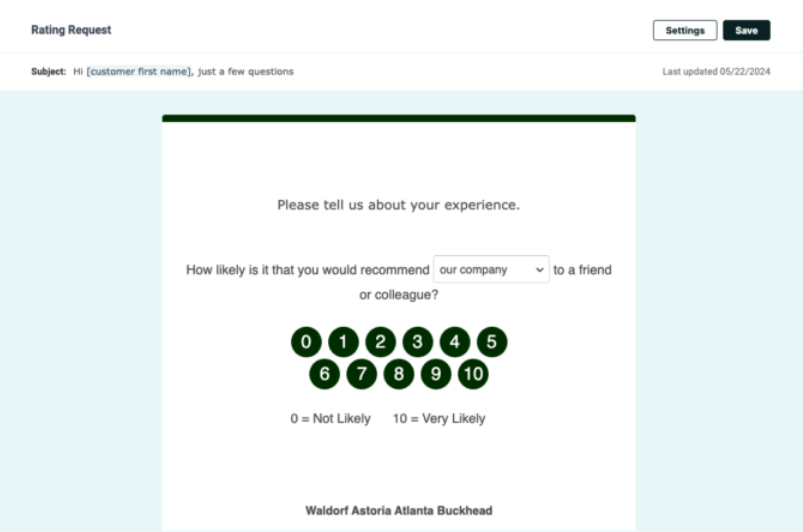
You can enter customer details yourself or import them through GatherUp's integrations, including Zapier and API connections. Its request-flow guide explains how to set up the invitations and feedback pages. QR codes, feedback links and kiosks also let you ask while the customer is with you.
Review monitoring and three ways to reply
GatherUp monitors more than 100 review sites and brings ratings, feedback and request activity into one dashboard. Filters and notifications help staff find unanswered reviews or give urgent complaints prompt attention.
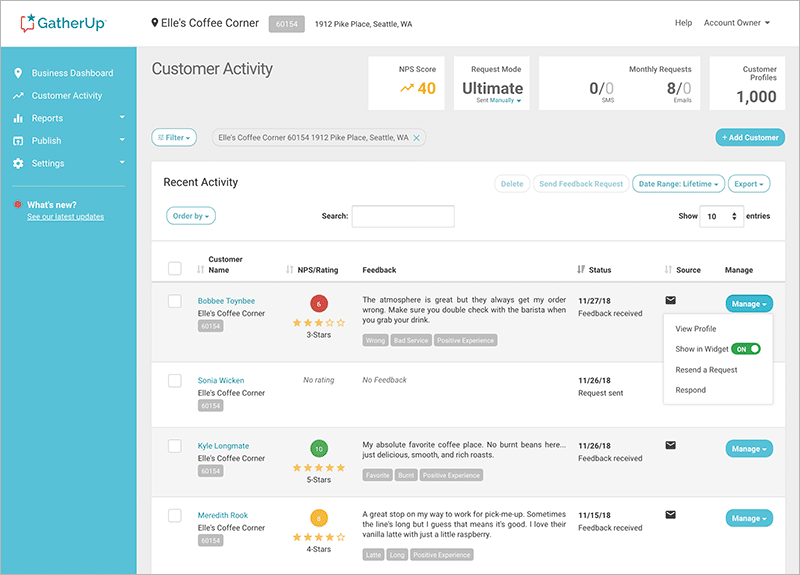
Its reply options do different jobs:
- SmartReply and suggested responses generate drafts that staff can edit. Staff can also approve and send replies from suggestions delivered by email. This works with connected Google and Facebook reviews, plus feedback collected directly from customers.
- Generated AutoReply writes new replies for eligible positive reviews. GatherUp documents this separately from its template option.
- Auto Reply Templates selects a complete response from a library you provide. You can upload up to 50 replies and set rating thresholds for positive Google and Facebook reviews. The system matches a reply to the review's content and sentiment.
The template mode suits teams that want to control the exact wording available for automatic replies. Generated drafts offer more variation. During a trial, check the mode you are using and whether a person reviews the reply before it is published.
Private surveys and Smart Insights
GatherUp collects private feedback alongside public reviews. Its Net Promoter Score survey asks how likely a customer is to recommend the business, while additional questions let you investigate particular parts of the experience.
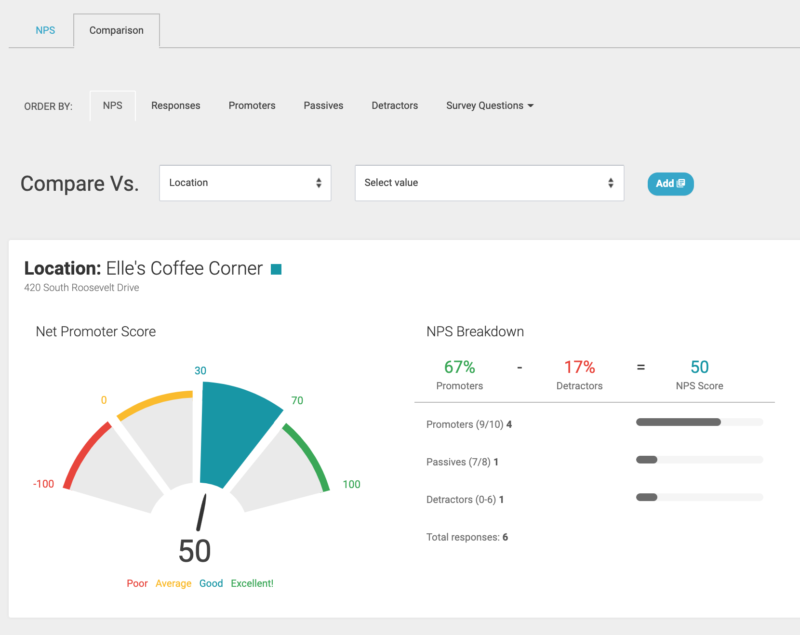
Smart Insights analyzes public reviews and feedback collected directly from customers. It groups comments into themes, highlights strengths and areas to improve, and lets you open the reviews behind a theme. The report guide explains how to filter and save reports.
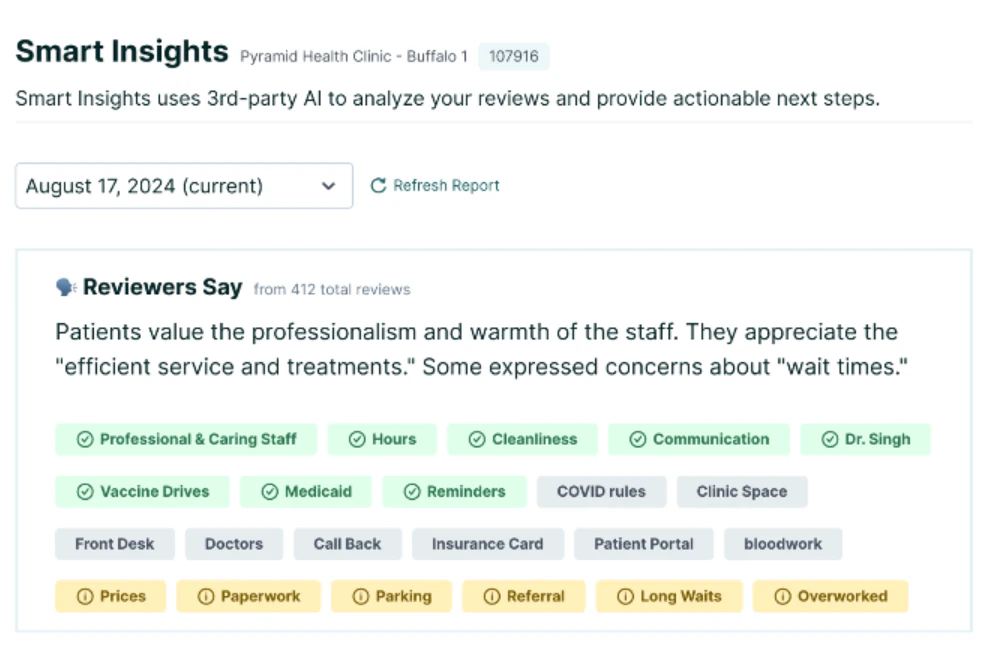
This is more useful than a star average alone. A manager can see that customers praise the staff but complain about waiting, then read the comments to understand where the delay happens.
Displaying reviews on client websites
GatherUp's review widgets put selected customer feedback on an existing website. Different layouts and filters let an agency match the display to the client's pages. A Conversion Pop-up offers a smaller, rotating review display.
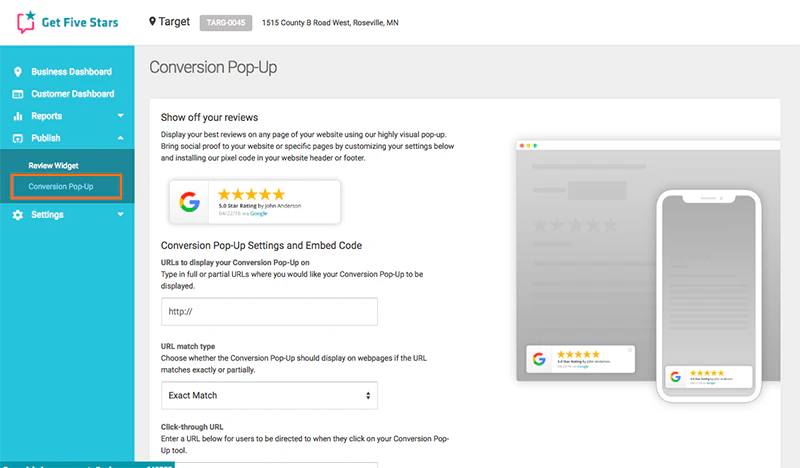
Its social-sharing tools can turn eligible reviews into branded posts. That is a useful way to reuse feedback your customers have already supplied.
Agencies can offer these tools under their own brand. Branded reports, website displays and reusable request sequences make it easier to run review programs for several clients. If clients already use those reports or widgets, include their replacement in the cost of switching.
Competitor reports and additional products
GatherUp's Competitor Report compares review counts, average ratings and how recently reviews arrived. It helps show whether nearby businesses are earning reviews more consistently.
GatherUp also sells two related products. Listings Management distributes business information to directories. Review Defense investigates suspicious review patterns. On eligible plans, it also submits disputes backed by that evidence. The review platform decides whether a review is removed.
GatherUp pricing
GatherUp's price depends on how many locations you have and whether you commit to a year. One location costs $124/month on a month-to-month plan or $99/month on an annual plan. For 2–10 locations, a month-to-month plan costs $75 per location/month. An annual commitment lowers that to $60 per location/month.
For 11–16 locations, the month-to-month price is $56 per location/month. GatherUp's pricing selector lists rates for larger groups of locations; agencies receive a custom quote. You can pay for an annual plan upfront or in monthly installments. Either way, you commit to the full year.
Optional Listings Management costs $40 per location/month. Review Defense starts at $45 per location/month on an annual plan. Prices are in USD.
GatherUp includes up to 300 SMS and 3,000 email credits per location each month.
The 14-day trial requires no credit card. Use it to send requests and check the feedback, replies and reports before choosing a plan.
When should you consider a GatherUp alternative?
GatherUp is well suited to sending requests, collecting private feedback and displaying reviews under your brand. Compare it more closely with alternatives if you need:
- Requests built around each job. A reusable template may be enough. If you want AI to use a returning customer's history, the work completed or a project photo in an invitation, compare how much context each system can use.
- Control over business information in replies. GatherUp offers generated replies and saved templates. If you want to keep a library of approved business Messages, have the system choose relevant ones for each review and see which it used, test those controls.
- Google Maps rankings across a neighborhood. Review counts and directory accuracy do not show where a business ranks. GatherUp's documented competitor and listings tools do not provide the Google Maps rank-grid tools described below.
RightResponse AI: a focused review management alternative
RightResponse AI is our recommended GatherUp alternative when you want personalized requests, more informative replies, feedback organized around your business and Google Maps tracking in one suite. It serves single-location businesses as well as multi-location organizations, franchises and agencies.
The focus is the review cycle: ask for feedback, respond usefully, understand the experience and compare local visibility. Businesses that need broader marketing software can keep those tools alongside it.
Requests that reflect the customer's experience
RightResponse AI Review Requester can use customer and job details to compose an invitation. For example, an email to a returning roofing customer can mention the crew and completed work, include a project photo and ask what brought the customer back. That gives the customer something specific to remember and write about.
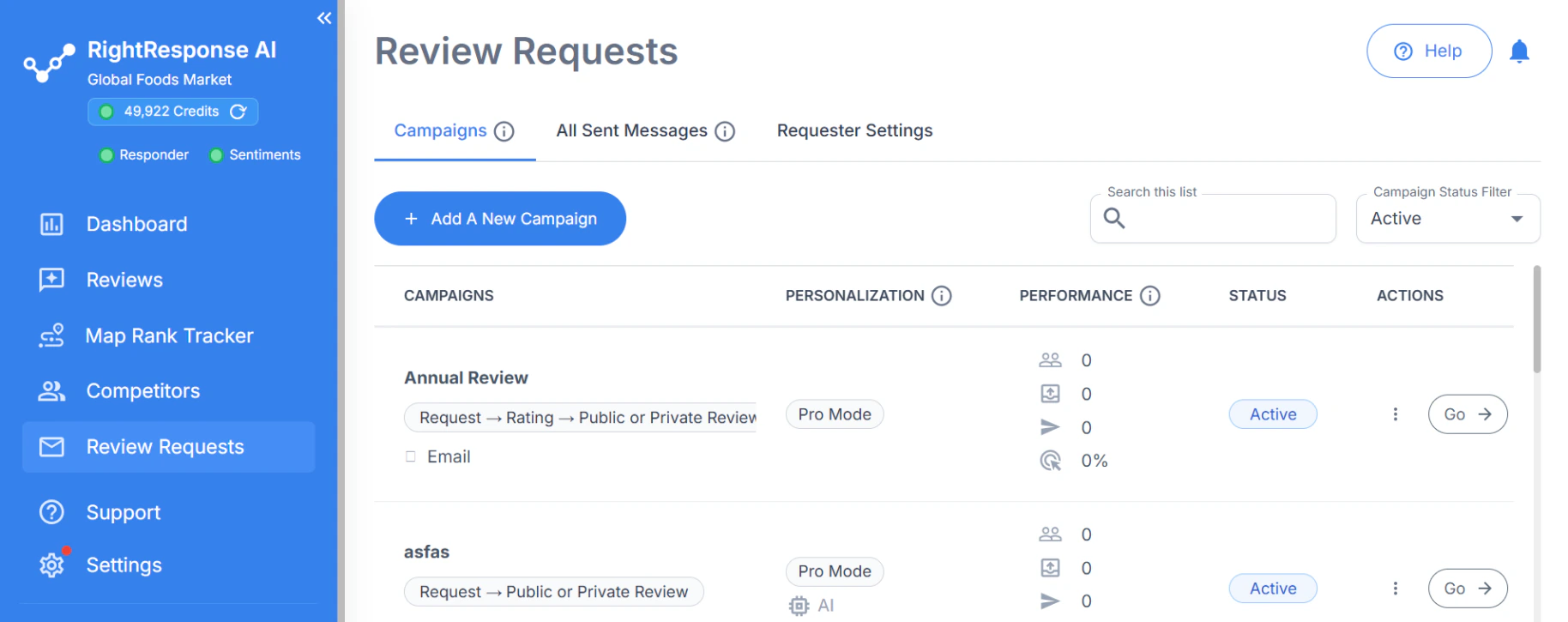
Reusable templates are also available. Add a customer directly, through a supported Zapier connection or through the shared Google Sheet to start a request. You control sending hours and follow-ups, and can set a blackout period between requests.
Employee QR codes make it easy to ask for a review in person. Scan counts and leaderboards show how the team uses them. Email and SMS click counts show whether customers open the review links. New reviews are counted separately from scans and clicks.
Replies that give the next customer useful information
Message-Informed replies can add approved business information when it helps answer the review. RightResponse AI drafts Messages from your business information. You review and approve them. Messages can also contain instructions about names, voice and how to handle particular situations.
Suppose a plumbing customer praises a technician's explanation of a water-heater repair. The business has approved a Message about its technicians' regular water-heater training. A reply can thank the customer and mention that training, giving future customers a reason to trust the team's knowledge. That detail belongs in the reply only when it helps.
The Intelligent Review Responder uses a 20-agent workflow to understand the review, consider relevant Messages, write the reply and check it. Your settings control approval and publishing. Staff can see which Messages were considered and used. You can set approved Messages and instructions for the company, brand, region or individual location.
That is the distinction to test against GatherUp's generated or template replies: what useful business information appears, why it belongs and how much control your team has over it.
Customer feedback organized around your business
Voice of the Customer analyzes what customers say about each part of their experience. Praise for helpful staff and criticism of a long wait belong to different topics, even when they appear in the same comment. Full topic analysis is available on PAYGO, Pro and Pro+. Core provides basic sentiment badges.
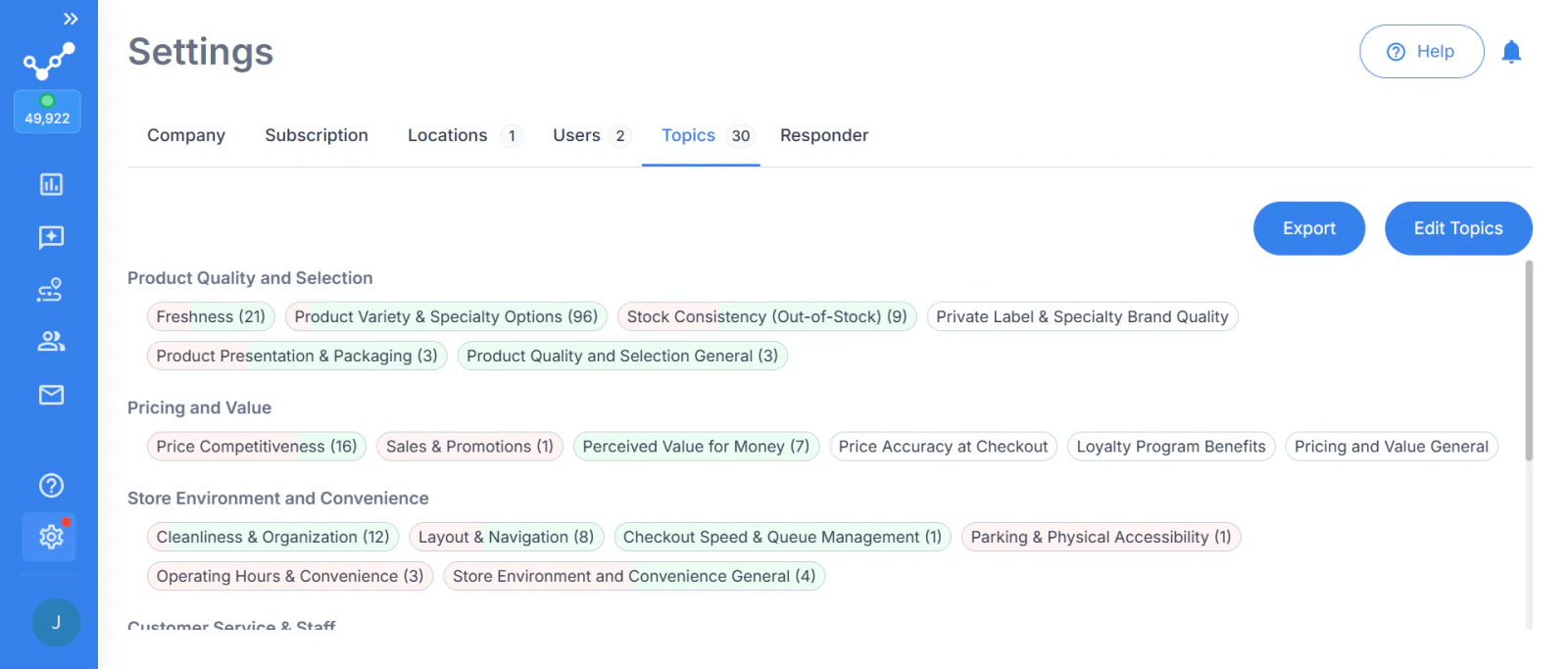
RightResponse AI develops topics for the business; your team can change them or supply its own. Reports show how often a topic appears and what percentage of its mentions are positive. Open the supporting phrases and full reviews to understand the pattern, then compare locations or periods.
That gives a multi-location team something specific to discuss with a manager: customers value the advice, but several describe long checkout lines. The next step is to investigate the wait and see whether later feedback improves.
Private surveys, including NPS, are available on Pro and Pro+. Pro includes 200 survey responses per month; Pro+ includes 500. Core does not include surveys.
Google Maps rankings and competitor reviews
Map Rank Tracker checks the same search from points across a local grid. You can see where your business appears, compare competitors found in the scan and use Rewind to revisit saved results.
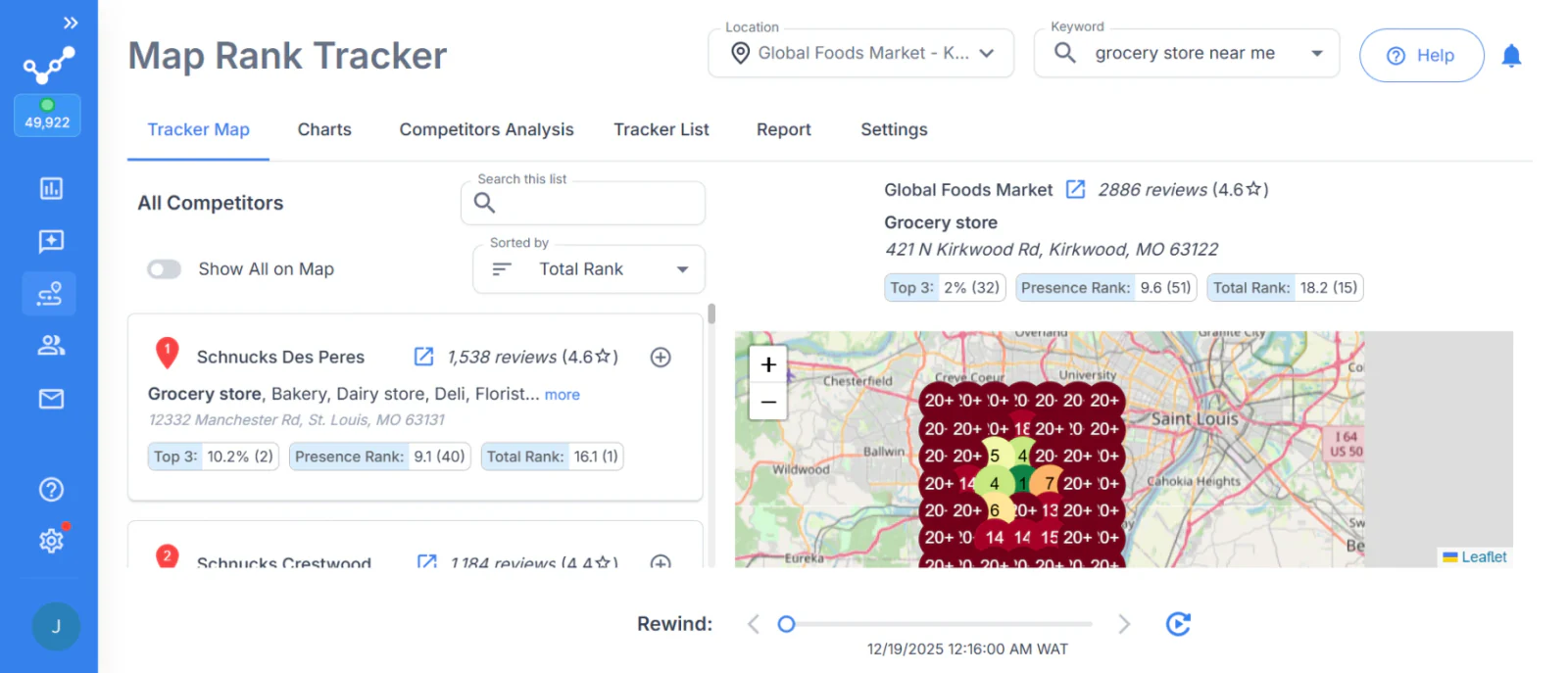
Competitor Review Analysis compares recent ratings, review activity and response rates. To compare what customers say about specific topics, use Competitor Voice of Customer. It requires Pro or Pro+ and separately purchased packs; the plans' combined map-scan and competitor-analysis allowances do not cover those packs.
RightResponse AI pricing, service and tradeoffs
RightResponse AI's monthly self-serve prices are per location:
- PAYGO: $10 plus usage credits. Useful for lighter use, with AI-personalized requests available.
- Core: $19. Includes 100 AI review responses, 1,000 template email requests and basic sentiment badges. It excludes Maps and Competitor Analysis.
- Pro: $29. Includes 200 responses, 2,000 email requests, AI request personalization and capacity for 200 SMS segments. It also includes 10 combined map scans or competitor analyses.
- Pro+: $44. Raises those allowances to 500 responses, 5,000 emails, 500 SMS segments and 25 combined scans or analyses.
RightResponse AI relies on inbound search rather than paid advertising and a large sales force, which helps keep its customer-acquisition costs down.
Your company's locations share the included allowances. SMS registration, phone-number and campaign charges can add cost; longer texts use more than one segment. You can buy extra capacity on Pro and Pro+. Annual subscriptions provide 12 months for the price of 10 monthly payments.
For a large deployment, contact RightResponse AI to discuss an enterprise plan. Agencies can explore white-label delivery; businesses that want help doing the work can ask about Done For You service.
The tradeoff is a smaller ecosystem than the largest incumbents. If your GatherUp service includes client website widgets, directory distribution or review disputes, plan how you will keep or replace those functions.
The seven-day trial includes 1,000 credits and most Pro features, with no credit card required. It ends early if the credits run out.
What to test before buying
Use the same recent reviews and customer examples in both trials. Send yourself a request, inspect a reply to a mixed review, and open the customer comments behind a feedback theme. For an agency or multi-location team, repeat that work for a second client or location.
Pay attention to the work left for your team. How much editing does a reply need? Can you explain the findings to a manager? Will you have to rebuild website widgets or reports? Those answers are more useful than comparing feature names alone.
How we evaluated GatherUp
We reviewed GatherUp's product pages, help guides, release notes and pricing, alongside RightResponse AI's current documentation. We compared requests, reply controls, feedback analysis, agency tools, local visibility and costs. We last checked the products and pricing on November 11, 2026.
The recommendations are editorial judgments about those documented capabilities. We did not run a controlled comparison of generated reply quality. Disclosure: We publish RightResponse AI and evaluated it alongside GatherUp using the same criteria.
This review belongs to the review management software comparison library, which connects product reviews, pricing guides and head-to-head comparisons.
Frequently asked questions
When should I choose GatherUp for my business?
Choose GatherUp when you want to send review requests and private surveys, then analyze the feedback together. It is especially useful for agencies that display reviews on client websites and offer review services under their own brand. GatherUp also offers generated replies and automatic replies drawn from saved templates.
When is RightResponse AI a better choice than GatherUp?
RightResponse AI is our pick when you want AI-personalized review requests, Message-Informed replies, feedback grouped by topics you choose, and Google Maps rank tracking together. Its suite serves single locations, multi-location businesses, franchises and agencies. Pro and Pro+ bring these tools together and include map-scan allowances. Core covers replies, template email requests and basic sentiment badges. Competitor Voice of Customer requires separate packs on Pro or Pro+.
Does GatherUp generate AI replies or use templates?
It offers both. SmartReply and suggested responses create drafts for staff to review; generated AutoReply writes new replies for eligible positive reviews. Auto Reply Templates is a separate mode that selects a complete response from up to 50 saved replies. Check the chosen mode and publishing settings during a trial.
Can I try GatherUp or RightResponse AI before committing?
GatherUp offers a 14-day trial without a credit card. RightResponse AI offers up to seven days with 1,000 credits and most Pro features, also without a card. Its trial ends early if the credits run out. Try sending requests, answering reviews and reading reports before choosing a paid plan.
Comparing more review platforms?
See how other GatherUp alternatives handle requests, replies, customer feedback and local visibility.