We use AI to respond to reviews every day. It makes it much easier to keep up with the work, and it gives businesses a way to respond to every review without asking the owner to write every reply.
If you’re doing this with ChatGPT, Gemini or Claude, though, you still have to read what comes back. You might have left something out of the prompt. The conversation might include information from another location or an earlier complaint. The reply can sound perfectly reasonable while saying something you never intended. Most of the time, checking it isn’t difficult. Someone just needs to make time to do it.
Some negative reviews need more than that. If a customer says your manager promised a refund, someone who knows what happened needs to work out the answer. AI can help with the wording once that person has decided what to say.
Let’s start with positive reviews, where there’s often an opportunity to do more than say thank you.
Positive reviews: give people something worth reading
Suppose a customer writes, “Great service and friendly staff.” AI can easily turn that into “Thank you! We’re glad you enjoyed our great service and friendly staff.” There’s very little to get wrong, but the response doesn’t tell anyone much.
You know things about your business that a future customer would find useful. Perhaps you explain the price before starting work, offer Saturday appointments or have served the community for years. When one of those details fits the review, it can give the next person a reason to choose you.
Take a customer who praises an auto repair shop for clear explanations and no surprises on the bill. The examples below are fictional; assume the business has confirmed the facts used in each reply.
The second reply explains how the shop helps customers avoid an unexpected bill. It gives some meaning to the compliment. That’s the kind of detail you want AI to work with, and you need to give it the information rather than leave it to guess.
This gets more involved when you have several locations. You might offer Saturday hours at one branch and be closed all weekend at another. A reply can be well written and still send someone to the wrong place at the wrong time.
Keep each location’s hours, services and contact details clearly identified in whatever you give the AI. When something changes, update it there. Otherwise, whoever checks the replies will have to keep correcting the same mistake. Our multi-location review management guide covers how to organize this across a larger business.
You can also share something about the business when the customer leaves only a rating. You don’t know what they bought or what they liked, but you can still thank them and include a fact that matters to you.
Use a light touch. You’re joining a conversation, so choose a detail that belongs and vary what you say. Google’s advice on review replies is to be helpful and conversational and avoid deals and promotions. A useful fact about the business is enough.
Allow time to read what ChatGPT writes
Giving AI good information helps, but you still need to check what it does with it. Think about the estimate policy in the first example. Asking customers to approve additional work is quite different from guaranteeing that the final price will never change.
An employee who knows the policy can correct that sentence without asking the owner. The same is true of an awkward phrase, the wrong opening hours or a detail that doesn’t belong in the reply. The work is reading carefully enough to catch it. Across a busy week, that can take a fair amount of someone’s time.
Keep your current business information and response instructions together so the person doing this has something reliable to check against. Approved replies are useful examples, too, as long as you explain any exceptions. A refund you offered one customer last year shouldn’t become an offer AI makes to everyone.
When you prepare a prompt, give the AI the review, the relevant business information and any instructions about what to say or avoid. Ask it to flag missing information instead of making it up. OpenAI’s prompting guidance recommends this kind of context and boundaries, followed by your own review of the result. Our guide to using ChatGPT for review responses walks through the setup.
Negative reviews: know when someone needs to step in
Some complaints come up often enough that you already know how you want to respond. Others leave you wondering what happened. AI can help with both, but the person handling the review needs to recognize which situation they’re looking at.
Use the answer you’ve already worked out
Suppose a customer says a treatment didn’t work. Your company includes a follow-up inspection when a recurring problem is reported within 30 days. You’ve also told the team to check the service date before confirming that a customer qualifies.
Those instructions give AI enough to write a useful reply:
Someone reading the draft can check it against the instructions you’ve already given. The reply should explain the follow-up process without inventing a reason the treatment failed or promising a free visit before the team has checked the date. The owner doesn’t need to work out a new answer every time this complaint appears.
Our guide to responding to negative reviews has more examples of how to acknowledge a problem and offer a useful next step.
Let the person who knows what happened write the answer
Now suppose the review says, “Your manager promised a free return visit, but you charged me.” Knowing your usual follow-up policy won’t tell you whether that promise was made or why the customer was charged. Someone needs to look into the situation before the business can answer it properly.
The manager who knows the situation and can speak for the business needs to decide what the reply will say and what the company will offer. They may write it themselves, edit a draft or give AI specific points to work with. AI can improve the wording, but the manager should read the final version to make sure it hasn’t changed their meaning. If they already know the customer’s history, editing the reply may be quicker than explaining it all to someone else.
They may also decide to wait while they work with the customer. Decide who will come back to the review and when, so it doesn’t get forgotten. Keep private details out of the public reply; Google’s negative-review guidance recommends moving complicated conversations offline. Complaints involving safety or private information should go to the person responsible for handling those issues.
The first time a new topic comes up, save whatever the owner tells you that would help with another review. “Send questions about disputed charges to the service manager” is something the team can use again. “Refund this customer because of what happened on Tuesday” may apply only to that customer. Keep the difference clear, and you won’t have to ask the owner the same basic questions next time.
Decide who checks the replies and who posts them
Once someone else is helping with reviews, agree on who does what. An employee might check the everyday replies, while a manager handles complaints that need more information. You may want one person to post everything, or you may let the person who approves a reply publish it as well.
Make sure whoever checks the replies can fix ordinary mistakes and knows when to ask the manager. Once you’ve confirmed Saturday hours, they should be able to check that AI used them correctly without coming back to you.
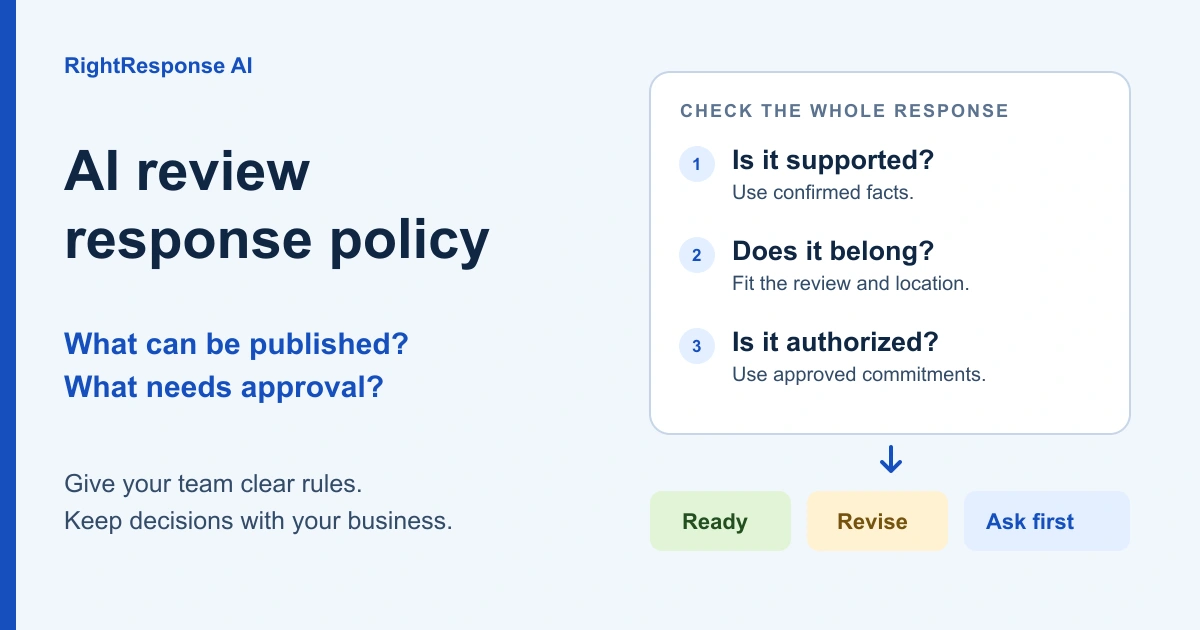
These are the things to look for when checking a draft:
A review platform may let you publish some replies automatically. Before turning that on, try it on a range of your actual reviews and look closely at what it writes. Check how the approval settings work, too. A five-star review can include a serious complaint, so the rating alone won’t tell you whether someone needs to get involved.
Our editable policy and ten-case worksheet gives you a place to record the arrangement and practice it with your team. After that, check published replies from time to time and keep the business information current. Also confirm that replies you’ve submitted actually appear: Google checks responses before posting them, so they can remain pending for a while.
How we do this in RightResponse AI
You can do all of this with your own documents, an AI assistant and a team member who manages the replies. RightResponse AI does much of that daily work for you. We help build the business information the system will use, prepare the responses and give you control over which ones publish automatically and which ones come to a person first.
We help you give the AI something useful to say
Our approach is called Message-Informed Review Responses, or MIRR. We read your website, reviews and past responses to learn what you do, what customers care about and how you’ve handled their questions. We use that information to help prepare a library of Messages for your business.
Pillar Messages describe things you’d want a prospective customer to know, such as being family owned. Content Messages provide information for particular topics, such as Saturday hours or the follow-up inspection policy. Instructional Messages tell the system how you want a situation handled—for example, to have the service team check the date before promising a visit.
We draft all three types of Messages for our customers, aiming to get them roughly 80% of the way through setup. You review what we’ve prepared, correct anything that’s changed and add what only you would know. Messages can apply to the whole company, a brand or one location, so Northside’s Saturday hours are available for Northside’s reviews.
The system then has to decide which information would help with each reply. A customer praising clear pricing gives us a reason to explain the estimate policy. A disputed charge calls for different handling. We don’t need to insert a business fact just because it’s available.
The system prepares and checks each draft
RightResponse works through several AI stages before a reply is ready. It checks for sensitive content, reads the review, finds relevant Messages and plans what the response should say. It then writes the reply and checks it against that plan. This takes care of much of the preparation you’d otherwise be doing around a ChatGPT prompt.
You can see which Messages were considered and which were used. If a reply needs something different, you can tell the Planner what to include or leave out, change the tone or generate another draft. The Intelligent Review Responder page shows those controls.
You choose which star ratings can publish automatically and which require approval, with separate settings for reviews with text, ratings alone, delays and publishing hours. If those settings would let a reply through that you’d want a manager to read, keep those reviews on manual approval. When the answer depends on what happened with a customer, it still needs to come from the person who knows.
GO makes it easy for the owner to finish a reply
When a response needs approval, we send it by email. GO lets the person receiving it open the draft, make changes and publish from their phone without signing into the dashboard. They can also publish immediately or add the response to their publishing schedule.
A manager who already knows the customer can put their answer straight into the reply. They don’t have to explain the history to someone else and wait for another version to come back.
This is also how we handle unfamiliar complaints in our done-for-you service. We ask the client how they’d like to respond. They may give us an answer, or they may find it easier to edit and publish the reply themselves. When they tell us something we can use again, we add it to the knowledge graph through the appropriate Message. We keep a one-time exception separate from general instructions.
Your own team can work the same way. The first time they need your help, explain what you’d say and save the part that will be useful again. Over time, more of the answers are already there, and you spend less time explaining how to handle the same situations. Our complete review management guide covers how responding fits into the rest of your review program.