SOCi offers a broad range of tools for multi-location businesses, including:
- Review requests, AI review responses, and customer-feedback analysis.
- Business listings, local pages, and local-search visibility.
- Social media content, publishing, and engagement.
- Surveys, chat, and customer messaging.
- Tools for coordinating marketing across corporate and local teams.
These tools are available across SOCi's search, reputation, and social products.
If you want a similarly broad platform
Start with Yext or Birdeye. Consider Yext when your main concern is managing location information, listings, and local pages. Consider Birdeye when you also want to manage customer conversations and follow-up in the same platform. Read on for their strengths, pricing, and tradeoffs.
If you need a more focused set of features
You may already have tools for social media, listings, or customer communication. Or you may want better performance in particular features without paying for capabilities you rarely use.
Start with what you need:
- RightResponse AI: Reviews, local visibility, and conversion.
- Reputation.com: Assigning customer problems to the right person and tracking whether they're resolved.
- LocalClarity: Managing location information and correcting conflicting listings.
- BrightLocal: Local rankings, citations, and SEO reporting.
- GatherUp: Agency-run review and customer-feedback programs.
The full comparison covers eight alternatives, including ReviewTrackers, and explains what each could replace in your SOCi setup.
Comparison research: This article is part of our review management software comparison library. It draws on product documentation, help pages, public demonstrations, published research, and product images.
Disclosure: RightResponse AI publishes this comparison and is one of the products evaluated. Our recommendations are based on product research and the needs of different buyers. We have not tested every platform side by side.
SOCi Alternatives at a Glance
Start by deciding which SOCi features you need to replace. A focused review tool may cost less, but it won't replace everything SOCi does. The table distinguishes published prices from third-party estimates. When you request a quote, ask what's included, what costs extra, and how long you're committing to pay.
| Platform | Primary use case | Pricing approach | Contract or trial | Main tradeoff |
|---|---|---|---|---|
| RightResponse AI | Reviews, local visibility, and conversion | Core $19; Pro $29; Pro+ $44 per location/month; PAYGO $10 plus usage | Monthly or annual; 7-day trial | Social publishing, broad listings distribution, and local pages need other tools; Core excludes maps |
| Yext | Location data, listings, and local pages | Custom quote; reported $800–$2,500/location/year for 10–100-location bundles | Terms depend on proposal | You'll still need to select products and plan the setup |
| Birdeye | Local marketing and customer communication | Custom quote; reported single-location plans around $299–$449/month | Terms depend on proposal | A broad platform may be more than you need for review management alone |
| Reputation.com | Customer feedback and issue resolution | Rep Core from $80/location/month; other packages and add-ons | Confirm billing and term in proposal | Actions and Ticketing cost extra |
| LocalClarity | Location records, bulk edits, and publisher conflicts | Professional $16/location/month, or $12 with annual billing; enterprise quote | Monthly or annual | Review-request delivery needs another email or SMS system |
| BrightLocal | Local rankings, citations, and SEO reporting | Grow $65/month for one location; $197/month for 11–20 locations | Monthly or annual; 14-day trial | Does not replace SOCi's tools for coordinating social posts across teams |
| ReviewTrackers | Review monitoring and location analysis | Custom quote; G2's 2024 starting-price benchmark is $89/location/month | Annual billing; confirm current terms | Advanced analysis and listings/rank tools depend on package |
| GatherUp | Agency review and feedback programs | Monthly: $124 for one location; $75/location for 2–10. Annual equivalents: $99 and $60/month | Monthly or annual; 14-day trial | You'll need other tools for company-wide social publishing and location-data management |
Why Do Businesses Look for SOCi Alternatives?
Businesses usually consider a SOCi alternative for one of four reasons:
- You already have some of the tools. A company with established social publishing, listings, or messaging software may need only review management. Replacing the whole system could add unnecessary cost and disruption.
- You want better performance in specific features. You may want more useful review responses, a better understanding of local rankings, or a clearer way to resolve customer complaints. The best alternative depends on which problem you're trying to solve.
- The platform takes too much work to manage. Permissions, approvals, integrations, and participation from local teams all take time. A focused tool may simplify the work, as long as you keep the controls you need.
- The price or contract no longer works for you. Compare the SOCi products you pay for with the features you'd get from an alternative. Include setup fees, usage charges, add-ons, and renewal terms—not just the advertised subscription price.
SOCi requires a custom quote, but reported prices can help you budget. Vendr's February 2026 research puts packages with multiple products at roughly $400–$1,800 per location per year for mid-sized businesses. It separately estimates $30,000–$65,000 a year for a 50-location package covering listings, social, and reviews. These estimates cover different buying situations; they are not SOCi's published prices or guaranteed starting rates.
When SOCi May Still Be the Right Choice
SOCi may still be the right choice when corporate and local teams need to manage several marketing activities together. Its products include AI-generated review responses, feedback analysis, local-search tools, and social publishing.
Staying may make sense when:
- Corporate teams set brand rules while local teams publish and respond within them.
- Listings, local pages, reviews, and social content already work together reliably.
- Your integrations, approvals, and location structure would be expensive to rebuild.
- The problem can be addressed by changing your configuration, package, or process.
If your setup works well, switching needs to deliver enough improvement to justify the cost and disruption.
How We Evaluated the Eight Alternatives
We looked at the work each product could take over from SOCi: managing location information, collecting and responding to reviews, understanding feedback, tracking local visibility, coordinating teams, and resolving customer problems.
We used product documentation and help pages to understand how the features work, not just whether they appear on a feature list. For pricing, we looked at the plans and add-ons needed for the work described below.
The numbers help you navigate the article; they are not an overall ranking. Screenshots illustrate features, not results we achieved in testing. Before buying, ask each vendor to demonstrate the features your team will rely on.
1. RightResponse AI: Reviews, Local Visibility, and Conversion
RightResponse AI is our strongest recommendation when the priority is improving reviews, local visibility, and conversion while keeping other marketing tools you already use.
RightResponse AI brings together review requests, useful responses, customer and competitor analysis, and Google Maps rank tracking. Its review responder uses an agentic system with 20 specialized agents across five stages: understanding the review, planning the response, selecting approved Messages, writing, and checking.
Review responses that add useful information
An AI response can use an employee's name and mention details from the review without telling the reader anything new. A Message-Informed response adds useful business information when it belongs in the reply. RightResponse AI draws that information from approved Messages supplied by the business.
For example, consider this review:
“First time here. Alex explained the brake repair clearly and had my car ready earlier than expected.”
If the business has approved a Message about its inspection process, a response could say:
“Thanks for trusting our team with your first visit. Every estimate includes a digital vehicle inspection with photos, so you can see what the technician sees before approving any work. We're glad Alex made the process clear and had your car ready sooner than expected.”
The customer valued a clear explanation of the repair. The inspection detail shows future customers how the business helps people understand the work before approving it. That detail would not belong in every response. If a customer has an unresolved complaint, for example, the reply should address the problem first.
You can also give the AI specific instructions. For example, provide an employee roster so it can correct a likely misspelling or leave out a name it doesn't recognize. Separately, you can supply a Message about employee training for responses to reviews that praise workmanship.
RightResponse AI works through competing instructions and records which Messages informed each response.
SOCi offers an approved reply library that avoids reusing recent responses, as well as newer AI-generated responses guided by your brand. RightResponse AI takes a different approach: it plans each reply and selects relevant information from your approved Messages. It decides what to include, what to leave out, and how to avoid making the same point over and over.
Understand what customers value and where competitors appear
RightResponse AI analyzes customer feedback by topics that matter to your business. You can compare what customers praise or criticize about you and nearby competitors, then read the reviews behind those findings.
Map-rank tracking shows where your business appears in Google Maps results across the surrounding area. You can see which competitors rank at each point and compare earlier scans.

View full-size RightResponse AI image (opens in a new tab)
Together, these tools help you identify problems and show potential customers what your business does well. Useful responses and review displays can help people decide to contact or visit you, though no tool can guarantee higher rankings or more sales.
Pricing and tradeoffs
RightResponse AI plans cost $19 for Core, $29 for Pro, and $44 for Pro+ per location per month. PAYGO is $10 per location plus usage. Annual plans give you 12 months for the price of 10, and there's a seven-day trial.
Core covers essential review responses. Pro adds maps and competitor analysis, with a combined allowance of 10 scans or analyses per location each month. Pro+ raises that allowance to 25 and adds competitor voice-of-customer reporting. These allowances are pooled, so you can use more at one location and less at another.
RightResponse AI does not replace SOCi's social publishing, broad listings distribution, or local pages. It's a good fit when you don't need those features or already have other tools for them.
2. Yext: Location Data, Listings, and Local Pages
Consider Yext when your main concern is keeping location information accurate across a large organization. It also offers review and social products, making it an option for businesses that want to replace several SOCi products together.
Yext lets your team maintain addresses, hours, services, and other business information in one place, then share it with connected listing sites and local pages. You can control who is allowed to change each record.
For example, when a location's hours change, you want that update to reach its listings and local page. Ask Yext to show how your team would make the change, who would approve it, and where it would appear.
Yext also lets you review suspected duplicate listings and ask the listing site to suppress them. The site still decides whether a listing qualifies, so submitting a request does not guarantee immediate removal.

View full-size Yext image (opens in a new tab)
Pricing and tradeoffs
Yext requires a custom quote. Vendr's February 2026 research reports packages with multiple products at around $800–$2,500 per location per year for 10–100 locations, and $500–$1,500 for 100 or more. These are third-party estimates, not prices offered by Yext. The products, services, and any separate platform charges will affect your total.
Ask for a quote covering the products and locations you need, plus setup and services. A listings-only quote won't tell you what it would cost to replace SOCi's reviews, social tools, and local pages too.
Yext is worth considering when keeping location information and pages consistent is a major challenge. You'll still need to choose products, set permissions, and plan the setup. If you mainly want better review responses or local SEO tools, a focused product may be a simpler choice.
3. Birdeye: Local Marketing and Customer Communication
Consider Birdeye when you want a broad local-marketing platform that also helps staff manage customer conversations and follow-up. Its products include reviews, listings, social, messaging, and customer-experience tools.
Ask Birdeye to walk through a typical customer's experience with your business: asking a question, completing a visit, receiving a review request, and raising an issue afterward. Can staff find the conversation, see who needs to act, and check whether someone followed up?
Birdeye's review responder does more than fill in templates. You can give it instructions, set the tone, and decide which responses it can publish automatically and which need human approval.

View full-size Birdeye image (opens in a new tab)
SOCi also offers chat, surveys, and ways to escalate customer issues. The question is whether Birdeye makes those daily tasks easier for your team. Use the demo to compare how staff would handle the same customer situation in each platform.
Pricing and tradeoffs
You'll need a custom quote for Birdeye. Third-party research puts single-location plans around $299–$449 per month. CostBench reports Starter at $299, Growth at $349, and Dominate at $449. Use those figures as a budgeting guide, not a promise that those packages are available today. Multi-location pricing may differ.
Ask the salesperson to list the features you saw in the demo in your quote, along with usage limits and any extra fees.
Birdeye can replace several SOCi products, but a broad platform may be more than you need if you only want review management. Compare the full cost and setup work with a focused review tool as well.
4. Reputation.com: Customer Feedback and Issue Resolution
Consider Reputation.com when you need to make sure someone acts on customer feedback. Responding to a complaint is one step; assigning someone to fix the problem and checking that it's resolved is another.
Reputation's Actions tools let you assign each issue to a person, set a deadline, escalate overdue work, and record when it's resolved. Managers can see what still needs attention instead of assuming a public reply means the problem is fixed.
For example, if customers repeatedly complain about appointments, a regional manager can investigate which locations are affected, assign follow-up work, and track it through completion.
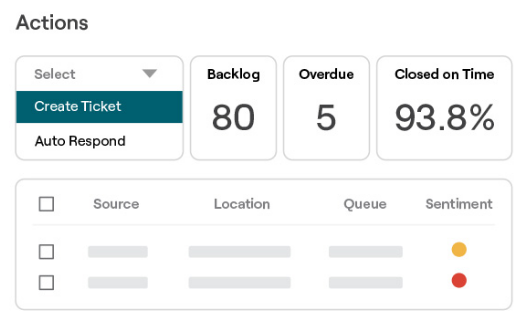
View full-size Reputation.com image (opens in a new tab)
Pricing and tradeoffs
Reputation lists three plans: Rep Core at $80, Core + Pulse at $115, and Core + Surveys at $150 per location per month. Businesses with 125 or more locations need an enterprise quote. Actions and Ticketing cost extra, so ask for a quote that includes them if you want to assign and track customer issues.
SOCi also analyzes feedback and lets teams escalate problems. Consider Reputation if your team needs a clearer way to see who's responsible for each issue, when it's due, and whether it's been resolved. During the demo, follow a complaint from the original review or survey through to resolution.
5. LocalClarity: Hands-On Location Data Management
Consider LocalClarity when your team needs to update many locations at once or fix conflicting information on sites such as Google and Apple.
Your records may show one set of opening hours while Google or Apple shows another. LocalClarity helps your team compare the differences and decide which information to keep.
RealityCheck shows the conflicting information so you can choose how to correct it. Bulk editing helps when the same change affects many locations, and permissions let you control who can make or approve changes.

View full-size LocalClarity image (opens in a new tab)
LocalClarity also handles review monitoring and responses, with AI assistance. It's worth considering if the same team manages both reviews and location information.
Pricing and tradeoffs
LocalClarity's Professional plan costs $16 per location per month, or $12 per month with annual billing. Enterprises and agencies can request a custom quote.
Check that LocalClarity supports the listing sites and features you use. Managing records on Google and Apple is not the same as replacing all of SOCi's directory listings and social tools. LocalClarity provides review-request links, but you'll need another service to send them by email or text. Include that service and any integration costs in your budget.
6. BrightLocal: Local SEO and Rank Investigation
Consider BrightLocal when you want to understand your local rankings, see which competitors appear nearby, and track whether your SEO work is helping.
Local Search Grid shows rankings at different points around a business. Select a point to see which businesses rank there. A location can rank well nearby and poorly a few streets away, so this gives you more detail than a single ranking number. You can also compare earlier scans to see what's changed.

View full-size BrightLocal image (opens in a new tab)
BrightLocal also offers local-search reports and citation services. Checking existing listings for errors, creating new listings, and keeping listings updated are different services. Ask which ones your package includes and which cost extra.
SOCi also tracks rankings across a geographic area. Consider BrightLocal if you want its local SEO reports, citation tools, and agency reporting—not just a ranking map.
Pricing and tradeoffs
BrightLocal's monthly plans cost $41 for Track, $54 for Manage, and $65 for Grow for one location. Grow includes review management. For 11–20 locations, Grow costs $197 per month in total—not $65 for each location. Annual billing is also available.
BrightLocal can help draft review responses with AI and send automatic replies using templates. That differs from RightResponse AI's selection of approved business Messages for each response. BrightLocal also does not replace SOCi's tools for coordinating social publishing between corporate and local teams.
7. ReviewTrackers: Review Monitoring and Location Analysis
Consider ReviewTrackers when managers want to compare reviews across locations and understand what customers are saying.
A rating tells you how a location is doing, but not why. ReviewTrackers lets managers compare locations, find recurring topics, and read the comments behind the results. That helps them see whether a problem affects one location or the whole business.
Its Experience Analysis and Competitor Insights tools help managers investigate questions such as: Are service complaints concentrated in one region? What do customers praise about nearby competitors?
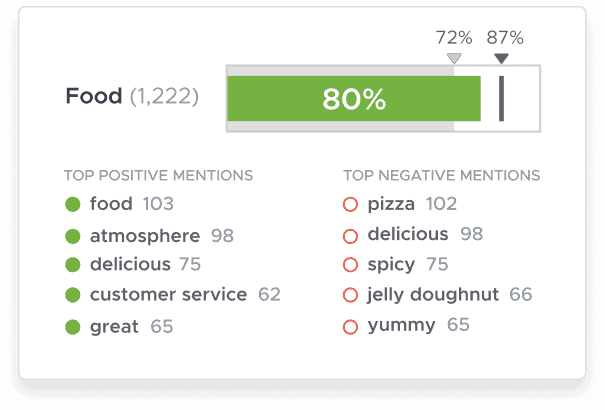
View full-size ReviewTrackers image (opens in a new tab)
You can also give its AI review responder different instructions for individual locations or groups of locations.
Pricing and tradeoffs
ReviewTrackers prices by location and bills annually. You'll need a quote for current pricing. G2 lists a starting price of $89 per location per month, but that entry was last updated in October 2024. Treat it as an older budgeting reference, not a current offer.
The Essential package lists Experience Analysis and Competitor Insights. Listings and local-rank tools cost extra. Ask which features are included in your quote rather than assuming the older $89 figure covers them all.
SOCi also analyzes customer feedback, so compare the reports using the same locations and reviews. Can your managers find recurring problems, read the comments behind them, and decide what needs attention?
8. GatherUp: Agency Review and Feedback Programs
Consider GatherUp if your agency manages review requests and customer feedback for multiple clients.
You can set up requests, collect private feedback, monitor public reviews, and report results to each client. Agencies can use each client's branding and manage their programs across client accounts.
GatherUp lets you time email or text requests around events such as a completed service or delivered order. That helps you ask for feedback when the experience is still relevant to the customer. Check which triggers, integrations, and message allowances your plan includes.

View full-size GatherUp image (opens in a new tab)
Private feedback and reports also help you show clients where customers are running into problems. SOCi collects feedback too. Consider GatherUp when you want to offer clients a focused review and feedback service without managing a broader marketing platform.
Pricing and tradeoffs
GatherUp costs $124 per month for one location or $75 per location per month for two to ten locations on monthly billing. With annual billing, the monthly equivalents are $99 for one location or $60 per location for two to ten locations. Agencies need a quote. There's a 14-day trial, and Listings Hub is a separate add-on advertised at $40 per location per month.
You'll still need other tools for company-wide social publishing and location-data management. For agency work, ask to see how your team would manage each client's account, branding, and reports.
Which SOCi Alternatives Should You Consider?
Start with the work you want to improve. You don't need to evaluate all eight products.
| If your main need is… | Consider | Why |
|---|---|---|
| A broad replacement for SOCi | Yext or Birdeye | Yext for location data, listings, and pages; Birdeye for customer conversations and follow-up alongside local marketing. |
| Reviews, local visibility, and conversion | RightResponse AI | Connects review requests, responses using approved Messages, customer and competitor insights, and map-rank tracking. |
| Following up on customer problems | Reputation.com | Assign issues to a person, set deadlines, and track whether they're resolved. |
| More control over location information or local SEO | LocalClarity or BrightLocal | LocalClarity for keeping location information accurate; BrightLocal for rankings, citations, and local SEO reports. |
| An agency-run review and feedback program | GatherUp | Manage client programs with branded requests, private feedback, and reports. |
Test Your Shortlist Before You Switch
Ask each vendor to show how its product handles the same locations and tasks from your business. That makes it easier to compare what your team would actually use.
- Try a mix of reviews. Include a positive review, an unresolved complaint that also contains praise, a misspelled employee name, and several reviews about the same topic. Does the AI include useful information, handle conflicting instructions, and avoid repeating the same point?
- Test approvals. Have a local user propose a change or response, then have a manager approve it. Check that nothing is published while approval is pending or after a rejection.
- Fix a real listing problem. Use conflicting hours, a duplicate listing, or another issue your team already encounters. Follow the correction through to the listing site. What happens if the change is rejected?
- See whether the reports help you decide what to do. Investigate why customer feedback has become more negative at one location or why a competitor ranks better on Maps. Can you inspect the reviews or ranking results behind the report?
Compare the results with what your team can do today. Include the time needed to set up the tool, check its work, and keep it running.
Questions to Ask Before Switching from SOCi
Before committing, check the new quote and your existing SOCi agreement:
- Which products, locations, users, integrations, message volumes, and scan allowances are included? What costs extra?
- What are the setup fees, billing schedule, and renewal terms? How much notice do you need to give before canceling?
- Which data, reports, response histories, private-feedback records, and other assets can you export and retain?
- Who controls your publisher accounts, local-page domains, URLs, and content after the agreement ends?
- Who handles setup, rejected listing updates, training, and ongoing support? What does the agreement promise?
How to Switch from SOCi
Once you've selected a product and agreed on pricing and contract terms, plan how to move your team's work to the new platform.
- List what you're moving. Include active SOCi products, locations, brands, regions, integrations, scheduled content, and the people responsible for them.
- Save your data and check account access. Make sure you have administrator access to your listing accounts. Export the records and content your agreement allows you to keep. Public reviews stay on their review sites, but private feedback, historical reports, and metrics calculated by SOCi may not transfer automatically.
- Set up accounts and responsibilities. Add locations, user permissions, approved Messages, and integrations to the new platform. Decide which system controls each shared field, such as opening hours, so connected tools don't overwrite one another's changes.
- Keep your local pages working. If SOCi hosts a store locator or local pages, arrange the domain, content, URLs, and any redirects before disconnecting that service.
- Test a few locations first. Include different brands, permissions, and integration needs. Make sure only one system sends review requests and publishes responses or scheduled social posts for each location. That prevents duplicate messages and posts during the changeover.
- Move the remaining locations and check the results. Verify listings and reports, fix failed connections, and complete the SOCi handoff according to your contract.
Continue the SOCi Research
For another comparison of broad platforms and focused tools, read our Birdeye alternatives article. Our complete guide to review management covers review requests, responses, and what you can learn from customer feedback.
The Final Verdict
If you want to replace several SOCi products together, start with Yext and Birdeye. Consider Yext when accurate location information, listings, and local pages are the priority. Consider Birdeye when customer conversations and follow-up are just as important as local marketing.
If your priority is reviews, local visibility, and conversion, RightResponse AI is our strongest recommendation. Consider Reputation.com for following up on customer problems, LocalClarity for managing location information, BrightLocal for local SEO, and GatherUp for agency review programs.
If SOCi already works well for your team, you may not need to switch. The goal is better results in the features you need, not a longer feature list.
Frequently Asked Questions
What are the best SOCi alternatives for multi-location businesses?
Yext and Birdeye are the closest options if you want a broad platform like SOCi. RightResponse AI is our strongest recommendation for reviews, local visibility, and conversion. Consider Reputation.com for following up on customer issues, LocalClarity for location information, BrightLocal for local SEO, ReviewTrackers for review analysis, and GatherUp for agency review programs.
Which platform is most similar to SOCi?
Yext is a close SOCi alternative when you need location data, listings, local pages, reviews, and social management together. Birdeye is another broad option, particularly for customer conversations and follow-up. Check that the quoted package includes the features and team permissions you use in SOCi.
Which SOCi alternative is best for AI review responses?
RightResponse AI is our strongest recommendation for responses that add useful, approved business information. Its review responder uses separate stages to understand the review, plan the reply, select relevant Messages, write, and check the response. SOCi also offers AI-generated replies. Test both with difficult reviews and repeated topics: does each reply address the review, handle conflicting instructions, and add useful information without repeating the same point?
Can I replace SOCi's review management without replacing my other marketing tools?
Yes. A focused review platform can work alongside your social, listings, or messaging tools. Consider RightResponse AI, ReviewTrackers, or GatherUp. Check that they work with your existing systems, and decide which tool handles each task so you don't send duplicate requests or publish two replies to the same review.
Which SOCi alternative is better for listings and local SEO?
Consider Yext for managing location information across listings and local pages, LocalClarity for finding and fixing conflicting location information, and BrightLocal for rankings, citations, and SEO reports. These tools solve different problems, so start with the work your team needs to improve.
Is there a less expensive alternative to SOCi?
A focused product may cost less if you don't need everything SOCi offers. RightResponse AI and LocalClarity publish per-location prices, while BrightLocal offers location bundles. Compare the features, locations, usage, setup costs, and contract terms you need. A lower starting price doesn't mean a product replaces everything SOCi does.
Which SOCi alternative should an agency consider?
Consider GatherUp for branded review and feedback programs, BrightLocal for local SEO reports and citation work, and RightResponse AI for reviews, local visibility, and conversion. Focus on the services you provide, how easily your team can manage and report on each client's account, and any usage limits.
Can Google Business Profile replace SOCi?
Google Business Profile may be enough if you only need to update your business information on Google and respond to Google reviews. It doesn't replace a system for managing reviews across sites, publishing social posts, running local pages and feedback programs, or coordinating approvals between corporate and local teams.
See whether RightResponse AI fits your review program.
Start a seven-day trial and try it with your own locations and reviews.

-1120w.webp)